Clock
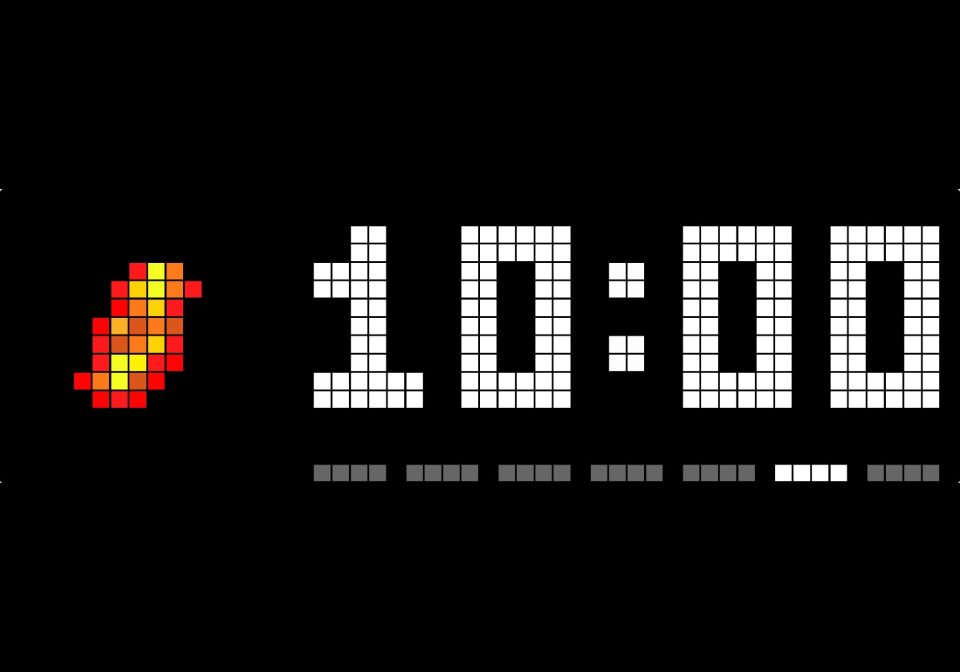
On your display
The time beside LaMetric's flame with the weekday under it, as LaMetric's Alarm Clock
- Topic
- Miscellaneous
- Includes
- Script
Runs on
- Runs on 32×8 (TC001 & DIY)
- Runs on 52×16 (TC002) 52×16 (TC002) version
- Does not run on 32×8 with AWTRIX 3 (TC001 & DIY) Made for AWTRIX NG.
Choose your display in the next step.
Script description
The time beside LaMetric's flame with the days of the week under it, laid out like the clock's own Time app: the LaMetric Time's Alarm Clock, without the alarm.
- TC002 (52×16): the 16×16 flame and the time in double-size digits
- TC001 (32×8): the 8×8 flame and the time in the small font
- Icon off: the time with seconds across the whole display
- Quiet hours: only HH:MM in the middle of the display, dimmed while it is shown; the old brightness comes back with the next app, even after a restart
24 or 12 hours, the leading zero, the colon (steady, blinking or pulsing) and the time's colour follow the clock's own time settings. The icon comes with the script, nothing to install. Switch off the clock's own Time app so the rotation does not show the time twice.
Settings: icon, weekday, week starts Monday, the weekday colours, quiet hours (from, to, brightness).
Source and details: https://github.com/rummeyer/awtrix-ng-lametric-apps
Sign in to view and copy the code of this script.
Discussion 0
Ask a question, suggest a change or share how you use it.
No comments yet. Start the conversation.
More scripts in Miscellaneous
Something wrong with this script? Report it.
Have an idea?
Sign in to ask questions and join the conversation.