FlowAWTRIX NG
Weather Clock
On an AWTRIX display
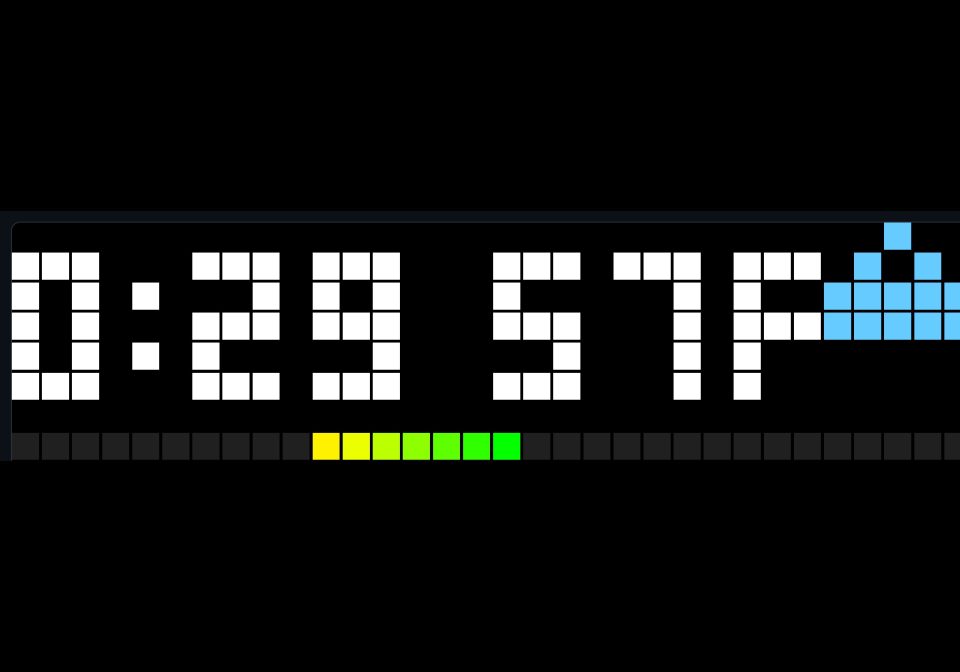
On your display
Shows the time and outdoor temperature along with a bar showing the difference between indoor and outdoor as a bar
- Works with
- AWTRIX NG
- Topic
- Smarthome
- Includes
- Script
Choose your display in the next step.
Flow description
Needs an mqtt feed containing temp and cond.
This is a fork of the flow at https://awtrix.de/flow/BVxjfPPqTRpo which also contains instructions for generating mqtt topics if you don't have them configured from another project.
ROFvv40nurfT.ax
# @name    Clock Temp
# @desc    Clock, outdoor Fahrenheit temperature and indoor/outdoor differential
# @author  Duv McIntyre
# @version 1.1
# @config ha_topic text "Home Assistant MQTT topic" default="homeassistant/wunderground/state" maxlen=96
# @config celsius bool "Use Celsius" default=false

class ClockTemp
  var outdoor, indoor, diff, condition, celsius

  def init()
    self.outdoor = nil
    self.indoor = nil
    self.diff = nil
    self.condition = "unknown"
    self.celsius = store.get("celsius")
  end

  def set_weather(payload)
    if payload == nil return end
    var m = re.search("\"temp\"\\s*:\\s*([-0-9.]+)", payload)
    if m == nil return end
    var t = num(m[1])
    if t == nil return end
    if self.celsius t = (t - 32) / 1.8 end
    self.outdoor = t
    if self.indoor != nil self.diff = t - self.indoor end
    var cm = re.search("\"cond\"\\s*:\\s*\"([^\"]+)\"", payload)
    if cm != nil self.condition = cm[1] end
  end

  def setup()
    mqtt.subscribe(store.get("ha_topic"), def (topic, payload)
      self.set_weather(payload)
    end)
  end

  def loop()
    var c = sensor.temperature()
    if c != nil
      self.indoor = self.celsius ? c : c * 1.8 + 32
      if self.outdoor != nil self.diff = self.outdoor - self.indoor end
    end
  end

  def diff_color(v)
    var d = v < 0 ? -v : v
    var ten = self.celsius ? 10 / 1.8 : 10
    var twenty = self.celsius ? 20 / 1.8 : 20
    if d <= ten return rgb(int(d * 255 / ten), 255, 0) end
    if d <= twenty return rgb(255, int(255 - (d - ten) * 127 / ten), 0) end
    return rgb(255, int(128 - (d - twenty) * 128 / ten), 0)
  end

  def draw_condition()
    var c = self.condition
    var ox = width() - 5
    var col = c == "sunny" || c == "clear-night" ? 0xFFFF00 : 0x66CCFF
    if c == "sunny" || c == "clear-night"
      circle(ox + 2, 2, 1, col)
      pixel(ox + 2, 0, col)
      pixel(ox + 2, 4, col)
      pixel(ox, 2, col)
      pixel(ox + 4, 2, col)
      return
    end
    if c == "lightning" || c == "lightning-rainy"
      rect_fill(ox, 1, 4, 2, 0xAAAAAA)
      pixel(ox + 2, 3, 0xFFFF00)
      pixel(ox + 1, 4, 0xFFFF00)
      pixel(ox + 3, 3, 0xFFFF00)
      return
    end
    rect_fill(ox, 2, 5, 2, col)
    pixel(ox + 1, 1, col)
    pixel(ox + 2, 0, col)
    pixel(ox + 3, 1, col)
    if c == "rainy" || c == "pouring"
      pixel(ox + 1, 4, 0x3399FF)
      pixel(ox + 3, 4, 0x3399FF)
    elif c == "snowy" || c == "snowy-rainy" || c == "hail"
      pixel(ox + 1, 4, 0xFFFFFF)
      pixel(ox + 3, 4, 0xFFFFFF)
    end
  end

  def draw()
    clear()
    var h = hour()
    var m = minute()
    var mm = m < 10 ? "0" + str(m) : str(m)
    var s = str(h) + ":" + mm
    if self.outdoor != nil s = s + " " + str(int(round(self.outdoor))) + (self.celsius ? "C" : "F") end
    self.draw_condition()
    text(0, 6, s, settings.get("textColor"))

    var x = 0
    while x < width()
      pixel(x, height() - 1, 0x202020)
      x += 1
    end
    if self.diff != nil
      var limit = self.celsius ? 30 / 1.8 : 30
      var p = int(round((clamp(self.diff, -limit, limit) + limit) * (width() - 1) / (limit * 2)))
      var center = int(round((width() - 1) / 2.0))
      var start = p < center ? p : center
      var finish = p < center ? center : p
      x = start
      while x <= finish
        var span = p == center ? 0 : (x - center) * self.diff / (p - center)
        pixel(x, height() - 1, self.diff_color(span))
        x += 1
      end
    end
  end
end

return ClockTemp()
Community
Discussion 0
Ask a question, suggest a change or share how you use it.
No comments yet. Start the conversation.
More flows for AWTRIX NG Scripts or Smarthome
Something wrong with this flow? Report it.
Have an idea?
Sign in to ask questions and join the conversation.