HomeAssistant Washdata
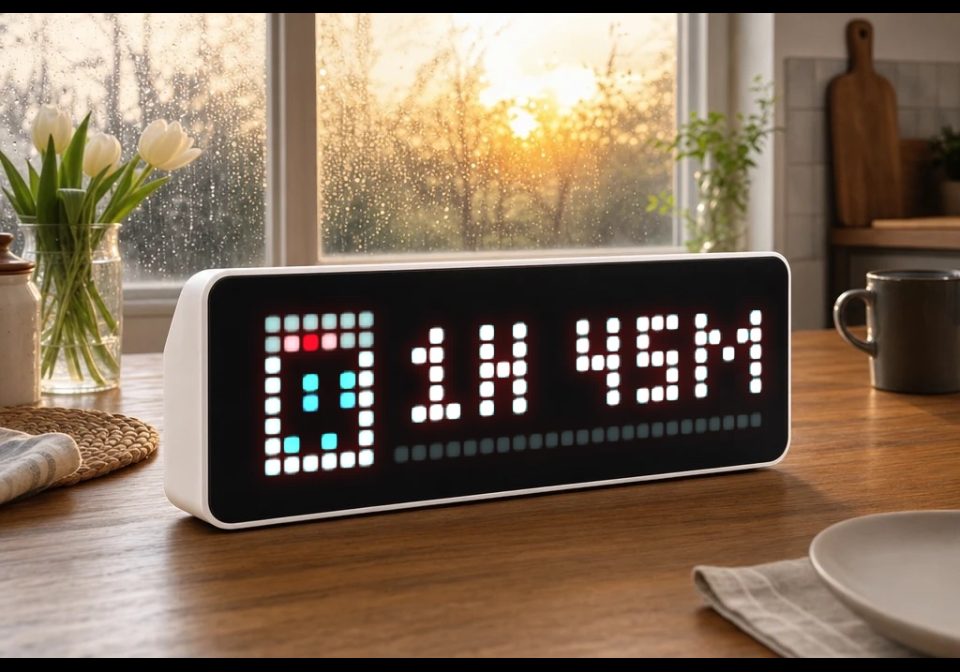
Shows remaining time & progress of a washing machine, dishwasher, or dryer with icon and progress bar on AWTRIX NG.
About this flow
| System | Home Assistant Blueprint |
|---|---|
| AWTRIX version | AWTRIX NG |
| Topic | Smarthome |
| Built by | idomi94 |
| File | GO8wCYv68E4R.yaml · 9.2 KB |
| Icons | — |
| Published | 30 Aug 2026 |
| Downloads | 107 |
Is this your flow?
If you created this flow, open your saved edit link to add it to your account. You can then manage it whenever you sign in. Adding it to your account replaces the edit link.
Flow description
What it does
Shows the progress of a running machine (washing machine, dishwasher, dryer, ...) as its own app on your AWTRIX NG display: icon, progress bar (0–100%), and remaining time as text (e.g. 1h 23m or 45min). Once the machine is done, it briefly shows "Done!" and then the app is automatically removed.
Features
- Multiple machines at once – set up this blueprint once per machine as its own automation, each getting its own app slot in the rotation.
- Device instead of manual topic prefix – pick your AWTRIX device from a dropdown, the MQTT prefix is read automatically from the device.
- Freely selectable trigger sensors – only updates on an actual sensor change (remaining-time and/or progress sensor), no time-pattern polling, keeping automation traces clean and easy to follow.
- Progress either comes directly from a percentage sensor or is calculated automatically from remaining time + total cycle duration.
- Automatic topic sanitizing – the internal app name is automatically converted into a safe MQTT topic name (lowercase, no umlauts/special characters).
- Freely configurable colors (text, progress bar, bar background), display duration, lifetime timeout, and a "Done" notification.
Requirements
- An AWTRIX NG device (via the MQTT integration in Home Assistant)
- A sensor providing the remaining time in minutes
- A binary sensor indicating whether the machine is running
- Optional: a progress sensor (percentage)
- An icon ID from the AWTRIX icon browser for each machine. e.g:
Dishwasher: 17590
Washing Maschine: 26671
GO8wCYv68E4R.yaml
blueprint:
name: "AWTRIX NG – Maschinen-Zyklusanzeige"
description: >
Zeigt eine laufende Maschine (Waschmaschine, Spülmaschine, Trockner ...)
auf einem AWTRIX-NG-Display an: Icon, Fortschrittsbalken und Restzeit
(z. B. "1h 23m" oder "45min"). Läuft die Maschine nicht mehr, wird kurz
"Fertig!" angezeigt und die App danach vom Display entfernt.
Trigger: Du wählst selbst, welche Sensoren eine Aktualisierung auslösen
sollen (z. B. Restzeit-Sensor und/oder Fortschritt-Sensor). Es gibt
keinen Zeit-Pattern-Trigger - dadurch findest du im Trace immer genau
die Sensor-Änderung, die eine Aktualisierung ausgelöst hat.
Gerät statt Prefix: Du wählst dein AWTRIX-Gerät aus einer Liste, der
MQTT-Prefix wird automatisch aus dessen "MQTT prefix"-Sensor gelesen.
Der App-Name wird automatisch in einen sicheren MQTT-Topic-Namen
umgewandelt (Kleinbuchstaben, Umlaute → ae/oe/ue/ss, Leer- und
Sonderzeichen → "_"). Du kannst also z. B. "Spüli" eintragen, im Topic
landet dann automatisch "spueli".
Mehrere Maschinen: Dieses Blueprint einmal PRO MASCHINE als eigene
Automatisierung anlegen (z. B. "AWTRIX – Waschmaschine",
"AWTRIX – Spülmaschine", "AWTRIX – Trockner"). Jede Instanz bekommt
einen eigenen App-Namen und erscheint dadurch als eigener Slot in der
Awtrix-App-Rotation.
Icon-ID: im Awtrix-Web-UI unter "Icons" nach "washing machine",
"dishwasher" bzw. "tumble dryer" suchen und die ID dort ablesen.
domain: automation
input:
awtrix:
name: AWTRIX-Gerät
description: Wähle dein AWTRIX-Gerät (MQTT-Integration) aus.
selector:
device:
filter:
- integration: mqtt
manufacturer: Blueforcer
restzeit_sensor:
name: Restzeit-Sensor
description: Sensor mit der Restzeit der Maschine in Minuten (Zahl).
selector:
entity:
domain: sensor
laeuft_sensor:
name: 'Läuft-Sensor'
description: >
Binärsensor, der "on" ist, solange die Maschine läuft (z. B. aus
einer Smart-Plug-Leistungsmessung oder Geräte-Integration).
selector:
entity:
domain: binary_sensor
fortschritt_sensor:
name: Fortschritt-Sensor (optional)
description: >
Sensor mit dem Fortschritt in Prozent (0–100). Wenn gesetzt, wird
dieser statt der Berechnung aus Gesamtdauer verwendet.
default: ""
selector:
entity:
domain: sensor
trigger_sensors:
name: Sensoren für Aktualisierung
description: >
Wähle alle Sensoren aus, bei deren Änderung die Anzeige aktualisiert
werden soll. Meist: Restzeit-Sensor, und falls vorhanden zusätzlich
den Fortschritt-Sensor (der sich oft öfter ändert als die Restzeit).
selector:
entity:
domain: sensor
multiple: true
app_name:
name: Interner App-Slot-Name (NICHT auf dem Display sichtbar)
description: >
Nur ein interner Bezeichner, damit AWTRIX diese Maschine als
eigenen Anzeige-Slot von anderen Apps (Uhrzeit, Wetter, andere
Maschinen ...) unterscheiden kann - erscheint selbst NIE auf dem
Display. Muss nur innerhalb dieses Geräts eindeutig sein, z. B.
"Spülmaschine" oder "Spüli". Wird automatisch in einen sicheren
MQTT-Topic-Namen umgewandelt, muss also nicht "sauber"
geschrieben werden.
selector:
text:
icon_id:
name: Icon-ID
description: Icon-ID aus dem Awtrix-Icon-Browser für diese Maschine.
selector:
text:
gesamtdauer_minuten:
name: Gesamtdauer eines Zyklus (Minuten)
description: Nur nötig, wenn kein Fortschritt-Sensor angegeben ist.
default: 120
selector:
number:
min: 1
max: 600
mode: box
text_color:
name: Textfarbe
default: "#FFFFFF"
selector:
text:
progress_color:
name: Farbe Fortschrittsbalken
default: "#00A6FF"
selector:
text:
progress_track_color:
name: Farbe Balken-Hintergrund
default: "#222222"
selector:
text:
duration_ms:
name: Anzeigedauer pro Rotation (ms)
default: 6000
selector:
number:
min: 1000
max: 30000
step: 500
lifetime_ms:
name: Lifetime / Sicherheits-Timeout (ms)
description: App verschwindet automatisch, falls keine Updates mehr kommen.
default: 90000
selector:
number:
min: 5000
max: 600000
step: 1000
fertig_text:
name: Text bei Fertigstellung
default: "Fertig!"
selector:
text:
fertig_duration_ms:
name: Anzeigedauer der "Fertig"-Meldung (ms)
default: 8000
selector:
number:
min: 1000
max: 20000
step: 500
triggers:
- trigger: state
entity_id: !input trigger_sensors
id: update
- trigger: state
entity_id: !input laeuft_sensor
id: laeuft
- trigger: homeassistant
event: start
id: start
conditions: []
variables:
v_device_id: !input awtrix
restzeit_sensor: !input restzeit_sensor
laeuft_sensor: !input laeuft_sensor
fortschritt_sensor: !input fortschritt_sensor
app_name: !input app_name
icon_id: !input icon_id
gesamtdauer_minuten: !input gesamtdauer_minuten
text_color: !input text_color
progress_color: !input progress_color
progress_track_color: !input progress_track_color
duration_ms: !input duration_ms
lifetime_ms: !input lifetime_ms
fertig_text: !input fertig_text
fertig_duration_ms: !input fertig_duration_ms
# Prefix aus dem "MQTT prefix"-Sensor des gewählten Geräts lesen.
v_prefix: >-
{% set e = device_entities(v_device_id) | select('search', 'mqtt_prefix') | list %}
{{ states(e[0]) if e else 'unknown' }}
# App-Name in einen sicheren MQTT-Topic-Slug umwandeln.
v_app_slug: >-
{%- set s = app_name | lower -%}
{%- set s = s | replace('ä','ae') | replace('ö','oe') | replace('ü','ue') | replace('ß','ss') -%}
{%- set s = s | regex_replace('[^a-z0-9_-]+', '_') -%}
{%- set s = s | regex_replace('^_+|_+$', '') -%}
{{ s if s else 'maschine' }}
actions:
- choose:
# Maschine ist gerade fertig geworden (laeuft_sensor -> off)
- conditions:
- condition: trigger
id: laeuft
- condition: state
entity_id: !input laeuft_sensor
state: "off"
- condition: template
value_template: "{{ v_prefix not in ['unknown', 'unavailable', 'none', ''] }}"
sequence:
- action: mqtt.publish
data:
topic: "{{ v_prefix }}/cmd/notify"
payload: >-
{{ {
"text": fertig_text,
"icon": icon_id,
"textColor": "#00FF00",
"durationMs": fertig_duration_ms | int
} | tojson }}
- delay:
seconds: 2
- action: mqtt.publish
data:
topic: "{{ v_prefix }}/cmd/apps/pushed/{{ v_app_slug }}"
payload: ""
# Maschine läuft: Trigger-Sensor-Update, Start oder HA-Neustart während sie läuft
- conditions:
- condition: state
entity_id: !input laeuft_sensor
state: "on"
- condition: template
value_template: "{{ v_prefix not in ['unknown', 'unavailable', 'none', ''] }}"
sequence:
- action: mqtt.publish
data:
topic: "{{ v_prefix }}/cmd/apps/pushed/{{ v_app_slug }}"
payload: >-
{%- set remaining = states(restzeit_sensor) | float(0) -%}
{%- if fortschritt_sensor and states(fortschritt_sensor) not in ['unknown','unavailable',''] -%}
{%- set pct = states(fortschritt_sensor) | float(0) -%}
{%- else -%}
{%- set total = gesamtdauer_minuten | float(1) -%}
{%- set pct = ((total - remaining) / total * 100) -%}
{%- endif -%}
{%- set pct = [0, [100, pct | round(0) | int] | min] | max -%}
{%- set h = (remaining // 60) | int -%}
{%- set m = (remaining % 60) | int -%}
{%- if h > 0 -%}
{%- set zeit_text = h ~ 'h ' ~ m ~ 'm' -%}
{%- else -%}
{%- set zeit_text = m ~ 'min' -%}
{%- endif -%}
{{ {
"text": zeit_text,
"icon": icon_id,
"iconMode": "fixed",
"textColor": text_color,
"progress": pct,
"progressColor": progress_color,
"progressTrackColor": progress_track_color,
"durationMs": duration_ms | int,
"lifetimeMs": lifetime_ms | int,
"lifetimeExpiry": "remove",
"scroll": {"mode": "static"}
} | tojson }}
default: []
mode: single
max_exceeded: silent
Discussion 0
Ask a question, suggest a change or share how you use it.
No comments yet. Start the conversation.
More flows for Home Assistant Blueprint or Smarthome
Something wrong with this flow? Report it.
Have an idea?
Sign in to ask questions and join the conversation.