Regenradar / weather radar
On your display
Regenradar – rain in the next 2 hours, straight from the DWD weather radar (Germany)
- Topic
- Smarthome
- Includes
- Script
Runs on
- Runs on 32×8 (TC001 & DIY)
- Runs on 52×16 (TC002)
- Does not run on 32×8 with AWTRIX 3 (TC001 & DIY) Made for AWTRIX NG.
Choose your display in the next step.
Script description
Shows whether, when and how hard it will rain at home within the next two hours, in 5-minute steps. The data is the radar nowcast of the German weather service (DWD), which is far more precise for the next two hours than any hourly forecast.
What you see
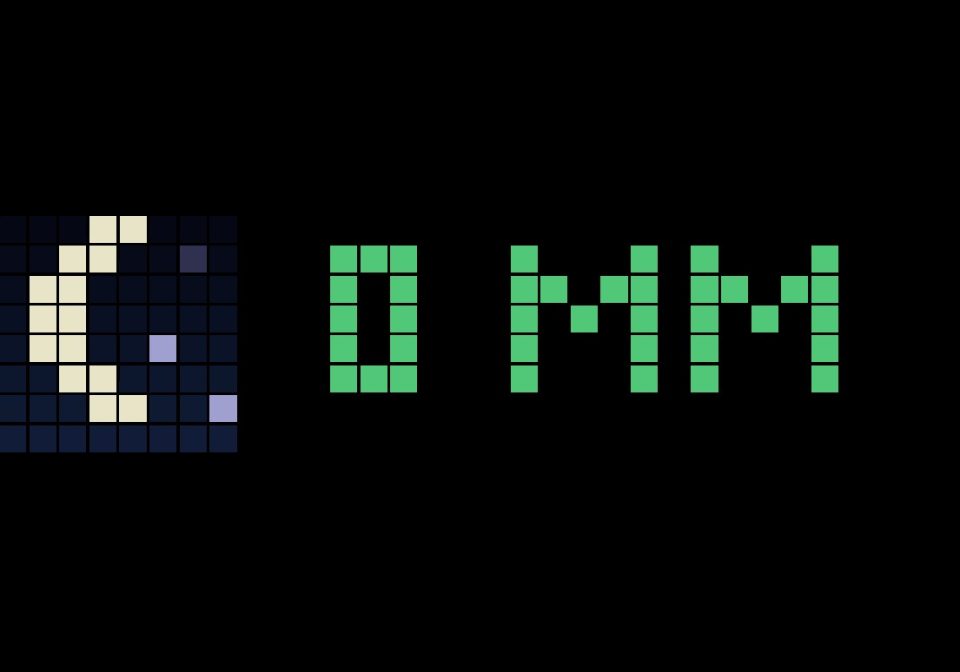
Left: an animated tile – sun (or moon and stars at night) when it stays dry, a cloud with sun and a drop when rain is coming, a dark cloud with falling rain when it rains now (denser and faster when it pours).
Right, for 3 s: DRY / 25 MIN / NOW (German: TROCKEN / 25 MIN / JETZT).
Then 24 bars grow in from the left: 2 hours in 5-minute steps, "now" on the left, a tick every 30 minutes. Height and colour show the intensity, from blue (drizzle) to red (over 15 mm/h). When it stays dry, only the text is shown.
... = no message received yet (check MQTT), --- = no new data for over 2 hours, red dot top right = no message for 15 minutes.
Requirements
Home Assistant with MQTT; AWTRIX NG connected to the same broker (Settings → MQTT)
A home location in Germany or close to its borders (coverage of the DWD radar)
Why Home Assistant? The radar comes from Bright Sky (free, no API key), which only serves it to clients that accept gzip – the clock cannot. So Home Assistant fetches it every 5 minutes and pushes about 25 numbers via MQTT. No HTTPS, no JSON parsing and very little memory on the clock. Home Assistant's own home location is used, nothing to enter.
Setup
Add to configuration.yaml, then reload REST commands (Developer tools → YAML):
yaml
rest_command:
regenradar:
url: >-
https://api.brightsky.dev/radar?distance=1000&format=plain&lat={{ state_attr('zone.home', 'latitude') }}&lon={{ state_attr('zone.home', 'longitude') }}&date={{ utcnow().strftime('%Y-%m-%dT%H:%M') }}
method: get
timeout: 20
Create a new automation, switch to Edit in YAML, paste, save and run it once:
yaml
alias: Regenradar an AWTRIX
description: DWD radar (Bright Sky) every 5 minutes via MQTT to the Regenradar app
triggers:
- trigger: time_pattern
minutes: "/5" - trigger: homeassistant
event: start
actions: - action: rest_command.regenradar
response_variable: r
continue_on_error: true - condition: template
value_template: "{{ r is defined and r.status == 200 and (r.content.radar | default([]) | count) > 0 }}" - action: mqtt.publish
data:
topic: regenradar
retain: true
payload: "{{ (as_timestamp(r.content.radar[0].timestamp) / 60) | int }}{% for f in r.content.radar %} {{ f.precipitation_5 | map('max') | max }}{% endfor %}"
mode: single
Install the script. Settings:
MQTT-Topic – regenradar, same as in the automation
Sensitivity – high: drizzle counts, normal: from about 0.5 mm/h, low: from about 1 mm/h
Only show when rain is coming – skips the app in the rotation while it stays dry
Language – de or en
The message is retained, so the clock has data right after a reboot.
Data: Deutscher Wetterdienst (DWD), radar composite RV, via Bright Sky. Made with Claude.
Kurz auf Deutsch: Zeigt, ob, wann und wie stark es in den nächsten zwei Stunden zu Hause regnet – aus dem Radar des Deutschen Wetterdienstes, in 5-Minuten-Schritten. Home Assistant holt die Daten alle 5 Minuten und schickt sie per MQTT an die Uhr; der Standort kommt aus zone.home. Einrichtung wie oben in drei Schritten, Sprache in den Einstellungen auf de lassen.
Sign in to view and copy the code of this script.
Discussion 0
Ask a question, suggest a change or share how you use it.
No comments yet. Start the conversation.
Have an idea?
Sign in to ask questions and join the conversation.