Poker Tournament Timer
On your display
A compact poker tournament timer for AWTRIX NG that counts down configurable blind levels, shows the current level and buy-ins, and alerts you at every level change.
- Topic
- Gaming
- Includes
- Script · 1 icon
Runs on
- Does not run on 32×8 (TC001 & DIY) Made for 52×16 (TC002).
- Runs on 52×16 (TC002)
- Does not run on 32×8 with AWTRIX 3 (TC001 & DIY) Made for AWTRIX NG.
Choose your display in the next step.
Script description
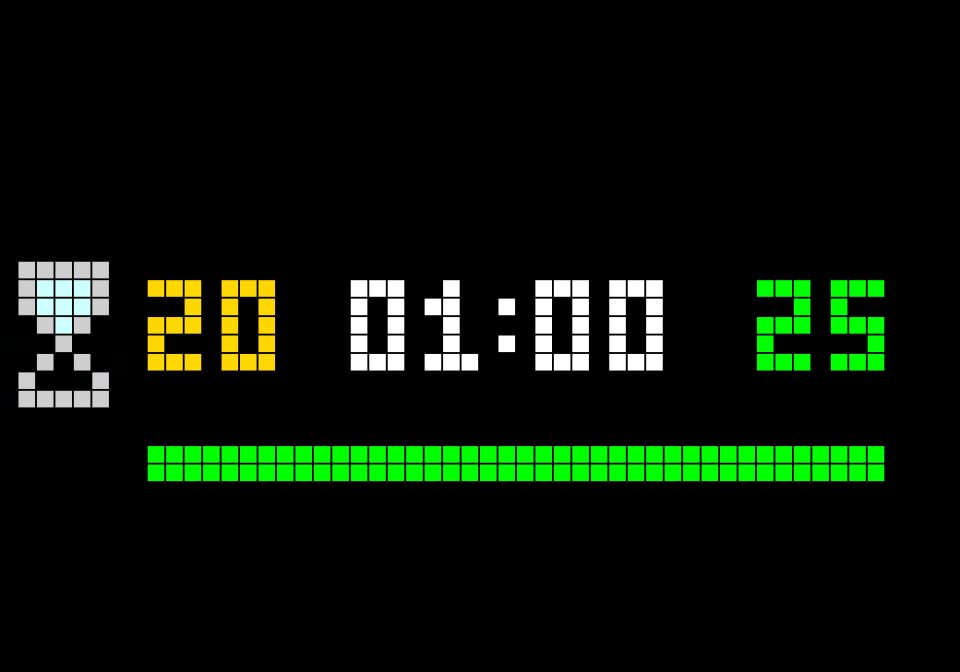
Poker Tournament Timer is a self-contained AWTRIX NG script for 52×16 matrix displays. It helps you run home games or small tournaments by displaying the remaining time of the current blind level, the active level number, and the number of buy-ins directly on the clock.
The display layout includes:
A timer icon on the left
The current level number in a configurable gold color
The remaining level time in white, or orange while paused
The buy-in counter in green on the right
An optional color gradient progress bar showing how much of the current level remains
When a level ends, the app automatically advances to the next level and shows a configurable notification, such as LEVEL ENDE. After the final configured level, it displays a final notification, such as TURNIER ENDE. Both notifications can include an optional alarm sound and a custom display duration.
Controls
Button Function
Middle / Select Start the timer, pause it, or resume a paused level
Right Increase the buy-in counter by 1
The current level is saved, so the timer can continue from the selected level after a restart. The buy-in counter is also retained across restarts.
Setup
Install the script on an AWTRIX NG clock with a 52×16 display.
Open the AWTRIX NG web interface and go to Apps.
Open the settings for Poker Tournament Timer.
Configure the level duration, start level, final level, buy-ins, alarm behavior, colors, and progress bar.
Save the settings and show the app on the clock.
Use the middle button to start the first level; use the right button to count buy-ins during the tournament.
Recommended settings
Level duration: 5 minutes is a good default for casual home games.
Start level: Set to 1 for a new tournament.
Final level: Set to the number of blind levels you want to play.
Alarm duration: 5 seconds is usually enough for a clear level-change alert.
Progress bar: Enabled by default; disable it if you prefer a cleaner display.
The script requires an AWTRIX NG clock and is designed for the 52×16 pixel layout. AWTRIX NG scripts are written and installed through the clock’s web UI and continue running locally on the device after installation.
Sign in to view and copy the code of this script.
Discussion 0
Ask a question, suggest a change or share how you use it.
No comments yet. Start the conversation.
Have an idea?
Sign in to ask questions and join the conversation.