Ulanzi Weather Clock
On your display
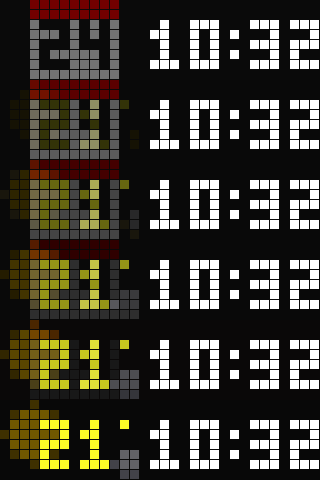
Time, calendar and an animated weather scene for every WMO code, in a muted and a classic design with sprite wipes. No MQTT, no cloud account: the panel fetches the weather itself.
- Topic
- Miscellaneous
- Includes
- Script
Runs on
- Runs on 32×8 (TC001 & DIY)
- Runs on 52×16 (TC002)
- Does not run on 32×8 with AWTRIX 3 (TC001 & DIY) Made for AWTRIX NG.
Choose your display in the next step.
Script description
Time, calendar and an animated weather scene in two designs. Muted: the time stands at the right while calendar and weather cross-fade at the left over a dimmed scene. Classic: calendar and time, then the weather, each wiped in by a sprite - Mario and Luigi, Blinky chasing Pac-Man, a Space Invader, a light beam, Yoshi, Sonic, a Lemming, KITT's scanner, a Metroid. A scene for every WMO weather code from Open-Meteo, no API key. The middle button switches the design; hold it for a demo of every scene. No MQTT, no home automation, no cloud account: the panel fetches the weather itself.
Installation - read this first. The clock is eight scripts: this app and seven modules (art, cycle, sprites, targets, timepage, weather, wipes). The Hub carries one script per flow, so Send to AWTRIX installs the app alone and the panel shows ERR: until the modules are there. Install the whole clock in one step instead:
- Download
ulanzi-weather-clock-<version>.zipfrom https://github.com/bkahlert/ulanzi-weather-clock/releases - Web UI → System → Restore backup → the zip. It adds the eight scripts and touches nothing else on the panel.
- Reboot. Then Apps → ⚙ Clock: set your latitude and longitude. Switch the built-in Time app off if you like.
An update is the same three steps with the next bundle.
Requirements. AWTRIX NG 1.1.2 or later (the hold on the middle button needs 1.1.2) on a 32×8 panel such as the Ulanzi TC001. The clock takes most of the panel's script heap and runs with about 45 KB of it free, so run it alone or next to small scripts.
Settings (Apps → ⚙ Clock): design; latitude and longitude; °C or °F; weather refresh; how long calendar and weather show; the scene's animation step; the muted design's backdrop, brightness and fade; which sprite carries each wipe, or none; the wipe pace.
Source, documentation, previews and the offline tests: https://github.com/bkahlert/ulanzi-weather-clock (MIT). The weather fetch, the temperature colour ramp and the code mapping follow Hank_the_Tank's Weather Script (https://awtrix.de/flow/fGEhP0cZZd6E).
Sign in to view and copy the code of this script.
Discussion 0
Ask a question, suggest a change or share how you use it.
No comments yet. Start the conversation.
More scripts in Miscellaneous
Something wrong with this script? Report it.
Have an idea?
Sign in to ask questions and join the conversation.