Enphase solar production
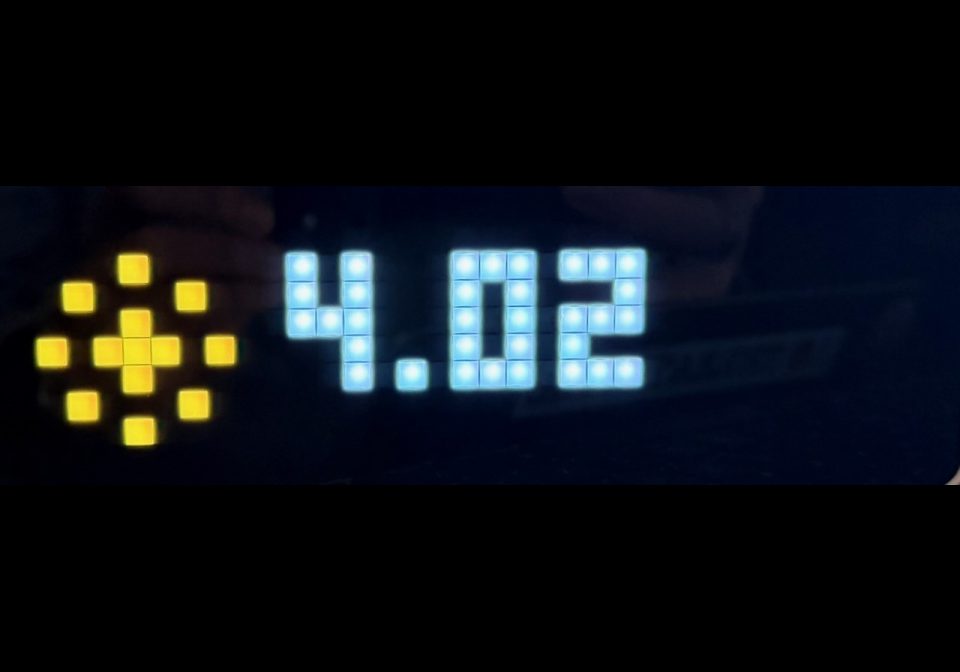
On your display
Shows the daily cumulative total and current solar production. Resets every day at 0:00 hrs.
- Topic
- Smarthome
- Includes
- Script
Runs on
- Runs on 32×8 (TC001 & DIY)
- Runs on 52×16 (TC002)
- Does not run on 32×8 with AWTRIX 3 (TC001 & DIY) Made for AWTRIX NG.
Choose your display in the next step.
Script description
SOLAR TODAY - Enphase solar production on AWTRIX NG
An on-device Berry app for AWTRIX NG (https://awtrix.de/), e.g. on a Ulanzi
TC001. It reads your Enphase IQ Gateway (Envoy) directly over your local
network. No Home Assistant, MQTT or cloud needed.
WHAT IT SHOWS
Energy today (sun icon) e.g. 3.51 = kWh produced since midnight
Current power (lightning bolt icon) e.g. 2240 = watts produced right now
(12.3k above 10 kW)
Today's curve (24 columns) cumulative production per hour,
white column = current hour
- The kWh and W screens alternate automatically (default every 5 seconds).
- Press SELECT (middle button) to toggle the curve.
- The icon is dimmed when the panels produce nothing.
- The value turns grey when the last reading failed (stale value).
REQUIREMENTS
- AWTRIX NG firmware (tested on 1.2.2 on a Ulanzi clock).
- An Enphase IQ Gateway with firmware 7.x or later (token authentication)
and microinverters. - The clock must be able to reach the gateway on port 443. If they are on
different subnets/VLANs, allow traffic from the clock to the gateway in
your firewall. - An owner token from Enphase (valid for 1 year).
GET AN ENPHASE TOKEN
- Go to https://entrez.enphaseenergy.com and log in with your Enlighten
account. - Select your site and gateway serial number, then "Create access token".
- Copy the full token (a long string starting with "eyJ").
Owner tokens are valid for one year. When it expires the clock shows TOK;
create a new one and replace it.
INSTALL
-
Open the AWTRIX NG web interface, go to Scripts and click "+".
-
Paste the contents of solar_today.be into the Code tab and save.
-
Set the configuration, either via the app's settings under Apps or in
the script's Data tab:{
"host": "192.168.1.50",
"token": "eyJ...your-full-token...",
"cycle": 5
}host only the IP address of the gateway, without https://
token the full owner token; spaces and line breaks are stripped
automatically
cycle seconds per screen; 0 shows kWh only -
Within about a minute the clock shows today's production.
CHECK THE GATEWAY FROM YOUR COMPUTER (OPTIONAL)
This asks for the token without echoing it or storing it in your shell
history (zsh):
read -s "T?Token: " && echo && curl -sk -H "Authorization: Bearer $T" https://192.168.1.50/ivp/pdm/energy
Look at production.pcu: wattHoursToday, wattHoursLifetime and wattsNow
should show realistic values.
STATUS CODES ON THE DISPLAY
IP? Host missing or contains invalid characters.
Enter only the IP address.
KEY? Token missing, too long or contains invalid characters.
Paste the complete token again.
TOK Gateway rejected the token (HTTP 401).
Token expired or wrong gateway; create a new one.
... No answer from the gateway.
Check IP, Wi-Fi and firewall/VLAN rules.
ERR Unexpected reply.
Check the curl output above.
HOW IT WORKS
- The gateway is polled once a minute. The Enphase/Home Assistant community
reports that faster polling can make gateways unstable. - Data comes from /ivp/pdm/energy, section production.pcu (the
microinverters). The more common /api/v1/production endpoint reads the
gateway's production meter (eim). On gateways without an enabled
production CT it returns zeros or meaningless values, so it is not used. - Today's energy is calculated as lifetime counter minus a baseline captured
at the first reading of each day. When the gateway's own wattHoursToday is
higher during daytime (e.g. after a mid-day install or restart), the
baseline is corrected to match. This avoids the known issue that
wattHoursToday sometimes resets late or not at all. - Microinverters report every few minutes, so the value rises in steps.
- The curve is saved every 15 minutes to limit flash writes. After a reboot
most of the curve is restored.
SECURITY NOTES
- AWTRIX NG does not verify HTTPS certificates. The gateway uses a
self-signed certificate anyway, but it means a device on your network
impersonating the gateway could capture the token. Only use this on a
network you trust. - The token is stored on the clock and visible in its web interface. That
interface is plain HTTP without a password by default, so enable HTTP
basic authentication under System. - The host and token are restricted to safe characters before they are used
in the URL and the Authorization header. - Never share screenshots of the Data tab or your token.
KNOWN LIMITATIONS
- Tested on one system with microinverters and no production CT. Systems
with an enabled production meter should still work via pcu, but values
may differ slightly from the meter. - Batteries and consumption are not shown.
- The display layout assumes a 32x8 matrix.
LICENSE
MIT. Use, modify and share freely.
Sign in to view and copy the code of this script.
Discussion 0
Ask a question, suggest a change or share how you use it.
No comments yet. Start the conversation.
Have an idea?
Sign in to ask questions and join the conversation.