Claude Direct
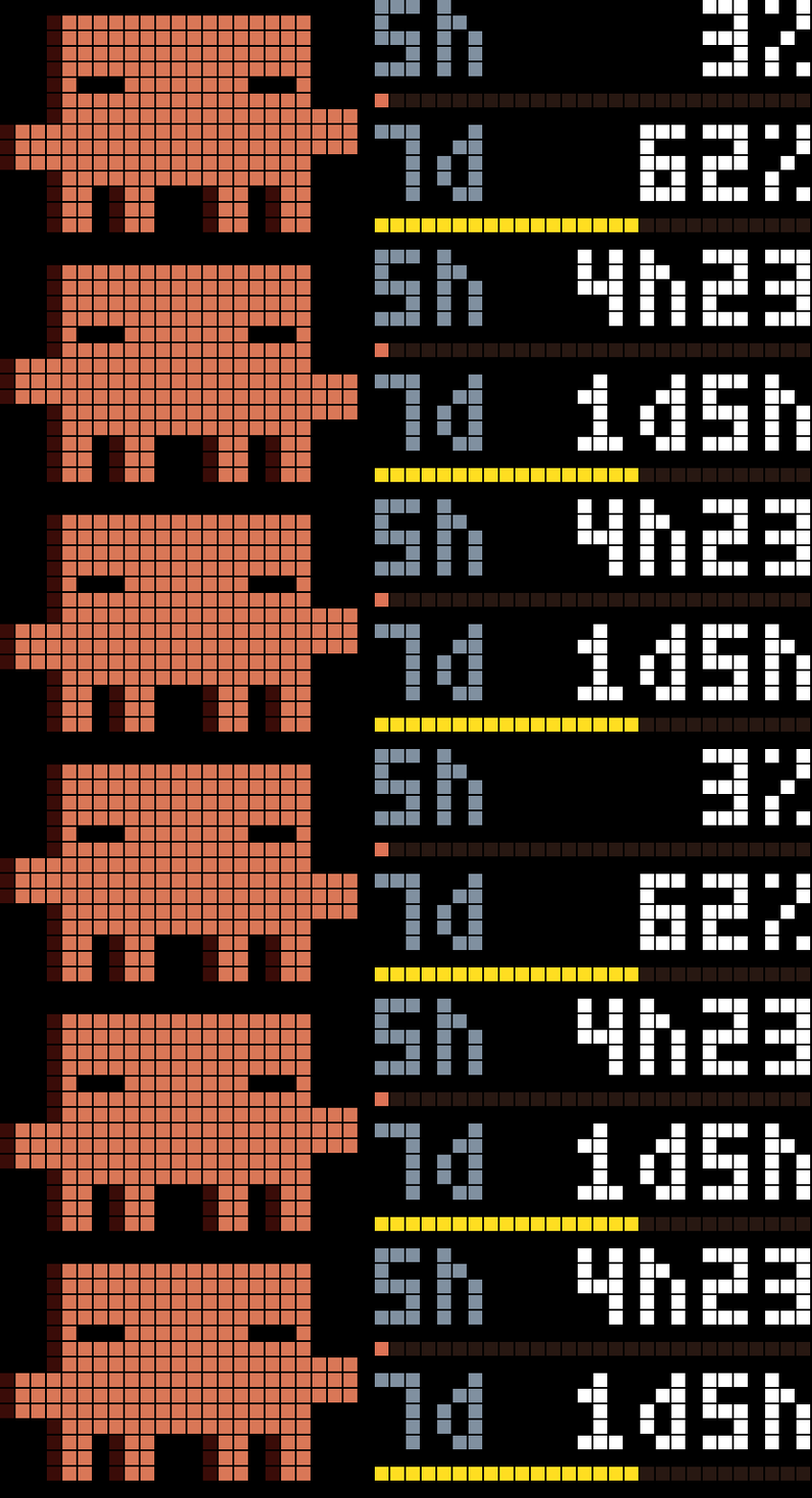
On your display
ClaudeDirect is an AWTRIX NG app for the UlanziTC002 that reads your Claude plan usage straight from Anthropic and shows it as percent bars and reset countdowns.
- Topic
- Miscellaneous
- Includes
- Script
Runs on
- Does not run on 32×8 (TC001 & DIY) Made for 52×16 (TC002).
- Runs on 52×16 (TC002)
- Does not run on 32×8 with AWTRIX 3 (TC001 & DIY) Made for AWTRIX NG.
Choose your display in the next step.
Script description
ClaudeDirect
A pixel mascot sits on the left. On the right, two rows of label, value and bar page through:
| Page | Shows |
|---|---|
| Usage | 5h session and 7d weekly usage in % |
| Reset | Time left until each window resets (45m, 2h05, 3d4h) |
| Model | The weekly limit of one model (default Fable), in % and time left |
| Extra | Extra usage in %, once per round |
Claw'd mascots are natively rendered, no icons needed. Bars turn yellow and then red at the warning and high thresholds, and the mascot gets more worried with the higher of 5h and 7d. -- means no active window. A red pixel bottom-right means the last fetch failed. Errors show as SETUP (no token), AUTH (token rejected) or API (nothing fetched yet).
Install
- First, get a refresh token. You need Python 3 and a Claude account. Create get-token.py file and run it:
#!/usr/bin/env python3
"""One-time OAuth login (PKCE) that prints a refresh token for the clock app.

Run it, open the printed URL, log in, paste the code shown on the callback page.
The refresh token belongs to this login only, so no other client invalidates it.
"""

import base64
import hashlib
import json
import secrets
import sys
import urllib.error
import urllib.parse
import urllib.request

CLIENT_ID = "9d1c250a-e61b-44d9-88ed-5944d1962f5e"
AUTHORIZE_URL = "https://claude.ai/oauth/authorize"
TOKEN_URL = "https://console.anthropic.com/v1/oauth/token"
REDIRECT_URI = "https://console.anthropic.com/oauth/code/callback"
SCOPE = "user:profile"


def main() -> int:
    verifier = secrets.token_urlsafe(32)
    challenge = (
        base64.urlsafe_b64encode(hashlib.sha256(verifier.encode("ascii")).digest())
        .rstrip(b"=")
        .decode("ascii")
    )
    state = secrets.token_urlsafe(32)

    url = AUTHORIZE_URL + "?" + urllib.parse.urlencode(
        {
            "code": "true",
            "client_id": CLIENT_ID,
            "response_type": "code",
            "redirect_uri": REDIRECT_URI,
            "scope": SCOPE,
            "code_challenge": challenge,
            "code_challenge_method": "S256",
            "state": state,
        }
    )
    print("Open this URL, log in, and copy the code shown afterwards:\n")
    print(url + "\n")

    pasted = input("Paste your code here: ").strip()
    code, _, returned_state = pasted.partition("#")
    if returned_state and returned_state != state:
        print("State mismatch, aborting.", file=sys.stderr)
        return 1

    request = urllib.request.Request(
        TOKEN_URL,
        data=json.dumps(
            {
                "grant_type": "authorization_code",
                "code": code,
                "state": returned_state or state,
                "client_id": CLIENT_ID,
                "redirect_uri": REDIRECT_URI,
                "code_verifier": verifier,
            }
        ).encode(),
        headers={
            "Content-Type": "application/json",
            "User-Agent": "claude-direct/1.0",
        },
    )
    try:
        with urllib.request.urlopen(request, timeout=15) as resp:
            tokens = json.load(resp)
    except urllib.error.HTTPError as err:
        print(f"Token exchange failed ({err.code}): {err.read().decode()}", file=sys.stderr)
        return 1

    refresh = tokens.get("refresh_token")
    if not refresh:
        print("No refresh_token in response.", file=sys.stderr)
        return 1
    print("\nPaste this into the app's 'Refresh token' setting:\n")
    print(refresh)
    return 0

if __name__ == "__main__":
    sys.exit(main())
Run it:
python3 get-token.py
- Open the URL it prints and log in to Claude.
- Authorise the app and copy the code displayed on the page and paste it into the terminal.
- The script prints a refresh token. Paste it into the app's Refresh token setting.
The token belongs to this login only, so Claude Code and other tools do not invalidate it. If the clock shows AUTH, run the script again and paste the new token over the old one.
- In the clock's web UI, open Scripts, create a script named
ClaudeDirect, pasteclaude-direct.axand save. - Open Apps, click the gear on
ClaudeDirect, paste the token into Refresh token and save.
Settings
| Setting | Default | Meaning |
|---|---|---|
| Refresh token | From get-token.py |
|
| Refresh | 5 min | How often usage is fetched (5 to 60). Anthropic blocks faster pollers for about a day |
| Scoped weekly model | Fable |
Name, or part of it, of the per-model limit; its first two letters label the row |
| Seconds per page | 3 | 1 to 10 |
| Page repeats | 3 | Rounds of usage and reset pages before the extra-usage page |
| Warning threshold | 50 % | Yellow bar, worried mascot |
| High threshold | 80 % | Red bar, alarmed mascot |
Sign in to view and copy the code of this script.
Discussion 0
Ask a question, suggest a change or share how you use it.
No comments yet. Start the conversation.
More scripts in Miscellaneous
Something wrong with this script? Report it.
Have an idea?
Sign in to ask questions and join the conversation.