SleeperMatchup
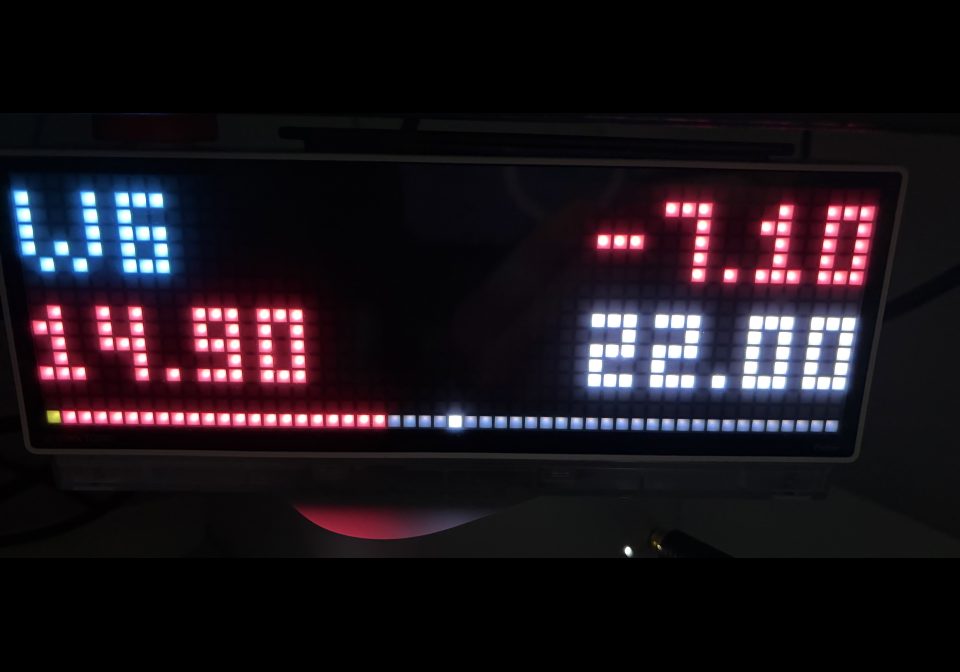
On your display
Display your weekly Sleeper NFL fantasy matchup directly on your TC002
- Topic
- News
- Includes
- Script
Runs on
- Does not run on 32×8 (TC001 & DIY) Made for 52×16 (TC002).
- Runs on 52×16 (TC002)
- Does not run on 32×8 with AWTRIX 3 (TC001 & DIY) Made for AWTRIX NG.
Choose your display in the next step.
Script description
Display your weekly Sleeper NFL fantasy matchup directly on your TC002:
current scores with two decimal places, your opponent, and your lead or deficit.
The top row alternates every four seconds between usernames and the scoring
week with the point difference. Green means you are ahead, red means you are
behind, and white means a tie. Your team and opponent are identified
automatically from your league. Commissioner score overrides are respected.
The bottom bar represents the point difference, not the probability of winning.
Sleeper's original win probabilities and projected final scores are not included
because the documented matchup API does not provide them.
Setup
- Import
sleeper.axas a separate script app. - In the app settings, enter League ID: only the digits from your Sleeper
link,https://sleeper.com/leagues/LEAGUE_ID/. - Under Sleeper username, enter your username or the display name shown
in your league, without@. Do not enter your custom team name. - Leave Roster ID override at
0. For co-owners, duplicate display names,
or teams without a matching name, enter the numeric roster ID instead.
In that case, the username can be left blank. - Leave Week override at
0to use the league's current scoring week
(settings.leg). Enter a number to select a specific week, including after
the season has ended.
The league ID is stored as text to preserve the precision of long Sleeper IDs.
Update it when your league moves to a new season; the script does not follow
successor leagues automatically. Name matching is case-insensitive.
Do not include leading or trailing spaces.
Settings and behavior
| Setting | Default | Purpose |
|---|---|---|
| Refresh interval | 60 s | Fetch league, users, rosters, and matchups again; minimum 30 s |
| Display time | 12 s | Time spent in the normal app rotation |
| Hide without matchup | off | Hide the app when no matchup is available or cached scores have expired |
- Your score is always on the left; your opponent's score is on the right.
- Names are shortened to fit. Unsupported characters appear as
?.
Unusually large scores are displayed one at a time. - The bottom bar is split in the middle when scores are tied. Its boundary
moves by one pixel for every two points of difference and stops at the edges. - The script does not pause rotation, play sounds, or jump to its own page.
Another app that pauses rotation may prevent this app from appearing. - If a network request fails, the last valid scores remain visible until they
are five minutes old. After that, a warning appears or the app is hidden. - Refresh intervals longer than five minutes intentionally cause temporary
warnings or hiding. Choose 240 seconds or less for continuous score display. - Byes, missing opponents, and matchups involving more than two rosters are
not displayed as regular matchups. Median or additional games are not
displayed separately. - Outside an active season, select an explicit week to display previous matchups.
- Pressing Select requests a refresh on the next loop iteration.
- Updates may lag behind the Sleeper app.
Diagnostics and validation
/api/v1/apps/APPNAME/data exposes status and matchup.
matchup records the last successful fetch and may be outdated. The internal
five-minute age limit determines whether those scores are displayed.
Validated on a TC002 on October 18, 2026:
- Compilation and startup without a reported script error.
- Live HTTPS requests with automatic identification of both participants.
- Isolated device tests covering roster and opponent lookup, a commissioner
override of zero points, decimal and negative scores, drawing and overflow
handling, stale data, byes, duplicate names, roster overrides, week changes,
empty responses, the offseason, and name width limits.
Run python3 tests/build_sleeper_test.py to generate a local test script at
/tmp/SleeperTest.ax. This does not upload anything automatically.
Acceptance by the awtrix.de upload process has not been tested, and the script
has not been published.
API documentation: https://docs.sleeper.com/
According to Sleeper, its API is free for non-commercial use.
Sign in to view and copy the code of this script.
Discussion 0
Ask a question, suggest a change or share how you use it.
No comments yet. Start the conversation.
Have an idea?
Sign in to ask questions and join the conversation.