Paprika Dinner
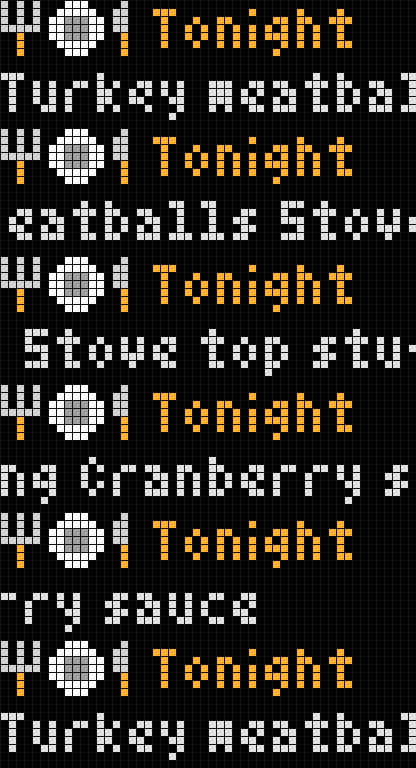
On your display
What's for dinner?
- Topic
- Miscellaneous
- Includes
- Script
Runs on
- Does not run on 32×8 (TC001 & DIY) Made for 52×16 (TC002). Needs an AWTRIX that keeps API keys.
- Runs on 52×16 (TC002) API key: open the app's settings on your AWTRIX and enter your key.
- Does not run on 32×8 with AWTRIX 3 (TC001 & DIY) Made for AWTRIX NG.
Choose your display in the next step.
Script description
Requirements
-
Paprika Recipe Manager 4 with Premium. The Calendar Feed this app reads is a Premium feature (there's a 1-week free trial).
-
Dinners planned in Paprika's meal planner.
-
An Ulanzi TC002. The app keeps your feed code in the clock's API keys, which only the TC002 has.
-https://www.paprikaapp.com -
**This script was not written by the makers of the Paprika App. **
When your kids are asking what's for dinner? Straight from your Paprika meal plan. Until 6 PM the app shows Tonight and today's dinner. After that it shows Tmrw and tomorrow's, so you can take something out of the freezer. Several dishes scroll along under a fork, plate and knife. When nothing is planned, the app stays out of the rotation.
At dinner time a farm dinner triangle rings once with "Dinner!" and the meal, but only if dinner is planned. If the clock was off at that moment, it still rings later in the same hour, never after.
Setup
- In Paprika 4, go to Settings → Meals → Calendar Feed → Create Link, and copy the link. It looks like
https://www.paprikaapp.com/calendars/CODE.ics. - On the clock, open Apps → gear → API keys for this app.
- Paste only the CODE part, the letters and numbers between
calendars/and.ics. Leave out the rest of the link, then press Save.
The code stays on the clock and is only ever sent to paprikaapp.com. Anyone with the link can read your meal plan, so treat it like a password. If it gets out, remove the feed in Paprika and make a new one.
If the app says "wrong feed code", the field holds more than the code (the whole link, or a space). Clear it and paste just the code.
Settings (gear)
- Tomorrow from: the hour it switches to tomorrow's dinner (default 18).
- Dinner from: meals planned at or after this hour count as dinner (default 15). Paprika's feed has no meal types, so this keeps breakfast and lunch out. All-day meals always count.
- Dinner bell: on/off, and Bell at: the hour it rings (default 18).
- Check every: how often to read the feed (default 30 minutes).
- Stale after: the text turns grey when the last good read is older than this.
- Scroll speed.
Sign in to view and copy the code of this script.
Discussion 0
Ask a question, suggest a change or share how you use it.
No comments yet. Start the conversation.
More scripts in Miscellaneous
Something wrong with this script? Report it.
Have an idea?
Sign in to ask questions and join the conversation.