Quotagent
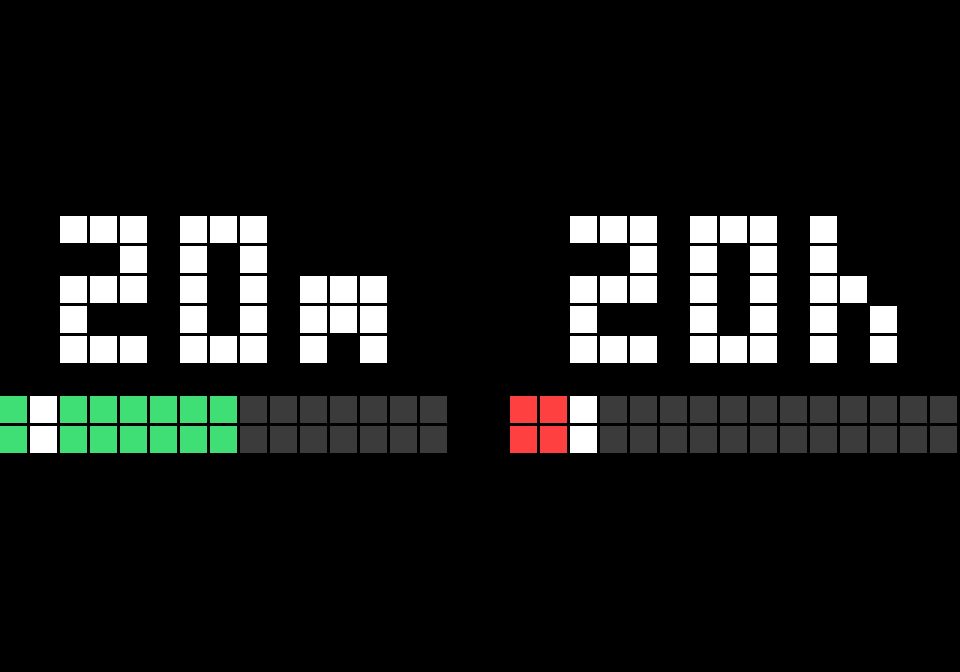
On your display
OpenAI Codex, Claude Code, and other AI quotas on AWTRIX NG. See what’s left, when it resets, and whether you’re on pace. Requires an MQTT publisher.
- Topic
- Miscellaneous
- Includes
- Script
Runs on
- Runs on 32×8 (TC001 & DIY)
- Runs on 52×16 (TC002)
- Does not run on 32×8 with AWTRIX 3 (TC001 & DIY) Made for AWTRIX NG.
Choose your display in the next step.
Script description
See how much AI quota you have left, when it resets, and whether you’re using it faster than planned. Quotagent shows one quota full-width or two side by side on a 32 × 8 AWTRIX NG display. The white tick marks how much quota would remain at an even pace. Bar colors and the low-quota threshold are adjustable.
Use it with OpenAI Codex, Anthropic Claude / Claude Code, Google Antigravity, Kimi Code, MiniMax, Z.ai, Alibaba Coding Plan, or any source that exposes compatible quota data. A separate MQTT publisher is required. Quotagent does not sign in to providers or fetch quotas itself.
Setup
- Install Quotagent and enable MQTT on your AWTRIX NG.
- Publish a single retained JSON message to
quotagent/statuson the same MQTT broker. If you use a different topic, set MQTT topic in Quotagent to match. - Keep Quotagent in your regular rotation, or enable Show on change for a five-second notification that leaves the current app in place.
Codex on Omarchy? Use the ready-made Omarchy relay. For other setups, see the MQTT contract and test command.
Copy this prompt into your coding agent
Set up an MQTT quota publisher for Quotagent on my AWTRIX NG for [provider and plan]. Read the Quotagent MQTT contract. Find a quota source I already have access to; for Codex on Omarchy, use the existing cache and relay. Ask me for any missing details, including the broker host and port and which quota windows to show.
Publish a single retained JSON object with a
windowsarray of one or two entries toquotagent/statuson the broker used by AWTRIX. Each entry needsdurationSeconds(the full window length),remainingPercent(0–100, not used percent), andresetAt(Unix seconds, not milliseconds). Keep the order stable. Set up automatic updates using the source’s existing refresh mechanism if possible.Verify that a new MQTT subscriber receives the retained message and that Quotagent shows the expected bars and reset countdowns. Keep credentials out of MQTT payloads and logs. Ask before replacing an existing publisher or changing device settings.
Sign in to view and copy the code of this script.
Discussion 0
Ask a question, suggest a change or share how you use it.
No comments yet. Start the conversation.
More scripts in Miscellaneous
Something wrong with this script? Report it.
Have an idea?
Sign in to ask questions and join the conversation.