ScriptAWTRIX NG
Fun Clock (8x32)
On an AWTRIX display
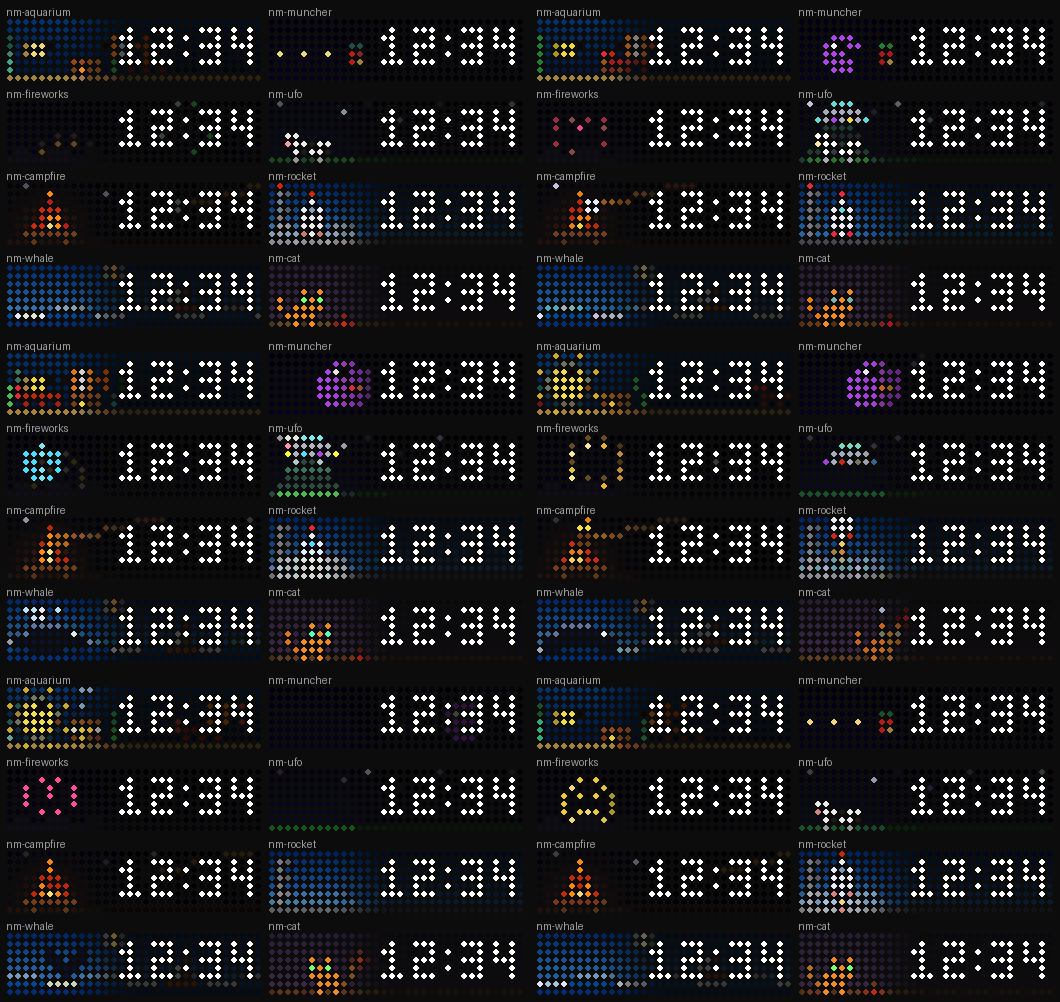
On your display
Clock with fun animated backgrounds
Which AWTRIX do you have?
See below where it runs, or choose your device.
- Topic
- Miscellaneous
- Includes
- Script · 8 icons
Runs on
- Runs on 32×8 (TC001 & DIY)
- Runs on 52×16 (TC002)
- Does not run on 32×8 with AWTRIX 3 (TC001 & DIY) Made for AWTRIX NG.
Choose your display in the next step.
Script description
A small clock over little animated cartoons that take turns.
Eight tiny stories play out behind the time:
- A UFO beams up a cow… and the cow parachutes back down.
- A cat stalks a laser dot, wiggles, pounces, and misses.
- A muncher eats its dots and a strawberry, gets fat, and burps.
- A pufferfish puffs up and scares the clownfish away, while a lobster strolls by snapping its claws.
- A marshmallow toasts, catches fire, and gets waved out.
- A rocket counts down, blasts off, and lands again.
- A whale surfaces, spouts, and waves its tail.
- Fireworks in hearts, smileys and rings.
Pick the ones you like and choose how often the background changes. The action happens on the left and fades to dark on the right, so the white clock is always easy to read.
Setup
- Press Send to AWTRIX. The 8 background icons (
nm-…) install with the script. - Open the Apps tab and click the gear next to FunClock.
- Under Backgrounds, switch off any scenes you don't want, choose Change background, and save.
- Optional: switch off the built-in Time app if you want this to be your only clock.
Settings
- Change background: every 30 s, 1 min (default), 5 min, 15 min or 1 h, or
turnfor a new background each time the app comes round in the rotation. - Clock colour: default white.
- Backgrounds: one switch per scene. A random enabled scene is picked each time, never the same one twice in a row.
Good to know
- The clock uses your AWTRIX's own time and its 12/24-hour setting.
- If a background icon is missing, a dimmed built-in effect is shown instead.
- Made for 32×8 displays (Ulanzi TC001).
Sign in to view and copy the code of this script.
Community
Discussion 0
Ask a question, suggest a change or share how you use it.
No comments yet. Start the conversation.
More scripts in Miscellaneous
Something wrong with this script? Report it.
Have an idea?
Sign in to ask questions and join the conversation.