Eurojackpot
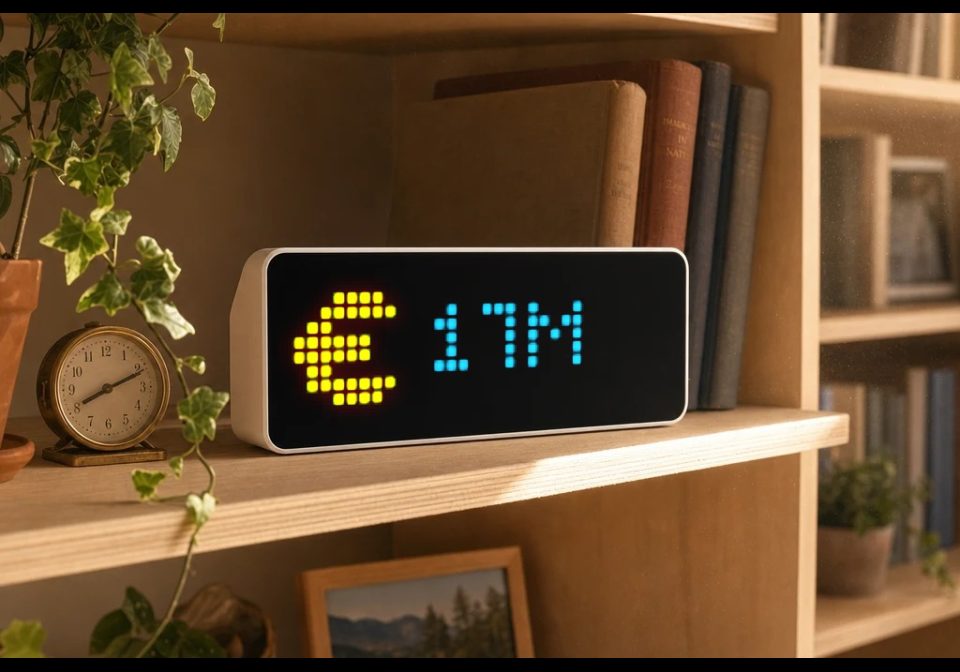
On your display
Displays the upcoming Eurojackpot jackpot amount on your AWTRIX NG.
- Topic
- Miscellaneous
- Includes
- Script
Runs on
- Runs on 32×8 (TC001 & DIY)
- Runs on 52×16 (TC002)
- Does not run on 32×8 with AWTRIX 3 (TC001 & DIY) Made for AWTRIX NG.
Choose your display in the next step.
Is this your script?
If you created this script, open your saved edit link to add it to your account. You can then manage it whenever you sign in. Adding it to your account replaces the edit link.
Script description
Displays the current jackpot amount for the upcoming Eurojackpot draw on your AWTRIX NG.
The jackpot value is fetched automatically and periodically refreshed. The last valid jackpot value is stored locally, so it can still be displayed after a restart until fresh data becomes available.
The app includes a built-in Euro-style icon, so no additional icon is required. If you prefer another icon, first choose and download an icon from the LaMetric icon library to your AWTRIX device. Then enter the corresponding icon ID in the app settings. If the field is left empty, or the selected icon cannot be loaded, the built-in icon is used automatically.
Configuration:
Icon ID – Optional LaMetric icon ID. Download the icon to your AWTRIX device first, then enter its ID here. Leave empty to use the built-in icon.
Icon spacing – Distance between the icon and jackpot value
Scroll speed – Scrolling speed if the value does not fit
Start time HHMM – Start of the display time window
End time HHMM – End of the display time window
Refresh interval – How often the jackpot value is refreshed
Display duration – Custom app duration; 0 uses the device setting
If the start and end times are identical, the app is always active.
Pressing the Select button triggers a refresh on the next loop cycle.
Sign in to view and copy the code of this script.
Discussion 0
Ask a question, suggest a change or share how you use it.
No comments yet. Start the conversation.
More scripts in Miscellaneous
Something wrong with this script? Report it.
Have an idea?
Sign in to ask questions and join the conversation.