Team Tracker
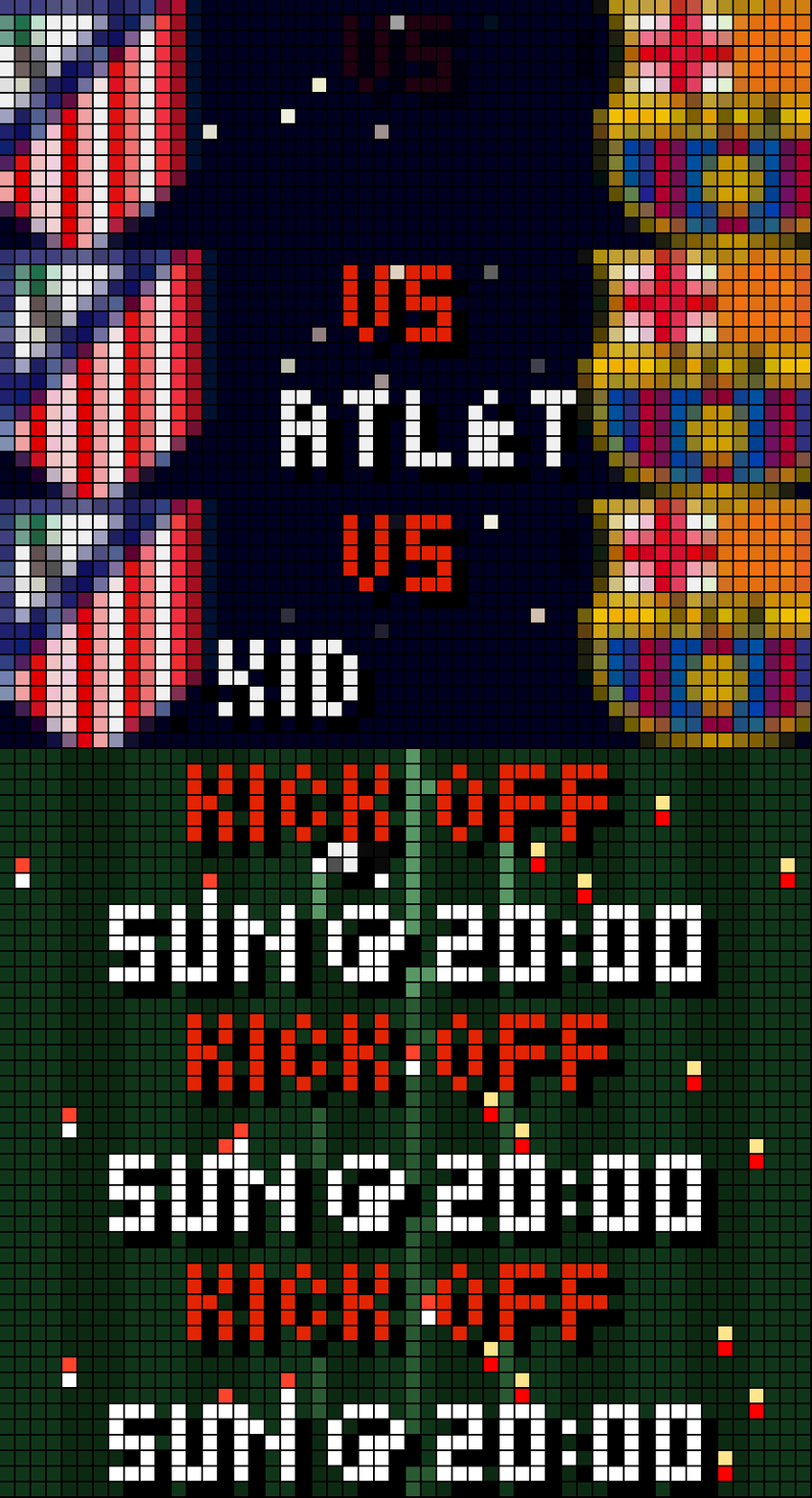
On your display
Team Tracker shows your football team's next match using ESPN data and it switches to live mode during the match.
- Topic
- Miscellaneous
- Includes
- Script
Runs on
- Does not run on 32×8 (TC001 & DIY) Made for 52×16 (TC002). Needs the built-in synthesizer and a voice that reads text aloud.
- Runs on 52×16 (TC002)
- Does not run on 32×8 with AWTRIX 3 (TC001 & DIY) Made for AWTRIX NG.
Choose your display in the next step.
Script description
Team Tracker
Your football team's next match, shown under the real sky and weather at the stadium. Once the match starts it switches to the live score, goals, cards and stats (xG, possession, shots, passes, corners, fouls). Data comes from ESPN.
The live score view (kits, score, goal and card banners, whistles) is based on the LiveScore app by Hank_the_Tank. The pre-match intro, kick-off page, sky and weather, and the in-match stats pages are new.
Before the match
- Intro (5 s): both crests slide in,
VSfades in, lightning strikes, and the opponent's name scrolls past. - Kick-off page: the day and time, such as
SAT @ 17:30. On match day it adds a countdown likeIN 45 MIN. - Time of day: the background is the real sky over the stadium at kick-off, calculated from the sun's position there. You get a blue day sky, an orange golden hour, a blue hour, or a night with twinkling stars.
- Weather: on match day the app fetches the forecast for the kick-off hour from Open-Meteo. The sky then shows clouds, slanted rain, drifting snow, fog or a storm. Before match day the sky is clear.
During the match
The app polls ESPN every 30 seconds (configurable) from 2 minutes before kick-off. Once ESPN reports the match as in play, the live view takes over.
-
Score screen (7 s):
- Both kits in the real ESPN shirt colours, with the score in big block digits between them.
- A match-time bar along the bottom: green for normal time, orange for extra time, amber at half-time, grey at full time.
- The app can jump to the front at kick-off, goals and red cards.
-
Goals:
- The panel flashes and
GOAL!pops in. - The scoring kit jumps. For your team there are fireworks and confetti.
- A jingle plays (a sad trombone if the opponent scores), with an optional spoken goal call.
- A banner then shows the minute and the scorer, marked
(pen)or(o.g.)where it applies.
- The panel flashes and
-
Cards: a banner shows the minute and player, with a yellow or red card.
-
Whistles: at kick-off, half-time and full time.
-
Stats pages (3 s each, after the score): each appears only once ESPN has the data, with home on the left and away on the right. A bar along the bottom is split in the shirt colours.
Page Shows xGExpected goals POSPossession in % SHOShots on goal PASAccurate passes CORCorners FOUFouls -
Stats background: the pages sit on the weather at the stadium right now, using the same time-of-day and weather sky as the intro. It falls back to grass if weather isn't available.
-
After the final whistle: the final score stays for a set time (4 hours by default), then the app moves on to the next match.
Finding your team ID
- Open your club's page on espn.com/soccer.
- Look at the address: e.g.
espn.com/soccer/club/_/id/83/barcelona. The number after/id/is the ID (83= Barcelona). - Enter it in the app settings under My Team.
Sign in to view and copy the code of this script.
Discussion 0
Ask a question, suggest a change or share how you use it.
No comments yet. Start the conversation.
More scripts in Miscellaneous
Something wrong with this script? Report it.
Have an idea?
Sign in to ask questions and join the conversation.