Weather Script
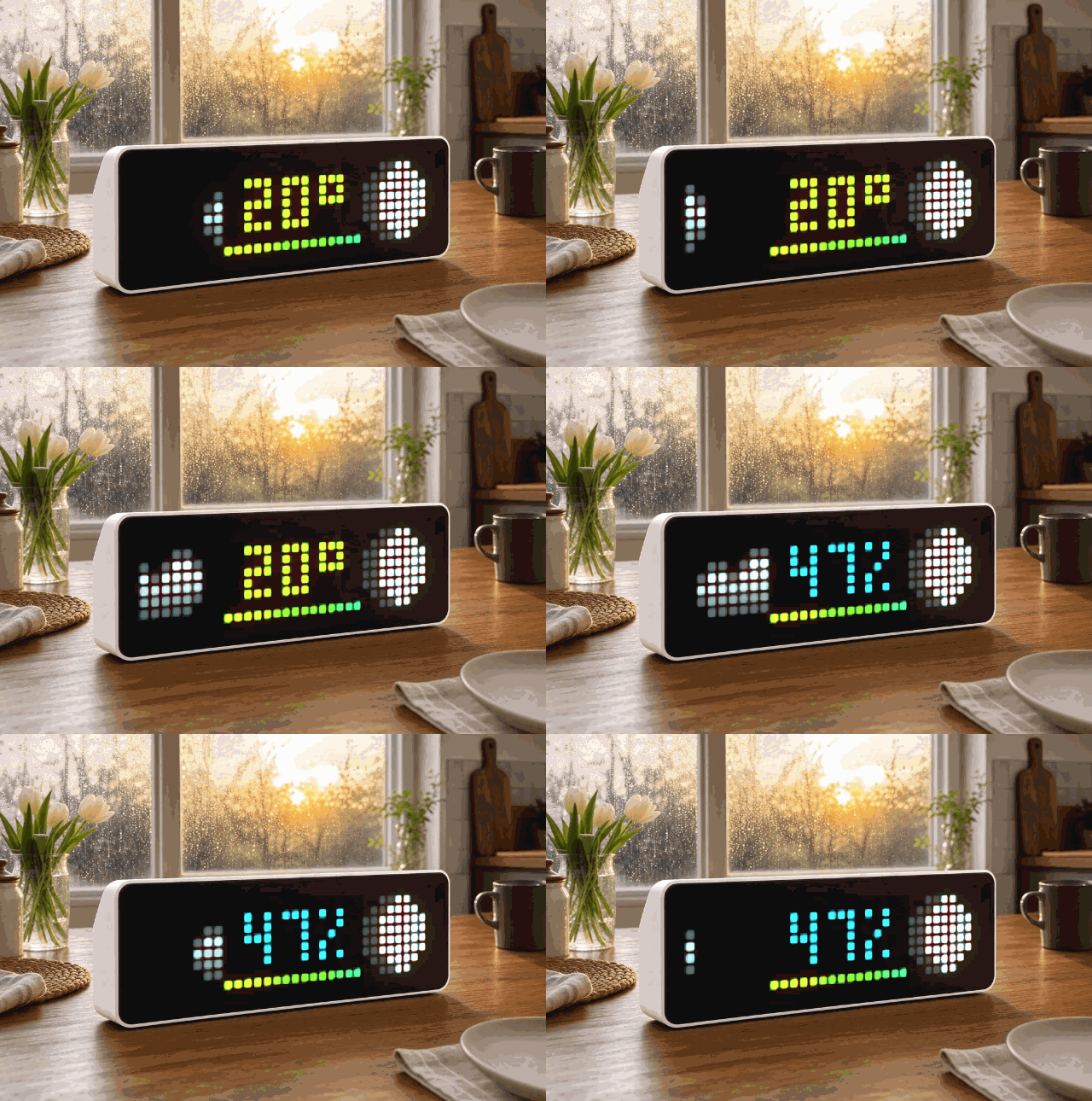
On your display
Weather, humidity, 15-hour forecast and moon phase
- Topic
- Miscellaneous
- Includes
- Script · 22 icons
Runs on
- Runs on 32×8 (TC001 & DIY)
- Runs on 52×16 (TC002)
- Does not run on 32×8 with AWTRIX 3 (TC001 & DIY) Made for AWTRIX NG.
Choose your display in the next step.
Script description
UPDATE
Moon Phase corrected
select "Temperature unit"
optional Humidity
Weather 3.7 for AWTRIX NG
A compact and memory-optimized weather app for AWTRIX NG. The script displays the current outdoor temperature, current weather conditions, a color-coded 15-hour temperature forecast, and the current moon phase on a 32×8 pixel matrix.
Weather data is provided by Open-Meteo. No user account or API key is required.
Display layout
The display is divided into four areas:
- left: icon for the current weather conditions
- center: current temperature rounded to a whole degree
- right: icon for the current moon phase
- below the temperature: 15 colored pixels showing the temperature trend for the next 15 hours
Each forecast pixel represents approximately one hour. Its color indicates the expected temperature range:
- Purple and dark blue: very cold
- Light blue: cool
- Green: mild
- Yellow: warm
- Orange and red: hot
The current temperature is also shown in a color matching its value.
Features
- current outdoor temperature
- current conditions based on the WMO weather code
- 15-hour temperature forecast
- automatically calculated moon phase
- weather updates approximately every five minutes
- manual refresh using the middle button
- storage of the last known temperature label, color, and weather icon
- immediate display of the last known values after a restart
- red status pixel for previously loaded weather data that has become outdated
- latitude and longitude can be entered directly from the Apps tab
- no API key required
- particularly low RAM usage
Memory optimization
The script has been optimized specifically for the limited memory available on AWTRIX NG devices.
Instead of loading the complete Open-Meteo response and converting it into a large JSON object tree, it keeps only a small response window of up to 640 bytes. The required values are then extracted using regular expressions.
This significantly reduces memory usage and allows the script to run more reliably alongside other scripts, particularly on devices without PSRAM.
Updates and data age
Weather data is requested from Open-Meteo approximately every five minutes.
After a successful request, the data-age counter is reset. If the last successfully loaded data is more than approximately 20 minutes old, a red pixel appears in the bottom-right corner.
The red pixel indicates that the displayed values may no longer be current. In this case, check the Wi-Fi connection, internet access, and the AWTRIX device log.
Note: If no weather data has ever been loaded or stored successfully, the script only displays
.... The red pixel is not drawn in this initial state. It appears only when existing weather data later becomes outdated.
Controls
Pressing the middle button on the AWTRIX NG immediately requests fresh weather data.
The app otherwise uses the global app duration and rotation settings configured on the AWTRIX NG.
Location settings
Weather 3.3 uses the configurable script settings introduced with AWTRIX NG firmware 1.0.10-dev. Users no longer need to open or edit the source code to change the location.
After installing the script:
- Open the Apps tab in the AWTRIX NG web interface.
- Find the installed weather script.
- Press the gear button on its row.
- Enter the desired latitude and longitude.
- Save the settings.
latitudeis the geographic latitude.longitudeis the geographic longitude.
The included default values 52.52, 13.40 point to the Berlin area in Germany. Other users can replace them directly in the settings form.
Coordinates can be found using OpenStreetMap or another mapping service.
The selected coordinates are stored on the AWTRIX NG and survive a restart. Saving new coordinates restarts the weather script so it can request data for the new location.
Required weather icons
The following icon IDs are used for the current weather conditions:
53386– clear sky2286– partly cloudy53384– overcast17055– fog2720– rain or drizzle2289– snow49300– rain showers29839– thunderstorm36637– unknown or unmapped weather condition
If the selected weather icon is unavailable, the script draws a small yellow sun as a fallback.
Required moon-phase icons
The following icon IDs are used for the moon phases:
23182319232023212314231523162317
These icons must be stored on the AWTRIX NG before the script is used. There is currently no drawn fallback for a missing moon-phase icon.
After installing, the script automatically requests its first weather data. Until the first successful request completes, the display shows ....
Requirements
- AWTRIX NG with scripting enabled
- working Wi-Fi and internet connection
- access to
http://api.open-meteo.com - required weather and moon-phase icons stored on the device
- AWTRIX NG firmware
1.0.10-devor newer for the configuration form - tested with AWTRIX NG firmware
1.0.11-dev
Privacy
The script sends only the geographic coordinates configured in the Apps tab to Open-Meteo.
It requires:
- no user account
- no API key
- no personal credentials
- no Home Assistant or MQTT connection
Troubleshooting
The display only shows ...
The AWTRIX NG has not yet received valid weather data. Check the following:
- Is the device connected to Wi-Fi?
- Does it have internet access?
- Is
api.open-meteo.comreachable? - Are the configured coordinates valid?
- Are latitude and longitude set correctly behind the gear button in the Apps tab?
- Is the script included in the app rotation?
A red pixel appears in the bottom-right corner
The last successfully loaded weather data is more than approximately 20 minutes old. The rest of the display continues to show the last known values.
The weather icon is missing
Check whether the required icon ID is stored on the AWTRIX NG. If a weather icon is missing, the script should draw a small yellow sun as a fallback.
The moon phase is missing
The corresponding moon-phase icon is probably not stored on the device.
The display shows ERR:Weather or ERR:Wetter
The script encountered a syntax or runtime error. The full error message is shown next to the script in the web interface and in the device log.
Credits
- Weather data: Open-Meteo
- Firmware and scripting system: Blueforcer / AWTRIX NG
- Weather app: Hank_the_Tank / Codex
- Memory optimization: with support from Blueforcer
Sign in to view and copy the code of this script.
These icons are attached to the script. Send them to your AWTRIX separately; they are not included in the script installation.

8×8 px

8×8 px

8×8 px

8×8 px

8×8 px

8×8 px

8×8 px

8×8 px

8×8 px

8×8 px

8×8 px

8×8 px

8×8 px

8×8 px

8×8 px

8×8 px

8×8 px

8×8 px

8×8 px

8×8 px

8×8 px

8×8 px
Sign in to download these icons or send them to your AWTRIX.
Discussion 0
Ask a question, suggest a change or share how you use it.
No comments yet. Start the conversation.
More scripts in Miscellaneous
Something wrong with this script? Report it.
Have an idea?
Sign in to ask questions and join the conversation.