ScriptAWTRIX NG
Volleyball Scoreboard
On an AWTRIX display
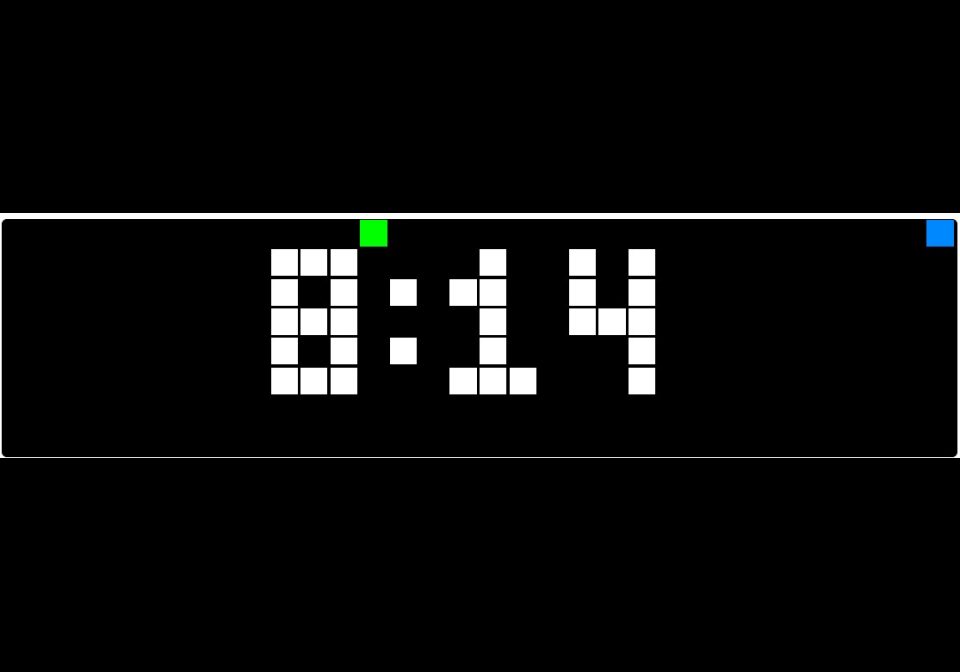
On your display
Volleyball Scoreboard
Which AWTRIX do you have?
See below where it runs, or choose your device.
- Topic
- Miscellaneous
- Includes
- Script
Runs on
- Runs on 32×8 (TC001 & DIY)
- Runs on 52×16 (TC002)
- Does not run on 32×8 with AWTRIX 3 (TC001 & DIY) Made for AWTRIX NG.
Choose your display in the next step.
Script description
Volleyball Scoreboard – Funktionen / Features
Deutsch
- Unterstützung für Ulanzi TC001 und TC002
- Automatische Anpassung der Anzeige an die jeweilige Displaygröße.
- TC001 mit 32 × 8 Pixeln.
- TC002 mit 52 × 16 Pixeln.
- Konfiguration über das AWTRIX-Webinterface
- Name der Heimmannschaft einstellbar.
- Name der Gastmannschaft einstellbar.
- Spielmodus wählbar: Best of 3 oder Best of 5.
- Scrollgeschwindigkeit einstellbar: langsam, normal oder schnell.
- Volleyball-Spielregeln
- Reguläre Sätze bis 25 Punkte.
- Entscheidungssatz bis 15 Punkte.
- Ein Satz muss mit mindestens 2 Punkten Vorsprung gewonnen werden.
- Best of 3: Entscheidungssatz bei einem Satzstand von 1:1.
- Best of 5: Entscheidungssatz bei einem Satzstand von 2:2.
- Spielstandanzeige
- Aktueller Punktestand beider Mannschaften.
- Anzeige der gewonnenen Sätze.
- Visuelle Kennzeichnung der gewonnenen Sätze durch farbige Punkte:
- Grün für die Heimmannschaft.
- Blau für die Gastmannschaft.
- Anzeige der aufschlagenden Mannschaft durch einen grafischen Punkt.
- Displaydarstellung
- TC001:
- Großer, gut lesbarer Spielstand.
- Keine scrollenden Mannschaftsnamen während des Spiels.
- Aufschlaganzeige am linken oder rechten Displayrand.
- TC002:
- Mannschaftsnamen können scrollend angezeigt werden.
- Spielstand bleibt fest positioniert und gut lesbar.
- Aufschlag- und Satzanzeigen bleiben sichtbar.
- Bedienung am Gerät
- Linke Taste: Punkt für die Heimmannschaft.
- Rechte Taste: Punkt für die Gastmannschaft.
- Auswahltaste: Menü öffnen.
- TC002: Bedienung zusätzlich über den Drehknopf.
- Menüfunktionen
- EXIT – Menü schließen.
- UNDO – Letzte Aktion rückgängig machen.
- SERVE – Aufschlag zwischen den Mannschaften wechseln.
- SET 0 – Aktuellen Satz zurücksetzen.
- GAME 0 – Gesamtes Spiel zurücksetzen.
- Spielende
- Anzeige der siegreichen Mannschaft.
- Anzeige des letzten Satzergebnisses.
- Anzeige des endgültigen Satzstandes.
- Scrollende Siegesmeldung.
- Menü bleibt auch nach Spielende erreichbar.
- Neues Spiel kann über GAME 0 gestartet werden.
- MQTT-Unterstützung
- Steuerung über MQTT-Befehle.
- Übertragung des aktuellen Spielzustands als JSON.
- Unterstützte Befehle:
- home_plus
- away_plus
- home_minus
- away_minus
- undo
- serve
- set_reset
- reset
English
- Support for Ulanzi TC001 and TC002
- Automatic display adaptation to the device's resolution.
- TC001 with 32 × 8 pixels.
- TC002 with 52 × 16 pixels.
- Configuration via the AWTRIX web interface
- Configurable home team name.
- Configurable away team name.
- Selectable match format: Best of 3 or Best of 5.
- Adjustable scrolling speed: slow, normal or fast.
- Volleyball rules
- Regular sets played to 25 points.
- Deciding set played to 15 points.
- A set must be won by at least 2 points.
- Best of 3: deciding set at a 1:1 set score.
- Best of 5: deciding set at a 2:2 set score.
- Scoreboard
- Current points for both teams.
- Display of sets won.
- Graphical indicators for sets won:
- Green dots for the home team.
- Blue dots for the away team.
- Graphical indicator showing which team is serving.
- Display layout
- TC001:
- Large, easy-to-read score.
- No scrolling team names during the match.
- Serve indicator at the far left or right edge.
- TC002:
- Team names can be displayed with scrolling text.
- Score remains fixed and easy to read.
- Serve and set indicators remain visible.
- Device controls
- Left button: Add one point to the home team.
- Right button: Add one point to the away team.
- Select button: Open the menu.
- TC002: Additional control via the rotary knob.
- Menu functions
- EXIT – Close the menu.
- UNDO – Undo the last action.
- SERVE – Switch the serving team.
- SET 0 – Reset the current set.
- GAME 0 – Reset the entire match.
- End of match
- Display the winning team.
- Display the final score of the last set.
- Display the final set score.
- Scrolling victory message.
- Menu remains accessible after the match has ended.
- A new match can be started using GAME 0.
- MQTT support
- Remote control via MQTT commands.
- Current match state published as JSON.
- Supported commands:
- home_plus
- away_plus
- home_minus
- away_minus
- undo
- serve
- set_reset
- reset
Sign in to view and copy the code of this script.
Community
Discussion 0
Ask a question, suggest a change or share how you use it.
No comments yet. Start the conversation.
More scripts in Miscellaneous
Something wrong with this script? Report it.
Have an idea?
Sign in to ask questions and join the conversation.