RainAhead
On your display
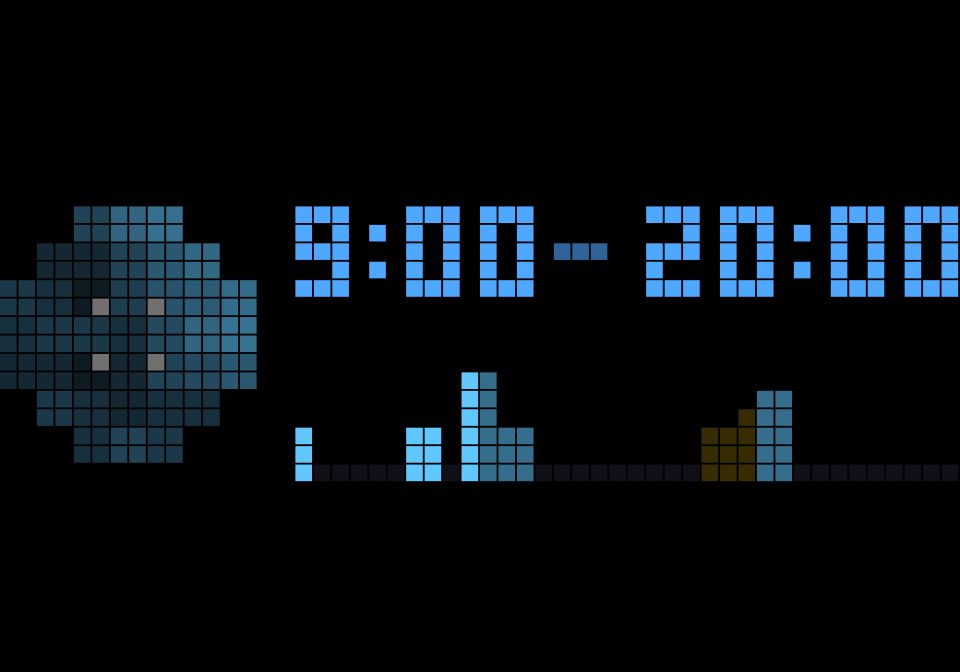
Should I take rain gear today? Imber shows a rain map of your area for the next hours, when the rain starts at your place to the quarter hour, and a chart until the end of your day with thunderstorm warnings.
- Topic
- Miscellaneous
- Includes
- Script
Runs on
- Does not run on 32×8 (TC001 & DIY) Made for 52×16 (TC002).
- Runs on 52×16 (TC002)
- Does not run on 32×8 with AWTRIX 3 (TC001 & DIY) Made for AWTRIX NG.
Choose your display in the next step.
Script description
Should I take rain gear today? RainAhead / Imber (Latin for "downpour") answers this in one static view: where the rain is around you, when it starts at your place, and how the rest of your day looks. It is not a weather report but a decision aid for the commute and the day.
How to read it
- Left: the rain map. A round map of the area around you, 20 km in every direction by default. You are in the middle, between the four grey dots. Each cell shows the rain total of the next 3 hours from the start time: black is dry, the brighter the blue, the more rain. A yellow dot marks thunderstorm potential, the brighter, the stronger.
- Top right: the time window. On the left the time the rain starts at your place (to the quarter hour; if it is already raining, now), on the right the time the chart ends.
- Bottom right: the chart. One pixel column per slice of time between these two times. The height is the rain at your place, a yellow column means thunderstorm potential nearby. The bright part at the start covers the same hours as the map, the rest of the day is dimmed.
The app only joins the rotation when rain is expected before the end of your day (20:00 by default). On dry days you never see it.
Setup
- Install the script and open its settings.
- Enter your latitude and longitude (decimal degrees, e.g. from a map app). The default is the centre of Germany.
- Optional: adjust the map radius, the map hours, the rain threshold and the end of your day.
Optional integrations
- Show only when (MQTT topic): the app only appears while this topic says
on. Example: let Home Assistant publishonduring your morning routine, so the forecast is on the clock when you get ready, and gone afterwards. - Indicator topic (MQTT): lights one of the clock's indicators while rain is expected today, e.g.
awtrix/cmd/indicators/3(use your own MQTT prefix).
Good to know
- Data: Open-Meteo (CC BY 4.0), model ICON-D2 of the German Weather Service (DWD), about 2 km resolution, updated every hour. It covers Germany and its neighbouring countries only; elsewhere the app shows no data.
- Two requests per update: hourly values for the map (one request for all 37 points) and 15-minute values for your place. With the default interval of 15 minutes this is about 3,700 location calls a day, within Open-Meteo's free limit of 10,000 for non-commercial use. Shorter intervals can exceed it.
- Thunderstorms are shown by the lightning potential index (LPI) of the model. It tells how likely and how strong lightning is, but it is not a probability.
- The clock needs internet access (HTTPS to api.open-meteo.com).
- Made for the 52×16 display (Ulanzi TC002).
Sign in to view and copy the code of this script.
Discussion 0
Ask a question, suggest a change or share how you use it.
No comments yet. Start the conversation.
More scripts in Miscellaneous
Something wrong with this script? Report it.
Have an idea?
Sign in to ask questions and join the conversation.