TIX Clock Redux
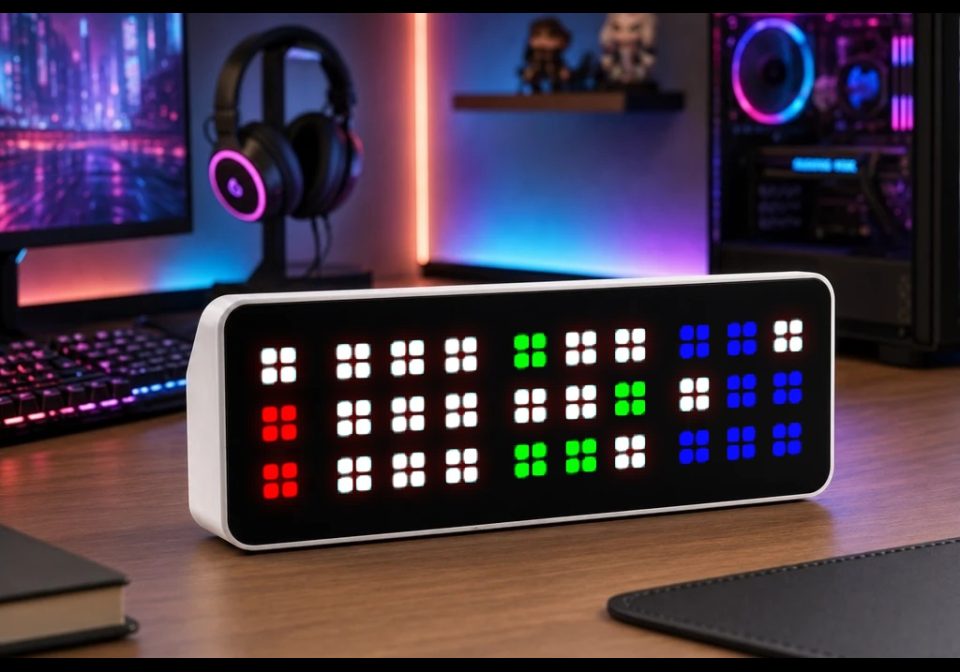
On your display
A recreation of a bygone clock with a unique display
- Topic
- Miscellaneous
- Includes
- Script
Runs on
- Runs on 32×8 (TC001 & DIY)
- Runs on 52×16 (TC002)
- Does not run on 32×8 with AWTRIX 3 (TC001 & DIY) Made for AWTRIX NG.
Choose your display in the next step.
Script description
Updated 2026-08-22 - changed logic regarding 12/24 hour time and to fix not displaying "12" for the hour at midnight on 12 hour time.
What It Does
A unique clock interface. The current time (HH:MM) is broken into four separate digits. Each digit has a 3x3 array of pixels (1x3 for the Hour Tens digit) and the number of pixels corresponding to that digit's value are lit up, with the pattern changing at the user-specified interval. In the preview photo there are 2, 0, 4 and 7 pixels on, which means the time is 20:47 / 8:47PM.
The original TIX clock is shown here: https://www.geekalerts.com/tix-led-clock/
Requirements
A 32x8 display device. Only tested on the TC001.
Setup
Out of the box no setup is required. By default, the clock will run with these settings, which can be configured in the Apps page:
- Update Interval - 60 seconds
- This can be set to any factor of 60 (1, 4, 15, etc.) and will update at that interval based on the actual time, not time of first execution (so a 4 second interval will update at :00, :04, :08, etc., give or take the delay of loop())
- 24 Hour Time - Enabled
- Hour Tens Digit Color - #FF0000 (Red)
- Hour Ones Digit Color - #FFFF00 (Yellow)
- Minute Tens Digit Color - #00FF00 (Green)
- Minute Ones Digit Color - #0000FF (Blue)
- Off Pixel Color - #FFFFFF (White)
All code, and any issues with it, was 100% written by me
Sign in to view and copy the code of this script.
Discussion 0
Ask a question, suggest a change or share how you use it.
No comments yet. Start the conversation.
More scripts in Miscellaneous
Something wrong with this script? Report it.
Have an idea?
Sign in to ask questions and join the conversation.