TurnTimer - a gaming clock
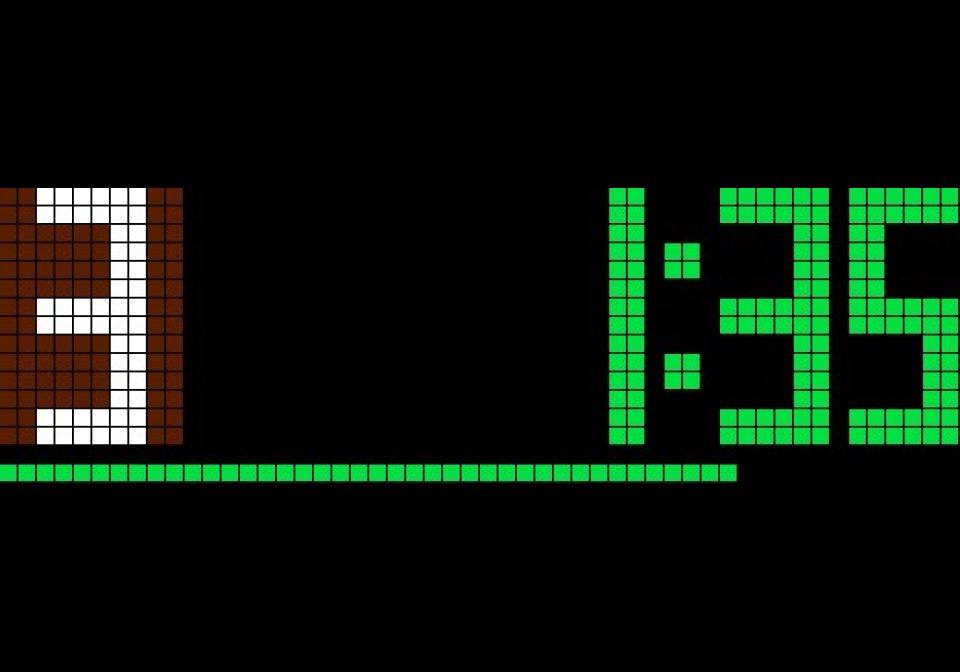
On your display
A generic turn timer / game clock for classic games. Features customizable turn times.
- Topic
- Gaming
- Includes
- Script
Runs on
- Does not run on 32×8 (TC001 & DIY) Made for 52×16 (TC002).
- Runs on 52×16 (TC002)
- Does not run on 32×8 with AWTRIX 3 (TC001 & DIY) Made for AWTRIX NG.
Choose your display in the next step.
Script description
A timer watch for game moves on the Ulanzi TC002 (52×16) with AWTRIX NG : n player, at most x minutes per turn. Whoever finishes his move will start the timer of the next player. Everything is set on the watch and operated with its keys.
Install:
- Install the script - Only the script. Nothing else neccessary.
- On the watch, hold the middle button half a second, select scripts, then train clock.
- The game clock does not run in the app rotation, but only when it is started in this way.
Buttons for configuration:
- Turn button, left or right button: Change value (2-12 players, 1-60 minutes per move)
- Press button: between "Player" and "Min/Train"
- Medium button: Start game, player 1 starts
The values remain stored.
Buttons in the game
Right (+) button : Finish turn, the timer of the next player starts
Left (-) button: Start of the player before
Middle button: Pause and continue
Hold the turn button: Back to setting
Hold the middle button: End train clock
On the Display:
Display
- On the left, the player number on a field in the color of the player, on the right the remaining time, at the bottom a bar.
- The time is green, yellow in the last quarter and red in the last 10 seconds.
- In the last 5 seconds it ticks. At expiration, a signal sounds and the indicator flashes red until the medium button is pressed.
Sign in to view and copy the code of this script.
Discussion 0
Ask a question, suggest a change or share how you use it.
No comments yet. Start the conversation.
Have an idea?
Sign in to ask questions and join the conversation.