Antigravity Quota
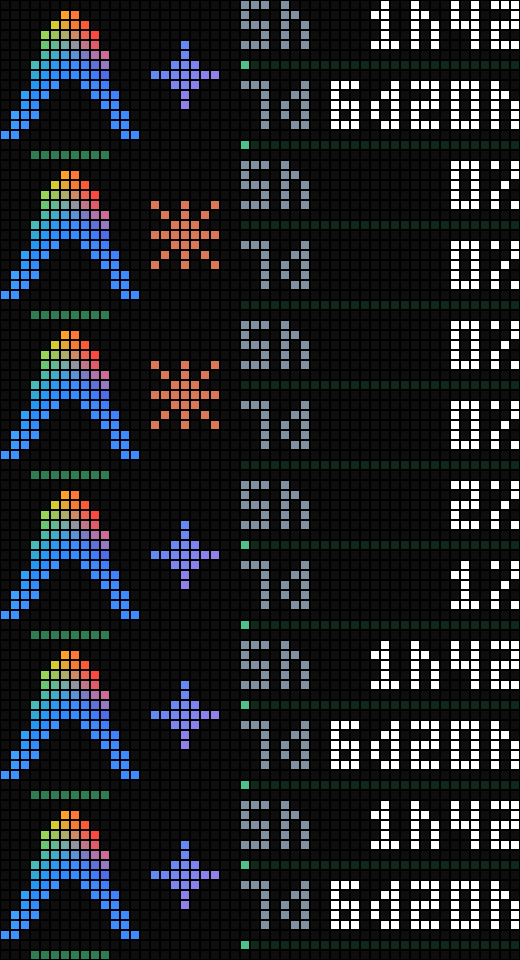
On your display
Google Antigravity 5-hour and weekly quota for the Gemini and Claude/GPT pools, pushed from your computer
- Topic
- Miscellaneous
- Includes
- Script
Runs on
- Does not run on 32×8 (TC001 & DIY) Made for 52×16 (TC002).
- Runs on 52×16 (TC002)
- Does not run on 32×8 with AWTRIX 3 (TC001 & DIY) Made for AWTRIX NG.
Choose your display in the next step.
Script description
Shows how much of your Google Antigravity quota you have used: the 5-hour and weekly limits of both model pools (Gemini, and Claude/GPT), plus the time until each resets.
Needs the free Quota Monitor plugin for Antigravity. The plugin reads the quota on your computer and pushes it to the clock; the clock itself never contacts the internet for this app.
Setup
- Install the plugin (Windows, macOS, Linux):
agy plugin install https://github.com/patw0929/awtrix-antigravity-quota/tree/master/plugin/quota-monitor - Install this script on your clock (keep the name Antigravity-Quota).
- Point the plugin at your clock:
- Antigravity desktop app: open a conversation → Toggle Side Panel → Plugins → Quota → Settings → enter the clock IP → tick Push to clock → Save
- Antigravity IDE or
agyCLI (restart the IDE once after installing): ask the agent "Set the AWTRIX clock to 192.168.x.x and turn on push"
Until the first data arrives the clock shows WAIT.
On the display
- Left: the Antigravity mark floats up and down, faster as the pool fills up. Its shadow is green, or yellow / red past the warning / high threshold
- Middle: the pool: Gemini sparkle = Gemini models, Claude burst = Claude and GPT models
- Right:
5hand7dpercent with bars, then a page with the time until reset - Red dot (bottom right): no update for 15 minutes, e.g. Antigravity is closed
Settings
Show used or remaining, seconds per page, when to mark data as stale, warning and high thresholds.
Source, docs and issues: https://github.com/patw0929/awtrix-antigravity-quota (MIT)
Sign in to view and copy the code of this script.
Discussion 0
Ask a question, suggest a change or share how you use it.
No comments yet. Start the conversation.
More scripts in Miscellaneous
Something wrong with this script? Report it.
Have an idea?
Sign in to ask questions and join the conversation.