UK Railboard
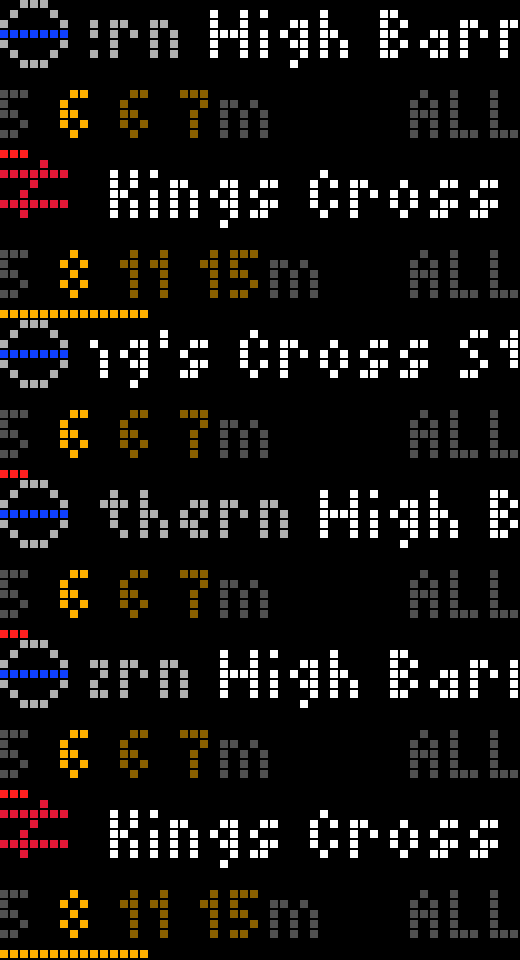
On your display
Live departures for up to two TfL or National Rail stations, with a "time to leave" chime and delay warnings
- Topic
- Smarthome
- Includes
- Script
Runs on
- Does not run on 32×8 (TC001 & DIY) Made for 52×16 (TC002).
- Runs on 52×16 (TC002)
- Does not run on 32×8 with AWTRIX 3 (TC001 & DIY) Made for AWTRIX NG.
Choose your display in the next step.
Script description
A free Rail Data Marketplace key is needed for National Rail stations. TfL works without one.
Getting started
- Install the app.
- On the clock's web page, open the Apps tab and press ⚙ next to UKRailboard.
- Under Station 1, set Type and Station (see below), then save.
That's enough to get going. Everything else is optional.
TfL stations
Set Type to TfL and type the station's name into Station, e.g. High Barnet. No account is needed.
If the name fits more than one station, the app picks the nearest one. To choose a specific one, add a word: Bank Underground or Bank DLR.
National Rail stations
National Rail needs a free key:
- Sign up at the Rail Data Marketplace.
- Subscribe to the Live Departure Board product.
- Copy your key into National Rail key in the app's settings, under Keys.
Then set Type to National Rail and enter the station's 3-letter code into Station, e.g. KGX for London King's Cross. To find your station's code, look it up in the National Rail list of stations.
Using it
| To… | Do this |
|---|---|
| Switch between your two stations | Turn the knob |
| See where the next train calls, or where it is now | Press the knob (press again to go back) |
| Change direction | Hold the knob, or press the middle button |
| Go to the next or previous app | Press the left or right button |
Reading the screen
 ⊖  Northern Edgware P2     ← where the next train you can catch is going
 8 12 15 19m     ALL        ← minutes until each train leaves
 ▬▬▬▬▬▬▬▬▬▬                 ← time left before you need to leave
- Top line: the destination of the first train you can still catch, and its platform. TfL trains start with the line name in the line's colour.
- The minutes:
- Bright amber: the first train you can catch.
- Dim amber: the trains after it.
- Grey: leaving too soon to make it, based on your walking time.
- Orange: running late.
- Red X: cancelled.
- Corner tag (e.g.
ALL,NB): the direction you're looking at. - Bottom bar: shrinks over the last 10 minutes before you need to leave.
- Coloured dot next to the icon: there's a problem on the line.
- National Rail boards also show replacement buses and ferries, as Bus … and Ferry ….
Directions
Hold the knob to step through the directions. All comes first, then one view per direction, and the name shows briefly as you switch.
By default the app works out the directions from the trains running:
- at a station with several lines (e.g. King's Cross), one view per line;
- otherwise one view per platform direction (TfL, e.g. Northbound) or per destination (National Rail).
To choose your own, type station names into Directions, separated by commas. Each one becomes a view of the trains that go to or through it.
| Station | Directions | Views |
|---|---|---|
High Barnet (TfL) |
Bank, Charing Cross |
All · via Bank · via Charing Cross |
KGX (National Rail) |
Cambridge, Peterborough |
All · to/via Cambridge · to/via Peterborough |
Leave chime
The clock chimes when a train you can catch is a set number of minutes away, so you know when to head out. Set it up under Chime and Leaving:
| Setting | What it does |
|---|---|
| Minutes to the station | How long it takes you to get there. Trains you can't make turn grey |
| Leave chime | Turns the chime on or off |
| Chime before departure | How many minutes before the train leaves to chime |
| Chime for station | Station 1 or 2 |
| From, Until, Days | When to chime, e.g. 06:30 to 09:30 on weekdays |
| Chime sound | A chime, or a spoken message |
| Warn about delays and cancellations | A lower tone when your train is late or cancelled |
Other settings
| Setting | What it does |
|---|---|
| Font | The lettering. matrix-light6 by default; try matrix-chunky6x for something bolder |
| Seconds per station | How long each station stays up before switching |
| Refresh every | How often to fetch new times |
| Skip when no trains | Leaves the app out of the rotation when nothing is running |
| Leave countdown bar | Shows or hides the bottom bar |
| TfL app key | Optional, only if you hit TfL's limits (get one here) |
If something's wrong
| The clock shows | What to do |
|---|---|
| Add NR key | Add your National Rail key (see National Rail stations) |
| key refused | Check the key. If it's right, compare National Rail URL with the GetDepBoardWithDetails address on your Rail Data Marketplace subscription page and copy it across |
| Station not found | Check the spelling, or try a shorter name |
| offline | The clock can't reach the internet; check its Wi-Fi |
| rate limited | Too many requests. Raise Refresh every, or add a TfL app key |
| No trains | Nothing is leaving soon, or nothing in the direction you picked. Hold the knob to go back to All |
Not covered: Northern Ireland, and trams or metros outside London (Metrolink, Tyne and Wear Metro, Glasgow Subway, Edinburgh Trams).
Sign in to view and copy the code of this script.
Discussion 0
Ask a question, suggest a change or share how you use it.
No comments yet. Start the conversation.
Have an idea?
Sign in to ask questions and join the conversation.