ScriptAWTRIX NG
PoELeagueTimer
On an AWTRIX display
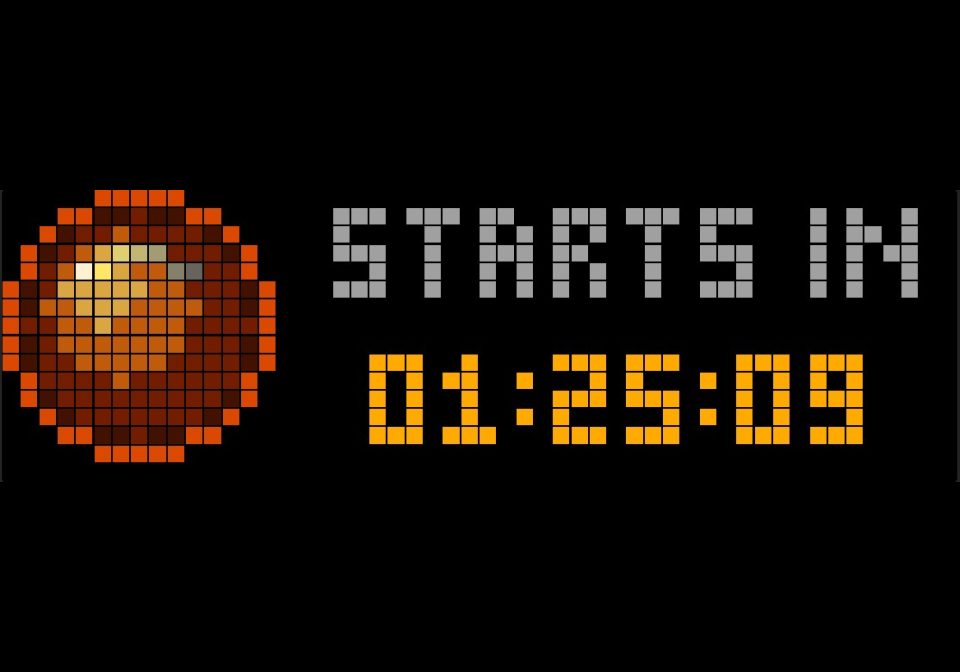
On your display
Path of Exile league timer for the TC002: countdown to launch, live time or time to the end, with a launch show and alerts.
Which AWTRIX do you have?
See below where it runs, or choose your device.
- Topic
- Gaming
- Includes
- Script
Runs on
- Does not run on 32×8 (TC001 & DIY) Made for 52×16 (TC002).
- Runs on 52×16 (TC002)
- Does not run on 32×8 with AWTRIX 3 (TC001 & DIY) Made for AWTRIX NG.
Choose your display in the next step.
Script description
Never miss a Path of Exile league launch. PoELeagueTimer counts down to the next league, then keeps tracking it while it runs.
What it shows
- STARTS IN before launch, then LIVE FOR (time since launch), or ENDS IN once you enter the end date.
- The top line alternates between the caption and the number of days (
2 DAYS). The bottom line showsHH:MM:SS, updated exactly on the second. Everything turns red during the last 24 hours. - The league name scrolls at the start of each turn.
- A progress bar on the bottom row, from green to red, once the end date is set.
- 16×16 logo of your choice: an animated fiery orb or portal drawn by the script, the official Chaos / Divine / Exalted Orb or Mirror of Kalandra art (loaded from GGG's CDN), your own Hub icon or image URL, or no logo at all (full-width text:
2d 03:12:45).
Launch show and alerts
- 1 hour before launch: notification with a short beep.
- 15 seconds before: the app comes to the front and pauses the rotation.
- Last 10 seconds: big digits in the middle, with a flashing red frame.
- Launch: LIVE! over fireworks for 15 seconds, with a short fanfare, then the rotation resumes.
- 1 hour before the end and at the end: notification with a beep.
- Each alert fires once only, even after a reboot. Press any button to end the pause early.
Setup
- Install the script, then open its settings (gear icon in the Apps tab).
- Enter League start in the clock's local time, as
YYYY-MM-DD HH:MM. The UTC offset is read from the clock, so summer and winter time are handled automatically. - Enter the League name.
- When GGG announces the end date, enter it in League end: LIVE FOR switches to ENDS IN and the progress bar appears.
- For the next league: new start date, new name, and clear the end date.
Settings
| Setting | What it does | Default |
|---|---|---|
| League start | Launch date and time, local time | — |
| League end | End date and time, optional | empty |
| League name | Shown at the start of each turn and in alerts | — |
| Logo | orb, portal, chaos, divine, exalted, mirror, custom, none | orb |
| Custom logo | Hub icon name or https image URL, when Logo = custom | empty |
| Caption / Timer / Last 24 h colour | Text colours | grey / orange / red |
| Orb / portal hue | Colour of the drawn logo (0–360) | 15 |
| Show from (days before) | The app joins the rotation this many days before launch | 60 |
| Show LIVE FOR for | Days to keep showing the live timer (0 = no limit). Not used once an end date is set | 0 |
| Alerts | melody, voice (needs a voice pack, otherwise falls back to the melody), silent, off | melody |
Requirements
- Ulanzi TC002 (52×16 display) running AWTRIX NG.
- Internet access for the official orb icons and image URLs. The built-in logos work offline.
Path of Exile is a trademark of Grinding Gear Games. This script is a fan project, not affiliated with or endorsed by GGG.
Sign in to view and copy the code of this script.
Community
Discussion 0
Ask a question, suggest a change or share how you use it.
No comments yet. Start the conversation.
Have an idea?
Sign in to ask questions and join the conversation.