SunEvent: Sunrise & Sunset Countdown
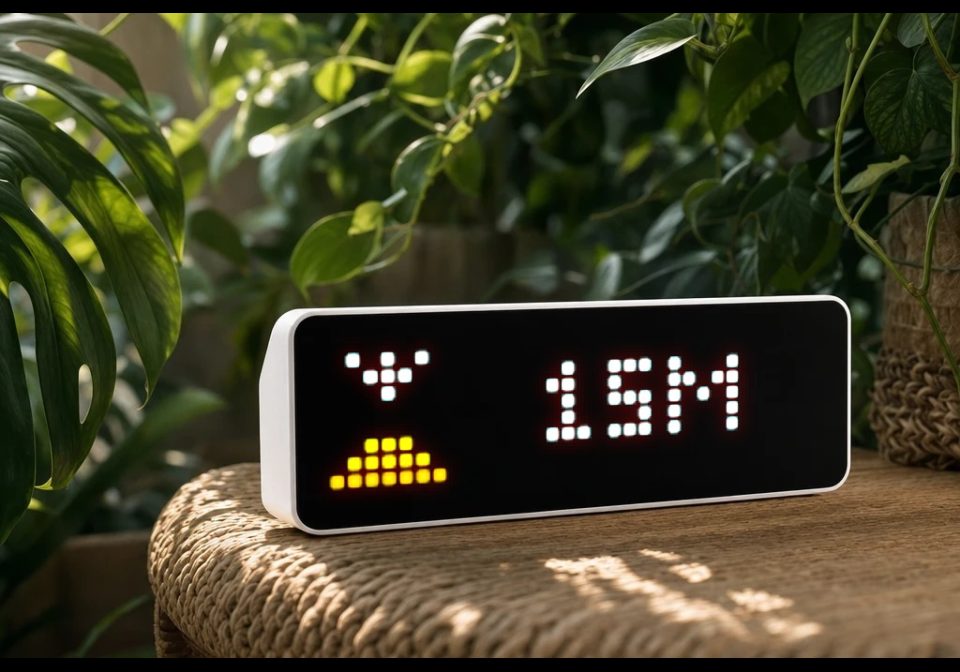
On your display
Simple automation for displaying time to sunset and sunrise
- Topic
- Smarthome
- Includes
- Script · 2 icons
Runs on
- Runs on 32×8 (TC001 & DIY)
- Runs on 52×16 (TC002)
- Does not run on 32×8 with AWTRIX 3 (TC001 & DIY) Made for AWTRIX NG.
Choose your display in the next step.
Script description
🌅 SunEvent: Sunrise & Sunset Countdown
A native Berry script for AWTRIX NG that acts as a smart countdown timer for upcoming sun events. It runs completely independently on the device and fetches data via the free Open-Meteo API, meaning no Home Assistant and no API keys are required.
✨ Features
-
Smart App Loop (Auto-Hide): The app stays hidden (skipped in the background) for most of the day. It only injects itself into your AWTRIX app rotation when a sunrise or sunset is imminent (e.g., exactly 30 minutes before it happens).
-
Live Countdown: Displays a dynamic countdown in minutes (e.g.,
15M) perfectly centered next to your chosen icon. -
Zero Registration: Uses the open-meteo.com API, which works out of the box using just your GPS coordinates.
-
Built-in Test Mode: Includes a toggle to force the app to appear immediately on your screen, making it easy to test your icons and settings without waiting for the actual sunset.
⚙️ Configuration
Navigate to Apps -> Settings (next to the script name) in your AWTRIX WebUI to configure the following parameters:
-
lat&lon(number): Your exact Latitude and Longitude for accurate sun event calculations. -
minutes(number): The alert threshold. This dictates how many minutes before the sunrise/sunset the app should start appearing in your rotation (Default:30, Range: 5–120). -
duration(number): How long the app stays on the screen per cycle, in milliseconds (Default:10000/ 10 seconds). -
icon_rise(text): The AWTRIX Icon ID to display during a sunrise (Default:2893). -
icon_set(text): The AWTRIX Icon ID to display during a sunset (Default:53384). -
test_mode(bool): Toggle this totrueto bypass the timer and force the app to display immediately. Remember to set it back tofalsefor normal operation!
💡 How it works
The script fetches the daily sunrise and sunset UNIX timestamps once an hour to keep the API load extremely low. Every second, it checks the local device time against these timestamps. Once the remaining time drops below your configured minutes threshold, the app automatically activates and starts counting down.
Sign in to view and copy the code of this script.
These icons are attached to the script. Send them to your AWTRIX separately; they are not included in the script installation.

8×8 px

8×8 px
Sign in to download these icons or send them to your AWTRIX.
Discussion 0
Ask a question, suggest a change or share how you use it.
No comments yet. Start the conversation.
Have an idea?
Sign in to ask questions and join the conversation.