Weather Clock (8x32)
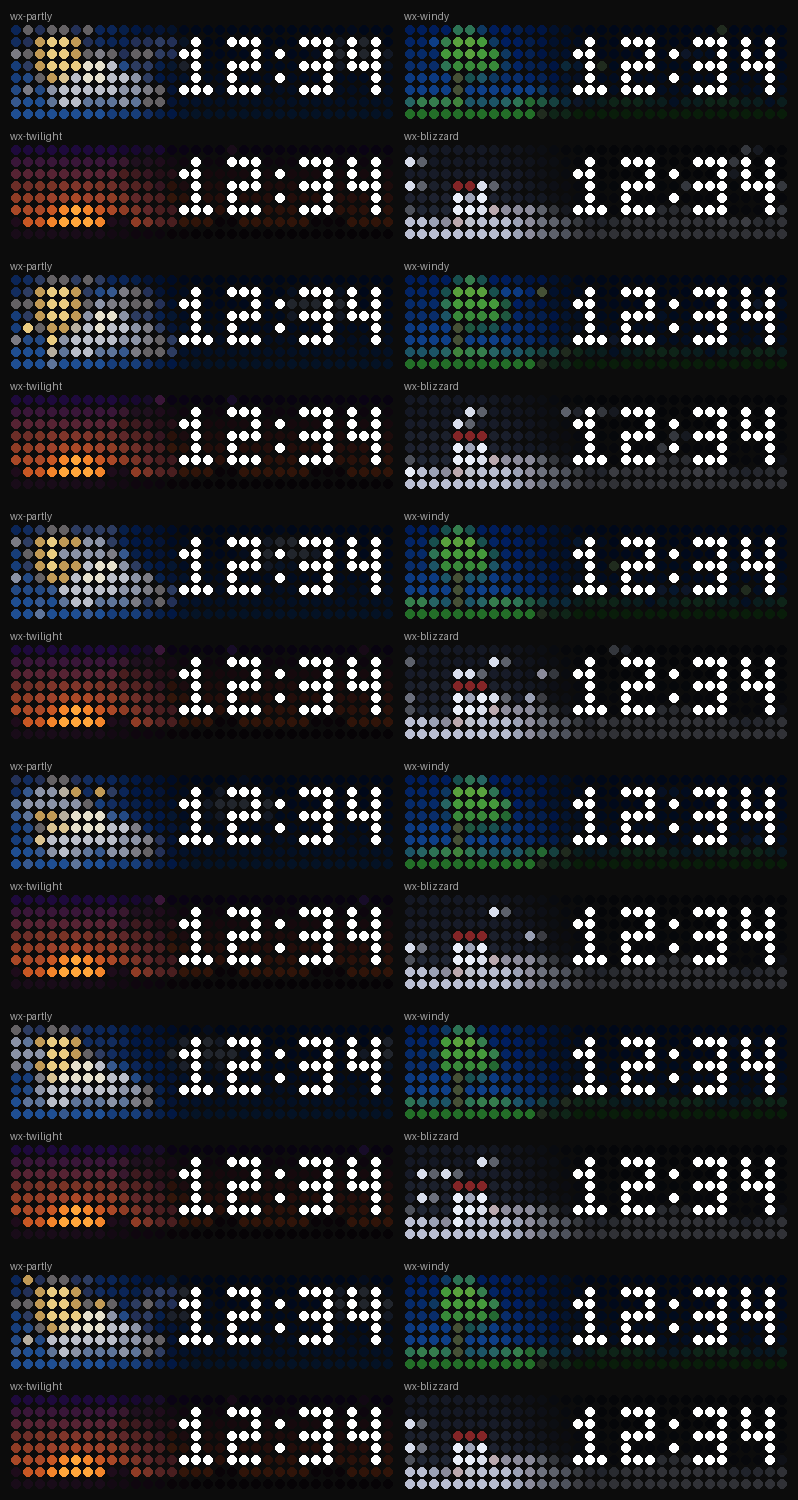
On your display
Animated weather background behind a clock
- Topic
- Miscellaneous
- Includes
- Script · 20 icons
Runs on
- Runs on 32×8 (TC001 & DIY)
- Runs on 52×16 (TC002)
- Does not run on 32×8 with AWTRIX 3 (TC001 & DIY) Made for AWTRIX NG.
Choose your display in the next step.
Script description
A calm clock over an animated weather scene for any city.
Type a place name ("Baltimore", "East Rutherford", "Mexico City") and the background follows the live weather there. There are 20 scenes: clear, partly cloudy, cloudy, fog, drizzle, sun showers, rain, freezing rain, thunderstorm, hail, snow, blizzard and windy days, night versions of most of them, and a twilight sky around sunrise and sunset. The scenes are drawn on the left and fade to dark on the right, so the white clock is always easy to read. The clock shows the city's local time, with daylight saving handled for you.
No API key needed. Weather, sunrise/sunset and place lookup come from Open-Meteo.
Setup
- Press Send to AWTRIX. The 20 background icons (
wx-…) install with the script. - Open the Apps tab and click the gear next to WeatherClock.
- Enter your City and save. The weather appears within a few seconds (up to ~15 s after a reboot).
- Optional: switch off the built-in Time app if you want this to be your only clock.
Settings
- City: any place name. Anything after a comma is ignored.
- Time zone:
city(the city's local time) ordevice(the clock's own time zone). - Windy above: wind speed in km/h that switches clear or cloudy days to the windy scene (default 35, 0 = off).
- Weather refresh: how often to check the weather (default 15 min).
- Clock colour: default white.
- Scene:
autofollows the weather; pick a scene to preview it.
Good to know
- A red dot in the top-left corner means the city wasn't found. Try a simpler or larger nearby place name.
- Day, night and twilight follow the city's real sunrise and sunset times.
- If a background icon is missing, a plain sky colour with the built-in weather overlay is shown instead.
- Made for 32×8 displays (Ulanzi TC001).
Sign in to view and copy the code of this script.
Discussion 0
Ask a question, suggest a change or share how you use it.
No comments yet. Start the conversation.
More scripts in Miscellaneous
Something wrong with this script? Report it.
Have an idea?
Sign in to ask questions and join the conversation.