Day progress
On your display
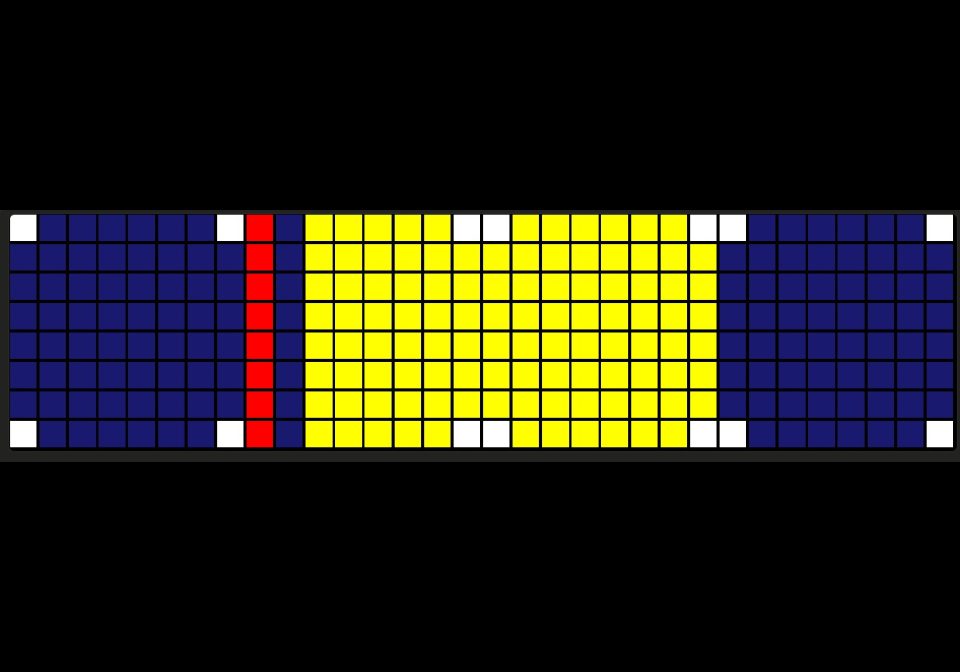
A 24-hour bar showing daylight and darkness for today, with a red marker for now. Sunrise and sunset are calculated on the panel from your latitude and longitude, so it needs no internet, MQTT or Home Assistant.
- Topic
- Miscellaneous
- Includes
- Script
Runs on
- Runs on 32×8 (TC001 & DIY)
- Runs on 52×16 (TC002)
- Does not run on 32×8 with AWTRIX 3 (TC001 & DIY) Made for AWTRIX NG.
Choose your display in the next step.
Script description
Day Progress turns the whole display into a timeline of today, from midnight on the left to midnight on the right.
Daylight (yellow) fills the span from sunrise to sunset; the rest of the day is night (midnight blue).
A red line marks the current time and moves across as the day goes on.
White tick marks at the top and bottom edges show midnight, 06:00, 12:00 and 18:00.
Sunrise and sunset are worked out on the panel itself with the NOAA solar equations, from the latitude and longitude you enter. Nothing is fetched from the internet and nothing has to be pushed to the clock. The calculation uses the panel’s own clock, including its UTC offset, so summer time is handled automatically. It runs every 30 minutes by default, so the marker and the seasonal change in day length stay current without using the processor between updates. The app stays out of the rotation until the panel’s clock has been set.
It works at any display width (32×8 and wider), because everything is scaled to the width of the matrix.
Settings
Day Progress turns the whole display into a timeline of today, from midnight on the left to midnight on the right.
Daylight (yellow) fills the span from sunrise to sunset; the rest of the day is night (midnight blue).
A red line marks the current time and moves across as the day goes on.
White tick marks at the top and bottom edges show midnight, 06:00, 12:00 and 18:00.
Sunrise and sunset are worked out on the panel itself with the NOAA solar equations, from the latitude and longitude you enter. Nothing is fetched from the internet and nothing has to be pushed to the clock. The calculation uses the panel’s own clock, including its UTC offset, so summer time is handled automatically. It runs every 30 minutes by default, so the marker and the seasonal change in day length stay current without using the processor between updates. The app stays out of the rotation until the panel’s clock has been set.
It works at any display width (32×8 and wider), because everything is scaled to the width of the matrix.
Settings
Latitude / Longitude: your location (east positive, west negative).
Update every: 15–120 minutes (default 30).
Night, Daylight, Now marker, Hour ticks: colours for each part.
Sign in to view and copy the code of this script.
Discussion 0
Ask a question, suggest a change or share how you use it.
No comments yet. Start the conversation.
More scripts in Miscellaneous
Something wrong with this script? Report it.
Have an idea?
Sign in to ask questions and join the conversation.