ScriptAWTRIX NG
Connection Monitor Lite
On an AWTRIX display
On your display
Checks Connection and Latency
Which AWTRIX do you have?
See below where it runs, or choose your device.
- Topic
- Miscellaneous
- Includes
- Script
Runs on
- Runs on 32×8 (TC001 & DIY)
- Runs on 52×16 (TC002)
- Does not run on 32×8 with AWTRIX 3 (TC001 & DIY) Made for AWTRIX NG.
Choose your display in the next step.
Script description
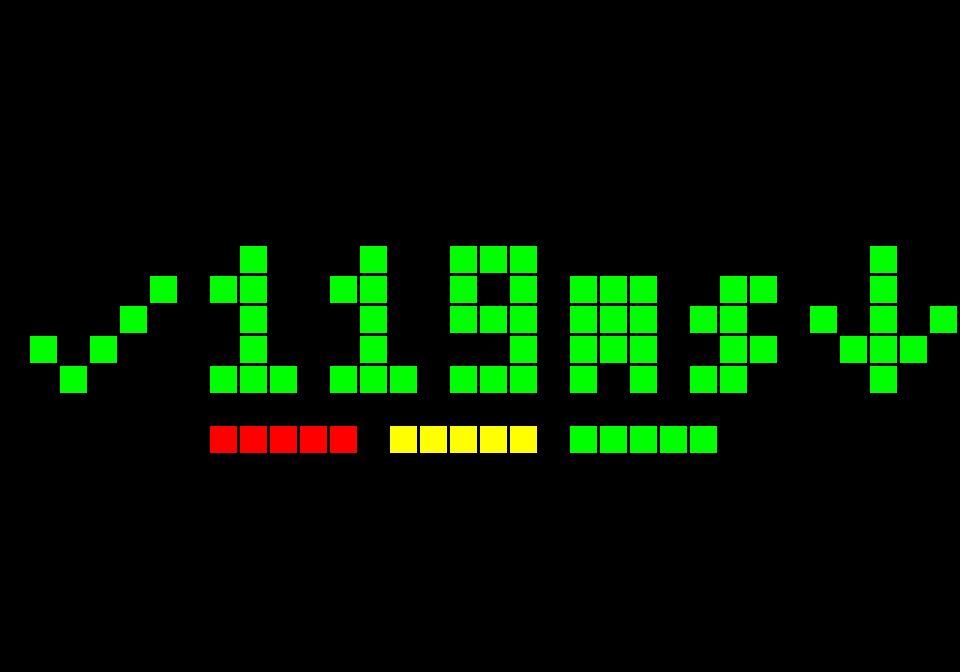
Checks if Google is responding online. Falls back to Cloudflare. This also verifies DNS. If they both fail, it tries by IP to Cloudflare.
-
###ms — current HTTP latency, colored by response time.
-
↑ / ↓ / → — latency getting worse, improving, or remaining stable.
-
Three colored bars — previous response times.
-
OFF / DNS — connectivity failure or suspected DNS failure.
Sign in to view and copy the code of this script.
Community
Discussion 0
Ask a question, suggest a change or share how you use it.
No comments yet. Start the conversation.
More scripts in Miscellaneous
Something wrong with this script? Report it.
Have an idea?
Sign in to ask questions and join the conversation.