ScriptAWTRIX NG
Karaoke
On an AWTRIX display
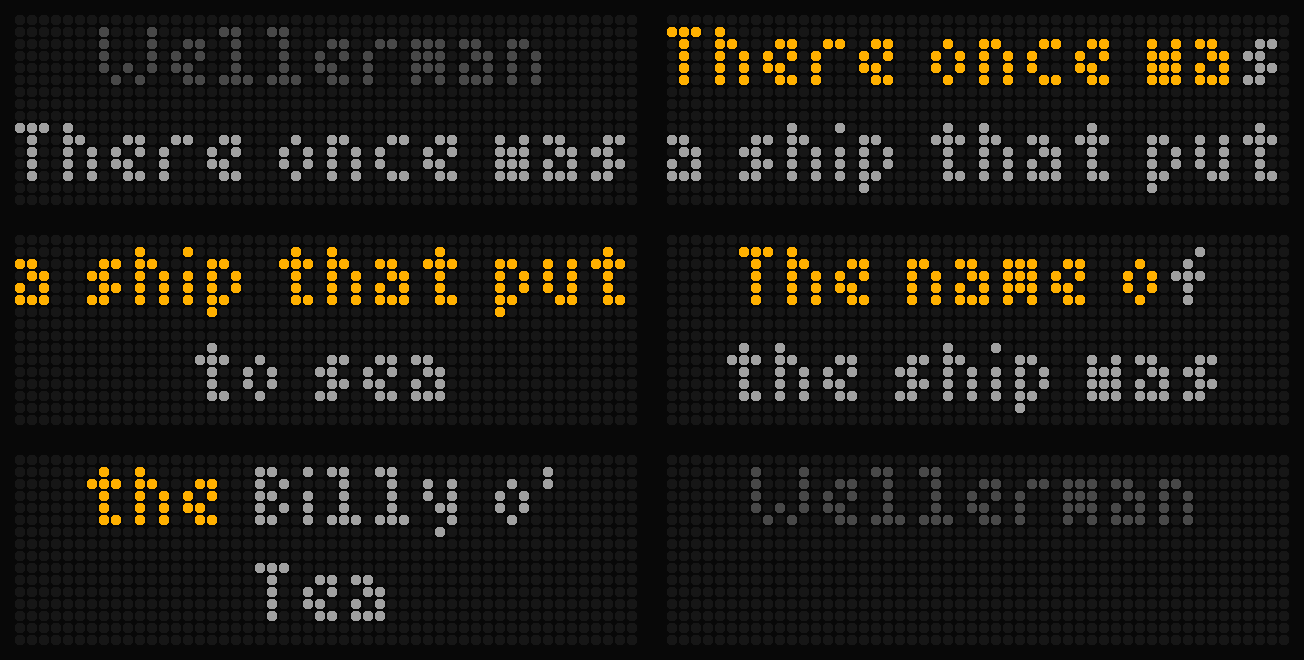
On your display
Karaoke for your clock: the lyrics of the song on your speakers light up word by word, in time with the music. Synced lyrics from LRCLIB.
Which AWTRIX do you have?
See below where it runs, or choose your device.
- Topic
- Smarthome
- Includes
- Script
Runs on
- Does not run on 32×8 (TC001 & DIY) Made for 52×16 (TC002).
- Runs on 52×16 (TC002)
- Does not run on 32×8 with AWTRIX 3 (TC001 & DIY) Made for AWTRIX NG.
Choose your display in the next step.
Script description
Sing along in the kitchen. Canora (Latin canorus, "melodious") turns your clock into a
karaoke display: the lyrics of the song that is playing, in time with the music.
What you see
- Top row: the words being sung right now. They light up from grey to amber as the song goes on.
- Bottom row: the next words, so you can read ahead. When the top row is done, everything moves up.
- Intros and solos: the song title, and a countdown of three dots before the singing starts again.
Canora only takes over the display while a song with lyrics is playing. On pause, stop, or a
song without lyrics, your normal app rotation continues. Press a button to hand the display back
until the next song.
What you need
- Home Assistant with MQTT and any media player that shows artist, title and song length:
Google Cast, Sonos, Music Assistant, Spotify and more. Exact timing where the player reports
its playback position, an approximate mode otherwise. - The free blueprint that sends the track to the clock. Setup guide, blueprint import button
and troubleshooting: https://github.com/exradice/canora
Settings
- Topic prefix of this clock (required): copy the Topic prefix from the clock's MQTT
settings. Canora receives the music on<prefix>/data/canora; the blueprint finds the same
topic from the clock's MQTT prefix sensor in Home Assistant. - Lyrics offset: if the words light up too late, a positive value (300 = 0.3 s earlier).
- Colors for sung and not yet sung words and for the title.
Good to know
- Lyrics come live from LRCLIB, a free community database. Missing a song?
Add it there. The script sends artist, title and duration to lrclib.net; nothing is stored. - Words inside a line are timed by an estimate, because LRCLIB has one timestamp per line.
- Made for the 52×16 display (Ulanzi TC002).
Sign in to view and copy the code of this script.
Community
Discussion 0
Ask a question, suggest a change or share how you use it.
No comments yet. Start the conversation.
Have an idea?
Sign in to ask questions and join the conversation.