Skip to content

New Share your ideas with the AWTRIX community. Keep your creations together in your account.

Sign in

Which AWTRIX do you have? Choose it once and the Hub shows what runs on it.

ScriptAWTRIX NG

Spectrum Visualization

On an AWTRIX display
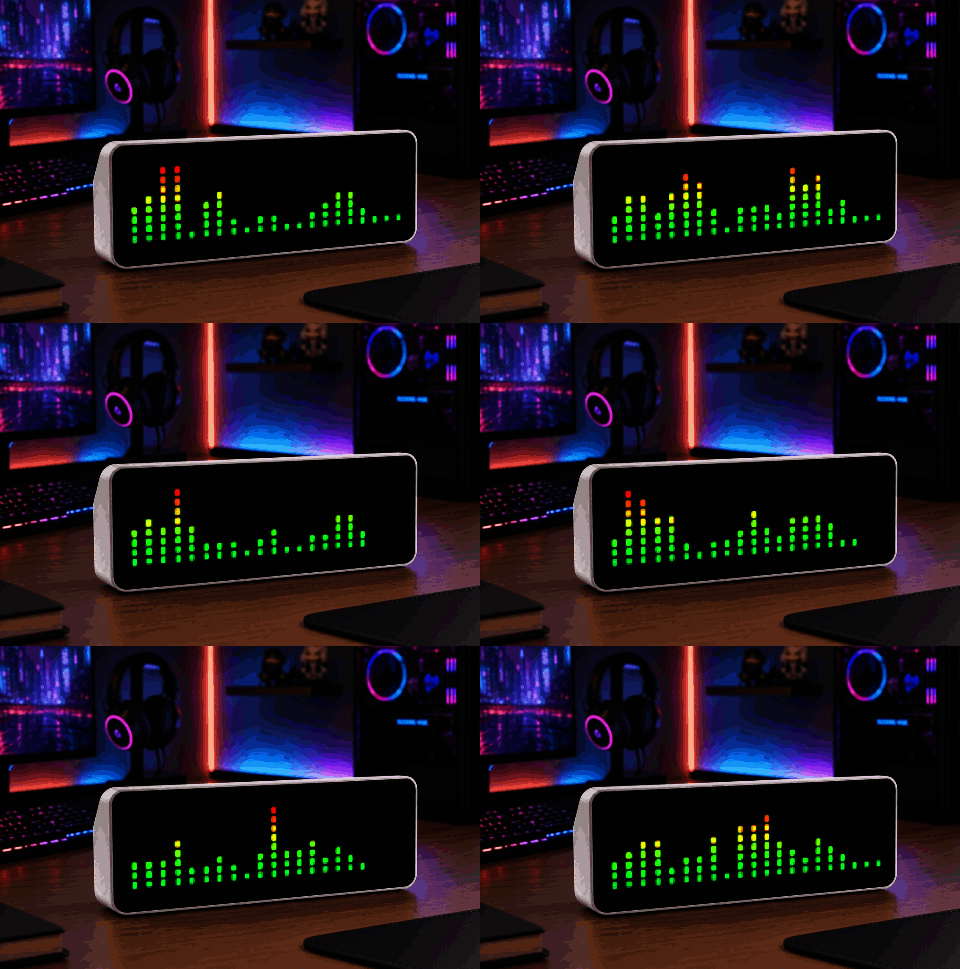
Spectrum Visualization shown on an AWTRIX display
Spectrum Visualization · by Blueforcer

On your display

Spectrum analyser for the music the device is playing

Which AWTRIX do you have? See below where it runs, or choose your device.
Topic
Miscellaneous
Includes
Script

Runs on

  • Runs on 32×8 (TC001 & DIY)
  • Runs on 52×16 (TC002)
  • Does not run on 32×8 with AWTRIX 3 (TC001 & DIY) Made for AWTRIX NG.

Choose your display in the next step.

Send to AWTRIX

Choose your AWTRIX

Spectrum VisualizationAWTRIX NG script

Install this script on your AWTRIX NG. Its icons and sounds are installed with it.

Your AWTRIX’s local address, for example 192.168.178.39 or awtrix.local.

The name shown in your AWTRIX script list. Use letters, digits, hyphens or underscores.

Connection & device login

Connect your phone or computer to the same network as your AWTRIX. Allow local network access if your browser asks.

Use the device’s IP address, without a page path such as /#/apps.

If your AWTRIX requires a login, the username and password fields will appear when you connect.

Sign in to the Hub to install scripts. Attached files are installed separately.

Script description

You need a ESP32-S3 with a I2S Audio DAC to use this

More scripts in Miscellaneous

Something wrong with this script? Report it.