ScriptAWTRIX NG
Google Calendar CJK
On an AWTRIX display
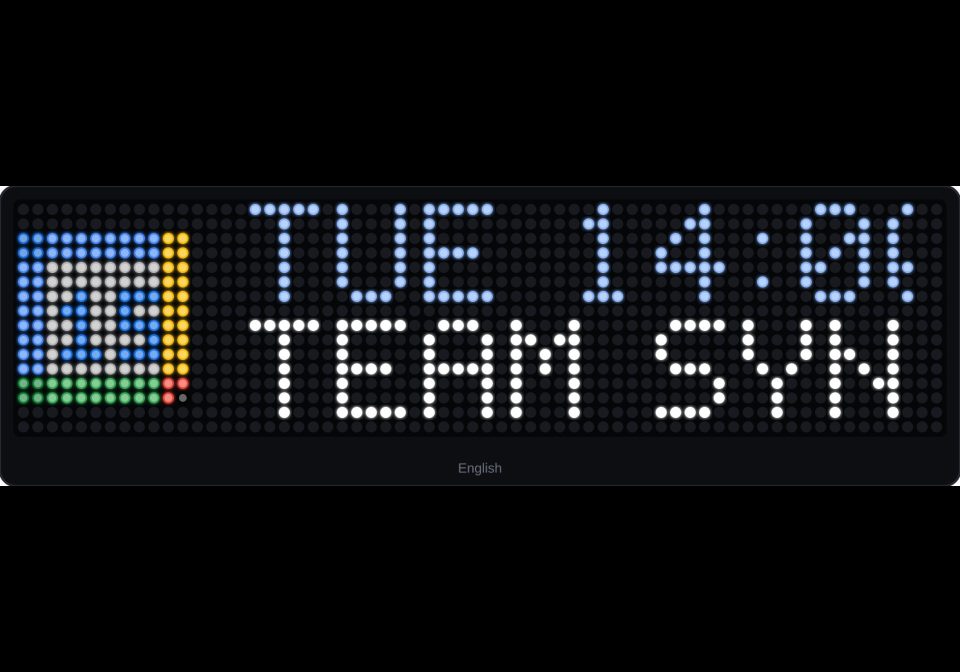



On your display
Upcoming Google Calendar events with full CJK (Chinese, Japanese, Korean) dynamic bitmap rendering for Ulanzi TC002.
Which AWTRIX do you have?
See below where it runs, or choose your device.
- Topic
- Miscellaneous
- Includes
- Script
Runs on
- Runs on 32×8 (TC001 & DIY)
- Runs on 52×16 (TC002)
- Does not run on 32×8 with AWTRIX 3 (TC001 & DIY) Made for AWTRIX NG.
Choose your display in the next step.
Script description
Live Google Calendar agenda with full CJK (Chinese, Japanese, Korean) support for Ulanzi TC002 (52x16) and other AWTRIX NG displays.
✨ Features
- Solves the missing glyph issue (
???): Streams pre-rasterized 8px CJK column bitmaps via a lightweight Cloudflare Worker proxy without taking up device flash memory. - Languages supported: Traditional & Simplified Chinese, Japanese (Kanji + Kana), and 100% of modern Korean Hangul (11,172 syllables), plus English.
- Two-line dynamic layout:
- Top row: Date, time, and localized weekday.
- Bottom row: Smooth marquee scrolling event title.
- Rotary knob navigation:
- Rotate knob left/right to browse upcoming events manually.
- Press knob to return to the earliest event.
- Configurable auto-cycle (set to
0for 100% manual knob control).
- Icons needed: None! All text and symbols are rendered dynamically.
🚀 Setup Instructions
Step 1: Deploy the Cloudflare Worker Proxy
- Deploy the proxy worker using
worker/worker.json Cloudflare Workers (Free tier is more than enough). - Note your Worker URL (e.g.
https://tc002-calendar.<your-subdomain>.workers.dev).
Step 2: Get your Secret Google Calendar iCal URL
- Open Google Calendar on your PC.
- In the left panel, click the three dots (
⋮) next to your calendar → Settings and sharing. - Under Integrate calendar, copy the Secret address in iCal format (
.../basic.ics).
Step 3: Configure Settings in AWTRIX Web UI
Go to Apps → Google Calendar CJK on your clock web UI:
- iCal URL: Paste your Secret iCal URL.
- Worker URL: Paste your Cloudflare Worker URL.
- Language: Choose
zh-TW,zh-CN,ja,ko, oren. - Time zone: Your IANA time zone (e.g.
Asia/Taipei,Asia/Tokyo,America/New_York). - Auto cycle (sec): Seconds per event (
8by default, or0for manual knob-only control).
🔗 Source & Documentation
- GitHub Repository: patw0929/awtrix-calendar-cjk
- Based on Google Calendar Agenda by Mvrcl1005. Font glyphs derived from Fusion Pixel Font by TakWolf.
Sign in to view and copy the code of this script.
Community
Discussion 0
Ask a question, suggest a change or share how you use it.
No comments yet. Start the conversation.
More scripts in Miscellaneous
Something wrong with this script? Report it.
Have an idea?
Sign in to ask questions and join the conversation.