Claude Code Usage
On your display
Shows your Claude plan limits on a 52×16 display
- Topic
- Miscellaneous
- Includes
- Script · 4 icons
Runs on
- Does not run on 32×8 (TC001 & DIY) Made for 52×16 (TC002).
- Runs on 52×16 (TC002)
- Does not run on 32×8 with AWTRIX 3 (TC001 & DIY) Made for AWTRIX NG.
Choose your display in the next step.
Script description
Claude Usage for AWTRIX NG (Ulanzi TC002)
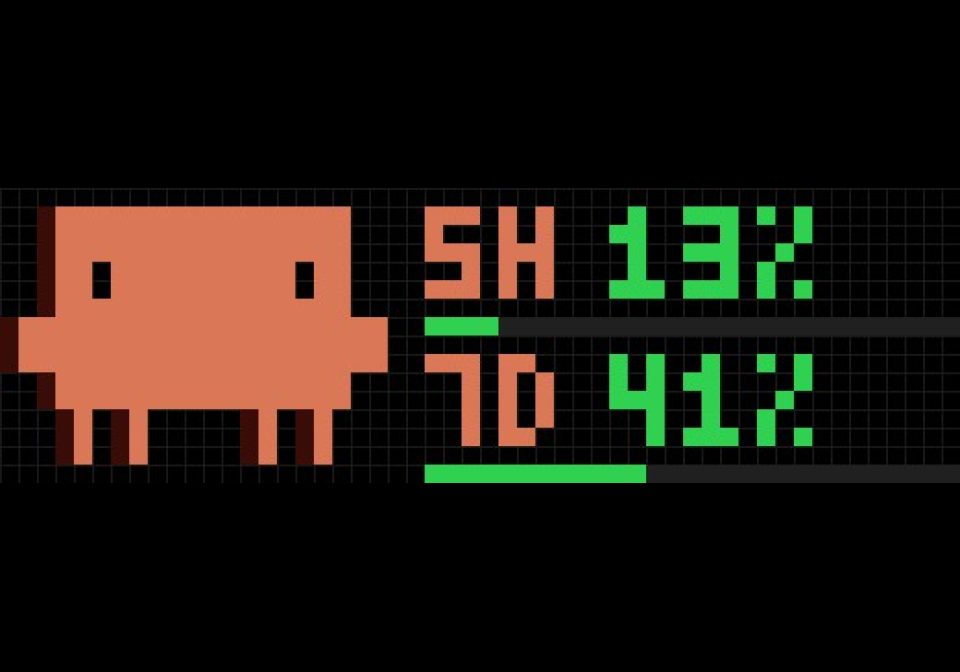
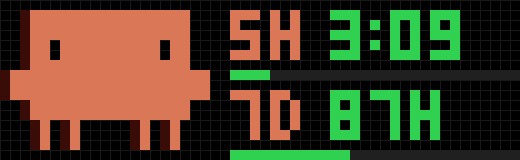
Unofficial. Shows your Claude plan limits on a 52×16 AWTRIX NG clock: the rolling 5-hour and weekly window, with the Claude mascot getting nervous as you approach a limit. Every 4 seconds the values alternate with the time until the window resets.
Two parts:
| Part | Runs on | File |
|---|---|---|
| AWTRIX script “Claude Usage” | the clock | claude-usage.ax (AWTRIX Hub) |
| Status line sender | your computer, inside Claude Code | claude_usage_mqtt.py |
The clock never talks to Anthropic. Claude Code already hands the limits to its status line command; the sender publishes them as a retained MQTT message, the script subscribes. No API key, no extra requests.
Requirements
- Claude Code with a claude.ai subscription. Claude Code documents the
rate_limitsstatus line field for Pro and Max; it also works with a Team plan (tested), but that is not documented and may change. The limits are only present after the first response of a session, and only while Claude Code runs somewhere. - An MQTT broker that both your computer and the clock can reach; MQTT set up on the clock (System → MQTT).
mosquitto_pubon the computer (brew install mosquitto,apt install mosquitto-clients).
1. The sender
cp claude_usage_mqtt.py ~/.claude/ && chmod +x ~/.claude/claude_usage_mqtt.py
cat > ~/.config/claude-usage-mqtt.env <<'EOF'
MQTT_HOST=192.168.1.10
MQTT_PORT=1883
MQTT_USER=
MQTT_PASS=
STATE_TOPIC=claude-code/usage
# 1 = also create Home Assistant sensors via MQTT discovery
HA_DISCOVERY=0
EOF
chmod 600 ~/.config/claude-usage-mqtt.env
~/.claude/settings.json:
"statusLine": { "type": "command", "command": "~/.claude/claude_usage_mqtt.py" }
The status line then reads [Opus] 5h: 13% | 7d: 41%. Check the broker:
mosquitto_sub -h <broker> -t claude-code/usage -v.
macOS: if publishing fails with “No route to host” for a broker in your own subnet, allow your terminal under System Settings → Privacy & Security → Local Network.
2. The script
Install “Claude Usage” from the AWTRIX Hub (the four mascot icons come along), or paste claude-usage.ax in the web UI under Scripts. Settings:
| Setting | Default | |
|---|---|---|
| MQTT topic | claude-code/usage |
must match STATE_TOPIC |
| Warning from | 70 % | orange, worried mascot |
| Alert from | 90 % | red, alarmed mascot (100 %: knocked out) |
| Old after | 30 min | dark red frame when nothing arrived |
| Show reset time | on | 3:11 below a day, 87H above |
| Hide without data | on | skip the app until the first message |
Payload
{"five_hour_pct": 13.0, "five_hour_resets_at": 1791453000,
 "seven_day_pct": 41.0, "seven_day_resets_at": 1791756000, "updated_at": 1791441318}
Percentages 0–100 or null when a window is not active; times in Unix seconds. Anything that publishes this shape works, the sender is just one way.
Credits and license
Mascot icons: the “Claude Usage” icon set by .justcodeit> on the AWTRIX Hub, installed from the Hub via @icons. This project is unofficial and not affiliated with or endorsed by Anthropic; “Claude” is a trademark of Anthropic.
Script and sender: MIT License, see LICENSE.
Sign in to view and copy the code of this script.
Discussion 0
Ask a question, suggest a change or share how you use it.
No comments yet. Start the conversation.
More scripts in Miscellaneous
Something wrong with this script? Report it.
Have an idea?
Sign in to ask questions and join the conversation.