Alarm Clock

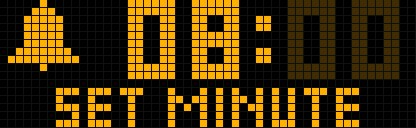
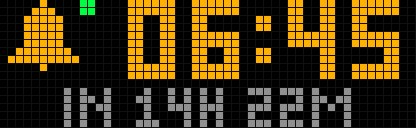
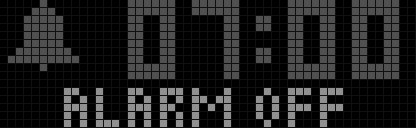
On your display
Alarm clock with snooze, repeat days, rising volume and a spoken wake-up. Set it with the knob.
- Topic
- Miscellaneous
- Includes
- Script
Runs on
- Does not run on 32×8 (TC001 & DIY) Made for 52×16 (TC002).
- Runs on 52×16 (TC002)
- Does not run on 32×8 with AWTRIX 3 (TC001 & DIY) Made for AWTRIX NG.
Choose your display in the next step.
Script description
A full alarm clock for the TC002. It shows the alarm time in large digits, a bell and a status line ("IN 7H 15M", "ALARM OFF", snooze countdown). When it rings it takes over the display, wakes a dark display, flashes, plays a tone and reads the time aloud.
Controls
| Input | Idle | Setting | Ringing |
|---|---|---|---|
| Knob press | Start setting (hour first) | Next field: hour, minute, days, save | Stop |
| Knob turn | Brightness / volume as usual | Change the blinking value | Snooze |
| Select (middle) | Alarm on / off | Next field | Stop |
| Left / right | Switch apps as usual | Minus / plus (hold to run) | Snooze |
The alarm is saved and switched on after the days field, or 10 seconds after the last input. A green dot next to the bell means the alarm is on. While snoozed, select or a knob press cancels it.
Settings (Apps tab, gear)
- Alarm: hour, minute, on/off, repeat (daily, weekdays, weekends, once)
- Sound: tone (beep, chime, rise, siren), say the time, alarm volume, start quietly
- Ringing: snooze length, stop ringing after N minutes
- Look: label and colour
The alarm volume is used only while it rings; your own volume and app volume come back afterwards. With Start quietly it rises over the first 30 seconds. Set Alarm volume to 0 to leave the volume alone.
Good to know
- Keep the app enabled: the alarm is checked by the app itself, also while another app is shown.
- The clock needs the time from the internet (NTP).
- The spoken time uses the clock's built-in voice; switch Say the time off for tones only.
- Uses no icons and no stored sounds.
Sign in to view and copy the code of this script.
Discussion 0
Ask a question, suggest a change or share how you use it.
No comments yet. Start the conversation.
More scripts in Miscellaneous
Something wrong with this script? Report it.
Have an idea?
Sign in to ask questions and join the conversation.