London Tube Board
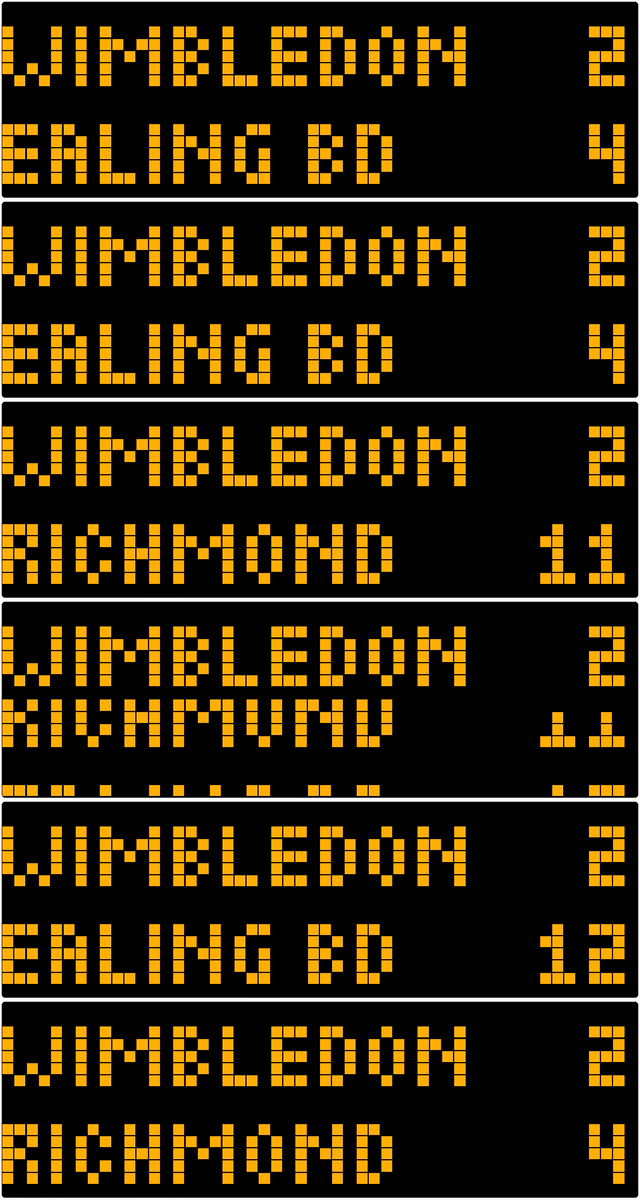
On your display
A simple London Underground departure board for the Ulanzi TC002
- Topic
- Miscellaneous
- Includes
- Script
Runs on
- Does not run on 32×8 (TC001 & DIY) Made for 52×16 (TC002).
- Runs on 52×16 (TC002)
- Does not run on 32×8 with AWTRIX 3 (TC001 & DIY) Made for AWTRIX NG.
Choose your display in the next step.
Script description
A real-time London Underground departure board for the Ulanzi TC002, featuring live TfL arrivals, multiple platforms, rotating services and authentic scrolling transitions. To set up ...
- Install the app on your Ulanzi TC002 running AWTRIX NG.
- Enter your London Underground station name (e.g. Embankment, Kennington or Balham).
- Optionally enter the TfL Station ID to override automatic station lookup.
- Enter the Underground line (e.g. district, northern or piccadilly).
- Enter the platform number(s), separated by commas (e.g. 1,3). Use 0 for all platforms.
- Enter your TfL API key, obtainable from https://api-portal.tfl.gov.uk/ (optional)
- Set the refresh interval (recommended: 60 seconds).
- Optionally adjust the service rotation interval, transition speed and text colour.
The app automatically retrieves live arrival predictions from TfL and updates the departure board.
An internet connection is required. Arrival information is provided by Transport for London.
Sign in to view and copy the code of this script.
Discussion 0
Ask a question, suggest a change or share how you use it.
No comments yet. Start the conversation.
More scripts in Miscellaneous
Something wrong with this script? Report it.
Have an idea?
Sign in to ask questions and join the conversation.