Slot Machine
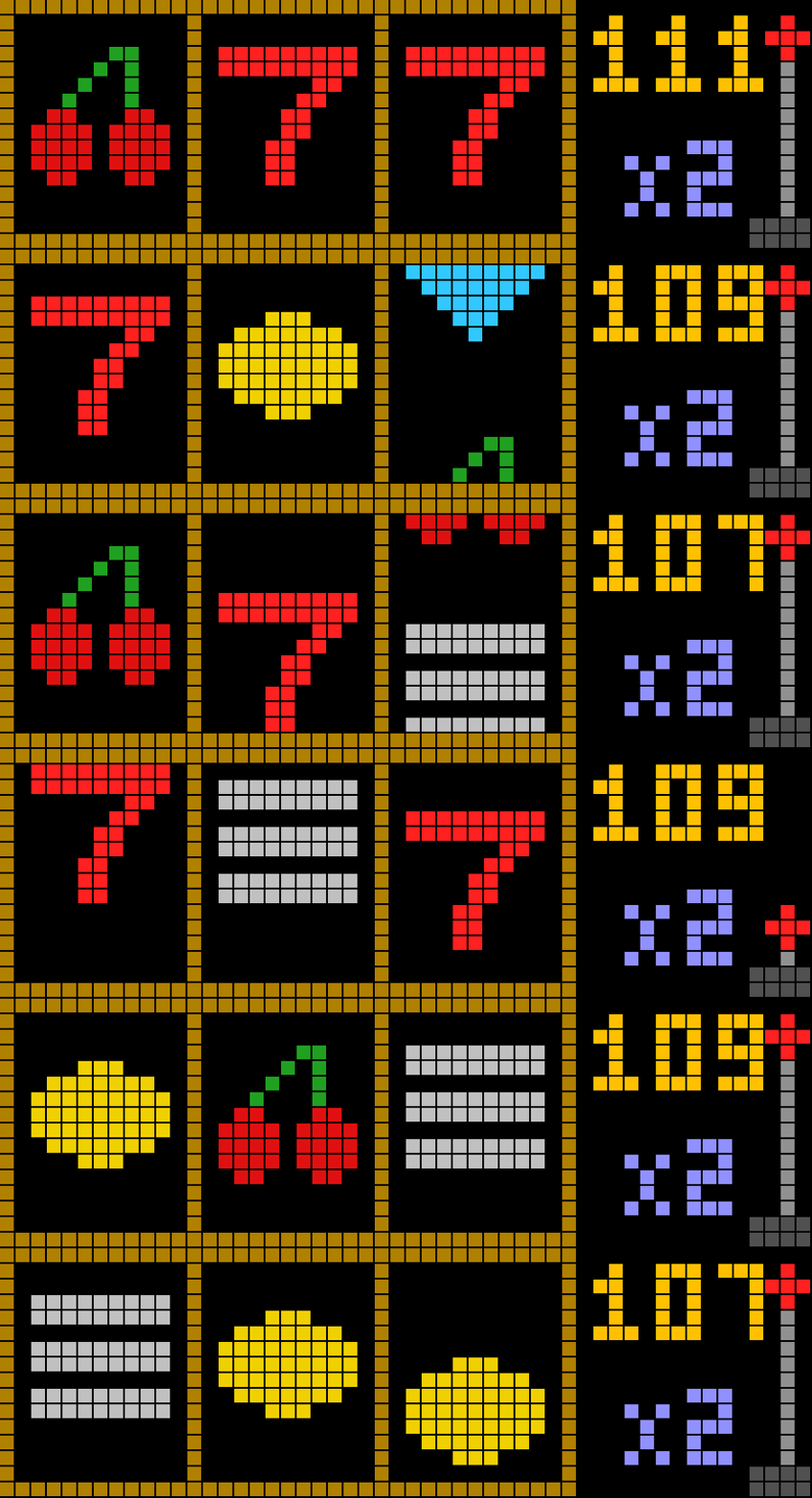
On your display
Caution: Gambling is addictive.
- Topic
- Gaming
- Includes
- Script
Runs on
- Does not run on Ulanzi TC001 Needs a panel of at least 52×16; its panel is 32×8.
- Runs on Ulanzi TC002
- Runs on ESP32 (DIY) Needs a panel of at least 52×16.
- Runs on ESP32-S3 (DIY) Needs a panel of at least 52×16.
- Does not run on Ulanzi TC001 with AWTRIX 3 Made for AWTRIX NG.
Choose your display in the next step.
Flow description
Slot Machine for AWTRIX NG (Ulanzi TC002)
Version 1.0 · by Hank_the_Tank / Claude · for the 52×16 panel of the Ulanzi TC002
A classic Las Vegas one-armed bandit for your clock: three spinning reels, a lever you can actually pull with the gamepad stick, flashing lights and synthesizer sound effects. It runs on demand, so you start it when you feel lucky, and it stays out of the normal app rotation.
┌───────────┬───────────┬───────────┐ ┌──────────┐
│           │           │           │ │  100  ●  │  ← credits · lever knob
│    🍒     │    7      │    🔔     │ │       │  │
│           │           │           │ │  x1   │  │  ← bet
└───────────┴───────────┴───────────┘ └──────▀▀──┘
Features
- Three reels, six symbols. Cherry, lemon, bell, BAR, diamond and the red 7, all drawn in code, so there are no icons to install.
- Real reel motion. The reels roll downwards, stop one after the other from left to right and bounce as they land.
- Suspense. When the first two reels match, the third one spins almost a second longer.
- A lever you can pull. On the gamepad, pull the right stick down and let go. The lever on the display follows your stick.
- Winning lights.
- Any win turns the frame into a rainbow and flashes the amount in green.
- The credits count up coin by coin.
- Three diamonds or three 7s set off a full-screen fireworks show with BIG WIN or JACKPOT.
- Synthesizer sounds, created live by the TC002, no MP3 files needed:
- lever pull
- ticking reels
- a clunk when each reel stops
- a win jingle and coins
- a jackpot fanfare with drums
- a "wah-wah" when you lose
- Bet 1 to 3 per spin. The payout is multiplied by the bet.
- Auto-spin for lazy high rollers.
- Credits are saved. They survive a reboot. When you go broke, the machine flashes a red
0and refills your credits after a moment.
Requirements
- An Ulanzi TC002 running AWTRIX NG. The layout is written for the 52×16 panel, and the script uses the TC002's gamepad module.
- Optional: a Bluetooth gamepad paired under System → Gamepad. Without one, the clock's buttons work too.
- Sound switched on in the clock's settings to hear the effects.
Installation
- Open the AWTRIX NG web interface: the clock's IP address, or
http://awtrixng-xxxxxx.local. - Go to the Scripts tab and create a new script called
SlotMachine. - Paste the contents of
SlotMachine.axand press Save. - On the clock: hold the middle button, choose Scripts, then Slot Machine.
If the panel shows a red ERR:, the error message is shown next to the script in the Scripts tab. Please include it in your feedback.
Controls
| Action | Gamepad | Clock buttons |
|---|---|---|
| Spin | A, START, R1 or R2 | middle button (short press) |
| Pull the lever | right stick down, then let go | – |
| Bet + / − | D-pad up/right · down/left | right / left |
| Auto-spin on/off | B (a green dot blinks bottom left of the credits) | – |
| Quit | – | hold the middle button |
Paytable
The middle row is the pay line. Payouts are multiplied by the bet.
| Combination | Pays |
|---|---|
| 7 · 7 · 7 | 100 – JACKPOT |
| ◆ · ◆ · ◆ | 40 – BIG WIN |
| BAR · BAR · BAR | 20 |
| 🔔 · 🔔 · 🔔 | 12 |
| 🍋 · 🍋 · 🍋 | 8 |
| 🍒 · 🍒 · 🍒 | 5 |
| any two 🍒 | 2 |
Each reel carries 20 symbols: 5 cherries, 4 lemons, 4 bells, 3 BARs, 2 diamonds and 2 sevens. About one spin in six wins something, and 7-7-7 lands about once in 1,000 spins. As in Las Vegas, the house wins in the long run.
Settings
All settings are on the Apps tab, behind the gear on the Slot Machine row. Saving restarts the game.
| Setting | Default | What it does |
|---|---|---|
| Starting credits | 100 | Credits you start with, and the refill when you go broke (10–999) |
| Auto-spin pause | 1200 ms | Pause between spins in auto-spin mode. Wins add a little extra time to enjoy the count-up |
| Frame colour | gold #B08000 |
Colour of the reel frame |
The credits are capped at 999, the house limit.
Feedback
This is the first release. Useful feedback:
- The panel shows
ERR:: the error text from the Scripts tab. - A sound is too loud, too quiet or too shrill: which one it is.
- Ideas: more pay lines, new symbols or a different paytable.
Credits
- Game: Hank_the_Tank, with help from Claude.
- Firmware: AWTRIX NG by Blueforcer.
Sign in to view and copy the code of this flow.
Discussion 0
Ask a question, suggest a change or share how you use it.
No comments yet. Start the conversation.
More flows for AWTRIX NG Scripts or Gaming
Something wrong with this flow? Report it.
Have an idea?
Sign in to ask questions and join the conversation.