Ulanzi Weather Clock
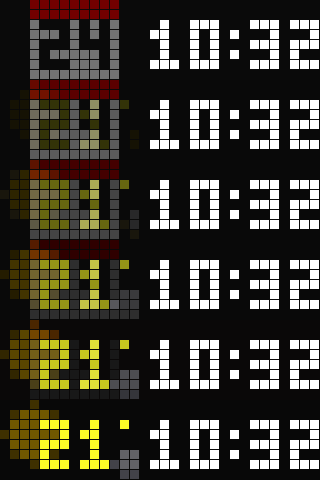
On your display
Time, calendar and an animated weather scene for every WMO code, in a muted and a classic design with sprite wipes. No MQTT, no cloud account: the panel fetches the weather itself.
- Works with
- AWTRIX NG
- Topic
- Miscellaneous
- Includes
- Script
Choose your display in the next step.
Flow description
Time, calendar and an animated weather scene in two designs. Muted: the time stands at the right while calendar and weather cross-fade at the left over a dimmed scene. Classic: calendar and time, then the weather, each wiped in by a sprite - Mario and Luigi, Blinky chasing Pac-Man, a Space Invader, a light beam, Yoshi, Sonic, a Lemming, KITT's scanner, a Metroid. A scene for every WMO weather code from Open-Meteo, no API key. The middle button switches the design; hold it for a demo of every scene. No MQTT, no home automation, no cloud account: the panel fetches the weather itself.
Installation - read this first. The clock is eight scripts: this app and seven modules (art, cycle, sprites, targets, timepage, weather, wipes). The Hub carries one script per flow, so Send to AWTRIX installs the app alone and the panel shows ERR: until the modules are there. Install the whole clock in one step instead:
- Download
ulanzi-weather-clock-<version>.zipfrom https://github.com/bkahlert/ulanzi-weather-clock/releases - Web UI → System → Restore backup → the zip. It adds the eight scripts and touches nothing else on the panel.
- Reboot. Then Apps → ⚙ Clock: set your latitude and longitude. Switch the built-in Time app off if you like.
An update is the same three steps with the next bundle.
Requirements. AWTRIX NG 1.1.2 or later (the hold on the middle button needs 1.1.2) on a 32×8 panel such as the Ulanzi TC001. The clock takes most of the panel's script heap and runs with about 45 KB of it free, so run it alone or next to small scripts.
Settings (Apps → ⚙ Clock): design; latitude and longitude; °C or °F; weather refresh; how long calendar and weather show; the scene's animation step; the muted design's backdrop, brightness and fade; which sprite carries each wipe, or none; the wipe pace.
Source, documentation, previews and the offline tests: https://github.com/bkahlert/ulanzi-weather-clock (MIT). The weather fetch, the temperature colour ramp and the code mapping follow Hank_the_Tank's Weather Script (https://awtrix.de/flow/fGEhP0cZZd6E).
wQPSUfXDCHbe.ax
# @name Clock
# @desc Two designs, the middle button switches. Muted: the time at the right, the calendar and the weather taking turns at the left over a dimmed scene, cross-fades, half brightness. Classic: calendar and time, then the scene with the temperature, each wiped in by a sprite - Mario and Luigi, Blinky chasing Pac-Man, a Space Invader, a light beam, Yoshi, Sonic, a Lemming, KITT or a Metroid. Hold the middle button for a demo of every weather scene.
# @author Björn Kahlert; weather fetch, colour ramp and icon mapping from Hank_the_Tank's Hub script fGEhP0cZZd6E v3.6
# @version 1.9
# @config design select "Design" default=muted options=muted,classic help="muted: the time at the right, calendar and weather taking turns at the left over a dimmed scene, steady colon, cross-fades, half brightness. classic: calendar and time, then the scene with the temperature at the right, sprite wipes. The middle button switches."
# @config lat number "Latitude" default=52.52 min=-90 max=90 step=0.0001
# @config lon number "Longitude" default=13.405 min=-180 max=180 step=0.0001
# @config unit select "Temperature unit" default=C options=C,F
# @config every number "Weather refresh" default=15 min=15 max=60 unit=min
# @config timeSecs number "Calendar shows for" default=12 min=3 max=300 unit=s
# @config weatherSecs number "Weather shows for" default=8 min=3 max=300 unit=s
# @config anim number "Scene animation" default=250 min=50 max=1000 step=50 unit=ms help="Time per animation step of the weather scene; lower is faster"
# @config backdrop number "Weather backdrop" default=45 min=10 max=100 unit=% help="Muted design: brightness of the calendar card behind the day and of the weather scene behind the temperature"
# @config fade number "Fade" default=3000 min=100 max=10000 step=100 unit=ms help="Muted design: length of the cross-fade between calendar and weather; at 3 s the change is slow enough to escape the eye"
# @config dimming number "Muted brightness" default=65 min=10 max=100 unit=% help="Muted design: brightness of everything it draws; the light sensor still applies on top"
# @config toWeather select "Weather comes in with" default=random options=random,mario,chase,invader,beam,yoshi,sonic,lemming,kitt,metroid,none help="Classic design: random draws a different sprite for every wipe; none is a hard cut"
# @config toTime select "Calendar comes in with" default=random options=random,mario,chase,invader,beam,yoshi,sonic,lemming,kitt,metroid,none help="Classic design: random draws a different sprite for every wipe; none is a hard cut"
# @config pace number "Wipe pace" default=90 min=30 max=300 unit=ms help="Classic design: time per pixel the sprite moves; lower is faster"

# One app, four phases in a loop: the calendar card, a transition to the weather, the
# weather, a transition back. Two designs, switched by the middle button and kept in the
# store. Muted: the time stands at the right through all of it, the left block cross-fades
# between the card and a slowed weather scene, both at the backdrop brightness, the weather under
# a full-size temperature standing where the card has its day, the colon is steady and everything is drawn dimmed. Classic: the card and the time, then the
# scene with the temperature at the right, a sprite moving left to right between them and the
# next page appearing behind it, drawn at random from the roster and never the same one twice
# in a row unless the settings name one. Built-in transitions cannot carry a sprite and two
# apps never see each other's pixels, which is why the time is drawn here too, after the look
# of the built-in Time app.
#
# Everything lives in modules - cycle, timepage, weather, wipes, targets, art and sprites -
# because the firmware compiles a script's whole source in one contiguous heap
# block and recompiles this app on every settings save, with a 24 KB reserve it will not touch
# while doing so; a warm clock has been seen with 9 KB in one piece and 30 KB free. This file
# is the settings and the wiring, and it is kept as small as it can be.
#
# Part of github.com/bkahlert/ulanzi-weather-clock, which holds the modules this file imports.
# On its own - installed from the AWTRIX Hub, say - it shows ERR until they are there; the
# release bundle installs all eight scripts at once (web UI: System, Restore backup).
import targets
import timepage
import weather
import wipes
import sprites
import cycle

class Clock
  var time_page, weather_page, wiper, cycle, full, beat, muted

  def init()
    var cast = sprites["cast"]
    var names = sprites["roster"]
    self.time_page = timepage()
    self.weather_page = weather()
    var widest = 0
    for who : names
      if cast[who][3] > widest widest = cast[who][3] end
    end
    self.wiper = wipes(self, cast, widest)
    self.full = targets["Direct"](0, 32)
    self.cycle = cycle(self, cast, names)
    self.beat = 0
    self.reload()
  end

  def on_show()
    self.reload()
    self.cycle.start()
  end

  # the design and its brightness for the three direct targets, then the modules' settings
  def reload()
    self.muted = store.get("design") == "muted"
    var g = self.muted ? int(store.get("dimming")) : 100
    self.full.gain = g
    self.wiper.left.gain = g
    self.wiper.right.gain = g
    self.cycle.reload()
    self.time_page.reload()
    self.weather_page.reload()
  end

  # right: the next page, left: the previous one, select: the other design, kept in the store
  # and the cycle started over. A press past the clock's last page or before its first wraps
  # here and is handed back to the firmware, whose navigation moves on to another app once
  # the rotation has one.
  def on_button(btn)
    if btn == "select"
      store.set("design", self.muted ? "classic" : "muted")
      self.reload()
      self.cycle.start()
      return true
    end
    return self.cycle.jump(btn)
  end

  # the middle button's press, hold and release go to the cycle's demo, which calls
  # on_button("select") for a short press; left and right stay with on_button
  def on_button_event(btn, event)
    return self.cycle.button(btn, event)
  end

  def duration()
    return self.cycle.total
  end

  # once a second: the weather's fetch clock, and the settings once a minute
  def loop()
    self.beat += 1
    if self.beat % 60 == 0 self.reload() end
    self.weather_page.tick()
  end

  def draw()
    clear()
    self.cycle.draw()
  end

  # the page a transition asks for, onto a draw target: the left block, then the time - on
  # every page in the muted design, on the calendar page in the classic one
  def page(weather, t)
    if weather self.weather_page.page(t) else self.time_page.calendar(t) end
    if self.muted || !weather self.time_page.clock(t) end
  end
end

return Clock()Discussion 0
Ask a question, suggest a change or share how you use it.
No comments yet. Start the conversation.
More flows for AWTRIX NG Scripts or Miscellaneous
Something wrong with this flow? Report it.
Have an idea?
Sign in to ask questions and join the conversation.