Fuel Prices
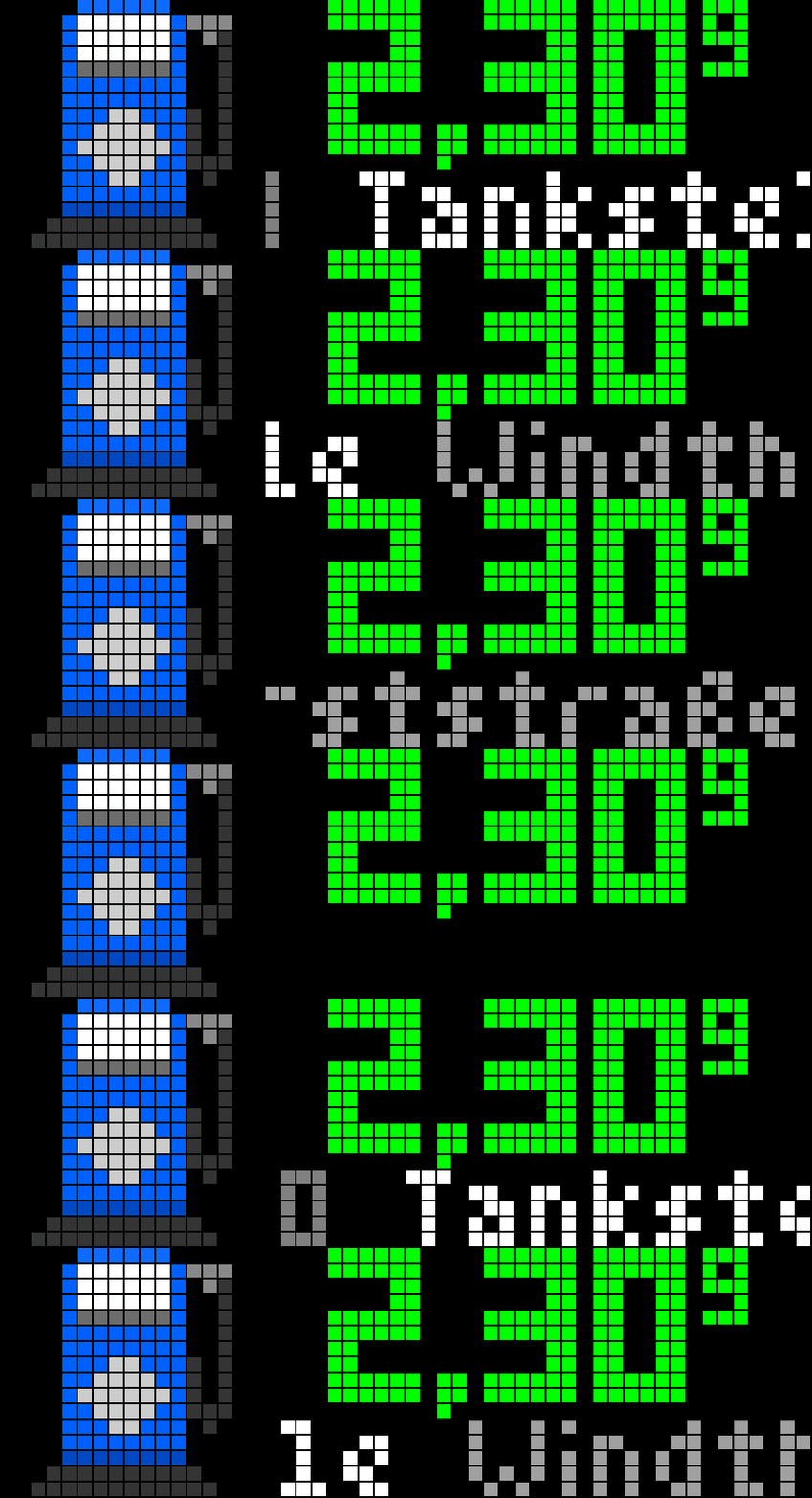
On your display
Shows the cheapest nearby fuel price (Tankerkoenig.de)
- Topic
- Miscellaneous
- Includes
- Script · 1 icon
Runs on
- Does not run on Ulanzi TC001 Needs a panel of at least 52×16; its panel is 32×8.
- Runs on Ulanzi TC002
- Runs on ESP32 (DIY) Needs a panel of at least 52×16.
- Runs on ESP32-S3 (DIY) Needs a panel of at least 52×16.
- Does not run on Ulanzi TC001 with AWTRIX 3 Made for AWTRIX NG.
Choose your display in the next step.
Flow description
Fuel Prices for AWTRIX NG (Ulanzi TC002)
Version 2.0 · by Hank_the_Tank / Claude · for the 52×16 panel of the Ulanzi TC002
Shows the cheapest fuel price near you on your clock, styled like a real German price sign: the price in big digits with the last digit raised (1,75⁹). Below it, the fuel type, brand and street of the station scroll by. Prices come live from Tankerkönig, the open data of the German Market Transparency Unit for Fuels (MTS-K).
┌────────────────┬──────────────────────────────────┐
│                │     1,75⁹          ← price       │  rows 0–9
│   ⛽ 16×16     │                                  │
│                │  DIESEL  ARAL  Hauptstraße 12    │  rows 11–15, scrolling
└────────────────┴──────────────────────────────────┘
Features
- Price-sign look. Large 6×10 px digits with a decimal comma and the tenth of a cent as a small raised digit, like at the pump.
- Cheapest station within your radius for Diesel, Super E5 or Super E10.
- Station details in a scrolling line: fuel type in grey, brand in white, street in light grey. Umlauts are shown correctly.
- 16×16 icon. Uses the Hub icon
gasstation-blue-x16. If it is missing, the app draws a petrol pump of its own. - Starts with data. After a reboot the last known price shows at once, instead of an empty panel.
- Light on memory. The app reads only the first (cheapest) station from the answer, not the whole list.
- Refresh. Every 10 minutes by default. Press the middle button while the app is on screen to refresh right away.
Requirements
- An Ulanzi TC002 running AWTRIX NG. The layout is written for the 52×16 panel. A separate version exists for 32×8 clocks (TC001).
- A free Tankerkönig API key from creativecommons.tankerkoenig.de. It takes a minute and needs only an e-mail address.
- A location in Germany. Tankerkönig covers German stations only.
Installation
- Open the AWTRIX NG web interface: the clock's IP address, or
http://awtrixng-xxxxxx.local. - Go to the Scripts tab and create a new script called
FuelPrices. - Paste the contents of
FuelPrices_TC002.axand press Save. - Press the button that installs the missing icon (
gasstation-blue-x16). - Open the Apps tab, click the gear on the Fuel Prices row and enter your API key, latitude and longitude. Save.
The price appears after the first refresh, a few seconds after saving. If the panel shows a red ERR:, the error message is shown next to the script in the Scripts tab.
Settings
All settings are on the Apps tab, behind the gear on the Fuel Prices row. Saving restarts the app.
| Setting | Default | What it does |
|---|---|---|
| API key | YOUR-API-KEY |
Your free Tankerkönig key. Required |
| Latitude / Longitude | 52.5200 / 13.4050 (Berlin) | Centre of the search, for example your home. Use a dot as decimal separator |
| Radius | 5 km | Search radius, 1–25 km |
| Fuel | diesel | diesel, e5 or e10 |
| Refresh | 10 min | How often prices are fetched, 5–60 minutes |
| Price color | green #00FF00 |
Colour of the price digits |
| Icon ID | gasstation-blue-x16 |
A 16×16 icon on the clock. Empty = the built-in pump |
Please keep Refresh at 5 minutes or more. Tankerkönig is a free service, and prices rarely change faster.
Troubleshooting
- The panel stays at
...: no price has arrived yet. Open the web UI console (log): a lineFuelPrices: no data (status …)means Tankerkönig sent no station. Status0means no connection; any other status usually means a wrong API key, wrong coordinates or no station within the radius. Try a larger radius. - A blue pump drawn in code instead of the icon: the icon is not installed on the clock. Press the install button in the Scripts tab, or check the Icon ID.
- Protect your key: anyone on your network can read an app's settings, the API key included, unless a login is set for the web UI (authentication in the System settings).
Credits
- Script: Hank_the_Tank, with help from Claude.
- Fuel price data: Tankerkönig / MTS-K, licensed under CC BY 4.0.
- Firmware: AWTRIX NG by Blueforcer.
Sign in to view and copy the code of this flow.
Discussion 0
Ask a question, suggest a change or share how you use it.
No comments yet. Start the conversation.
More flows for AWTRIX NG Scripts or Miscellaneous
Something wrong with this flow? Report it.
Have an idea?
Sign in to ask questions and join the conversation.