LiveScore
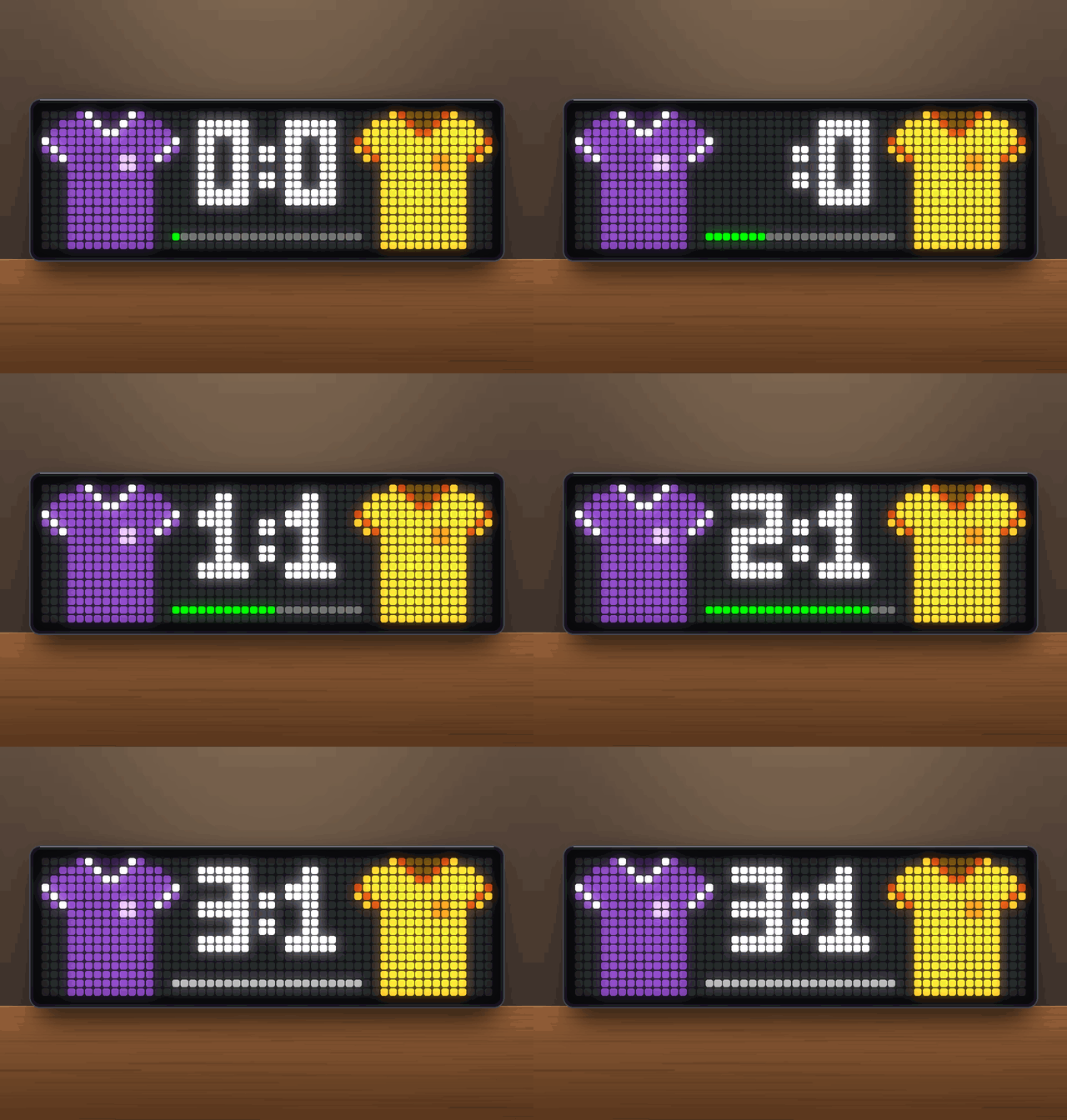
On your display
Shows the live score of your favourite football team
- Topic
- Miscellaneous
- Includes
- Script
Runs on
- Does not run on 32×8 (TC001 & DIY) Made for 52×16 (TC002). Needs a voice that reads text aloud.
- Runs on 52×16 (TC002)
- Does not run on 32×8 with AWTRIX 3 (TC001 & DIY) Made for AWTRIX NG.
Choose your display in the next step.
Flow description
LiveScore for AWTRIX NG (Ulanzi TC002)
Version 1.1 · by Hank_the_Tank / Claude · for the 52×16 panel of the Ulanzi TC002
The live score of your favourite football team, with both teams' kits on either side and a bar that fills up with the match time. The data comes from ESPN's public scoreboard API, so you don't need an API key or an account.
The app only joins the rotation while your team is playing. On all other days it stays out of the way.
┌──────────┬────────────────────┬──────────┐
│   ▄██▄   │                    │   ▄██▄   │
│ ████████ │      2  :  1       │ ████████ │  ← home kit · score · away kit
│   ████   │                    │   ████   │
│   ████   │  ▬▬▬▬▬▬▬▬▬▬▭▭▭▭▭▭  │   ████   │  ← match time (22 cells = 90 min)
└──────────┴────────────────────┴──────────┘
Features
- Hidden until kick-off. The app looks up your team's next match in all competitions (league, cups, European games). It skips its turn in the rotation until the match is live.
- Big score in the middle. It uses 6×10 px block digits. Double-digit scores switch to a narrow form, so they still fit between the kits.
- Both kits. The home team is always on the left and the away team on the right.
- The opponent wears its ESPN team colours.
- Your team uses its ESPN colours, or your own colours and a pattern: plain, stripes, hoops or checker.
- Colours that are too dark to see on the LEDs are lightened automatically.
- Match time bar in the bottom row:
- green while the match is on, moving smoothly between updates
- amber at half-time
- orange in extra time and penalties
- grey after the final whistle
- Goals. The scoring team's digits blink for 10 s, and the app jumps to the front of the rotation. It does the same at kick-off. You can switch this off.
- Goal announcement. The clock calls out "Goal! Goal! Goal! Dortmund!" with its built-in offline voice (English). Choose all goals, only your team's goals, or off.
- Final score. After the final whistle, the result stays in the rotation for 15 minutes. Then the app hides again and waits for the next match.
- Light on the network. The app checks the fixtures every 30 minutes. From two minutes before kick-off it checks the score every 30 s. Press the middle button while the app is on screen to update right away.
Requirements
- An Ulanzi TC002 running AWTRIX NG firmware 1.1.6 or newer (tested on 1.1.6). On older firmware everything works except the goal announcement.
- A 52×16 display. The layout is written for it and is not meant for 32×8 clocks.
- No icons are needed. The kits and digits are drawn in code.
Installation
- Open the AWTRIX web interface in a browser, using the clock's IP address or
http://awtrixng-xxxxxx.local. - Go to the Scripts tab and create a new script called
LiveScore. - Paste the contents of
LiveScore_share.axand press Save. - Open the Apps tab, click the gear on the LiveScore row and enter your team's ESPN ID (see below).
As long as your team isn't playing, you won't see the app. That is intended. If the panel shows a red ERR:, the error message is shown next to the script in the Scripts tab. Please include it in your feedback.
Finding your team's ESPN ID
Search for your team on espn.com and open its club page. The ID is the number in the address:
https://www.espn.com/soccer/club/_/id/124/borussia-dortmund → 124
A few examples: Bayern Munich 132 · Borussia Dortmund 124 · Real Madrid 86 · Barcelona 83 · Liverpool 364 · Arsenal 359 · Manchester City 382.
Settings
All settings are on the Apps tab, behind the gear on the LiveScore row. Saving restarts the app.
| Setting | Default | What it does |
|---|---|---|
| ESPN team ID | 132 (Bayern Munich) | Your team. Set this first. |
| Kit colour / Kit trim (my team) | red / white | Your team's colours, used when ESPN colours for my team is off |
| Kit pattern (my team) | plain | plain, stripes, hoops or checker |
| ESPN colours for my team | on | Off: use the two colours above. Useful when ESPN has no proper colours for your club. |
| Update during the match | 30 s | How often the score is checked while the match is on (15–300 s) |
| Show final score | 15 min | How long the result stays after the final whistle. 0 hides the app right away. |
| Include friendlies | off | ESPN often doesn't update friendlies live, so they are skipped by default |
| Jump in at kick-off and goals | on | Brings the app to the front at kick-off and on every goal |
| Goal announcement | all | all goals, only mine, or off. Uses the app volume from the Audio tab. |
| Score | white | Colour of the digits |
| Match time bar | green | Colour of the bar while the match is on |
Good to know
- ESPN coverage. The app only knows matches that ESPN lists. Top leagues, second divisions, cups and European competitions are covered well. Lower leagues and friendlies may show up late or not at all.
- Some clubs have no colours on ESPN. VfL Osnabrück, for example, is listed as black on black. Turn ESPN colours for my team off and pick your own colours.
- The minute is approximate. ESPN updates its match clock every few seconds to minutes. Between updates the bar keeps moving on its own and corrects itself at the next update.
- Postponed or cancelled matches are skipped automatically. So is a match that never kicks off within four hours of its planned start.
- The app sends the user agent
curl/8.7.1, because ESPN rejects some others with 403 Forbidden.
Changelog
- 1.1 – Spoken goal announcement (needs firmware 1.1.6). Short ESPN names like "D Dresden" are read as "Dresden".
- 1.0 – First release.
Sign in to view and copy the code of this flow.
Discussion 0
Ask a question, suggest a change or share how you use it.
No comments yet. Start the conversation.
More flows for AWTRIX NG Scripts or Miscellaneous
Something wrong with this flow? Report it.
Have an idea?
Sign in to ask questions and join the conversation.