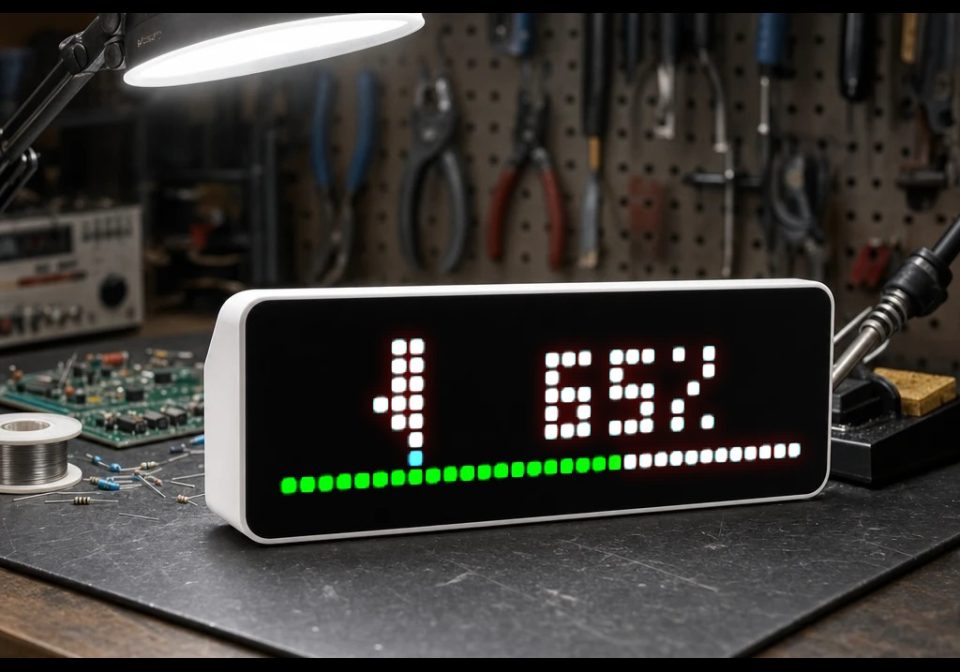
Klipper print status
Shows Klipper 3D printer progress via Moonraker API
About this flow
| System | AWTRIX NG Scripts |
|---|---|
| AWTRIX version | AWTRIX NG |
| Topic | Miscellaneous |
| Built by | Set |
| File | mM4sasmjv7jT.ax · 3.8 KB |
| Icons | 2 |
| Published | 25 Aug 2026 · updated 27 Aug 2026 |
| Downloads | 50 |
Is this your flow?
If you created this flow, open your saved edit link to add it to your account. You can then manage it whenever you sign in. Adding it to your account replaces the edit link.
Flow description
You can set host, port, refresh period, icons, progress bar color, and work percent value correction.
mM4sasmjv7jT.ax
# @name    Klipper
# @desc    Shows Klipper 3D printer progress via Moonraker API
# @author  Set
# @version 1.4
# @config  host  text   "Moonraker IP / Host" default="192.168.1.50"
# @config  port  number "Port"              default=7125 min=1 max=65535
# @config  every number "Refresh (sec)"     default=5 min=1 max=60 unit=s
# @config  correction number "Percent correction"     default=0 min=0 unit=% max=20 help="Positive only, Will be added to current value from Moonraker API"
# @config  icon  text   "Print Icon ID"     default="51841"
# @config  dicon text   "Done Icon ID"      default="55186"
# @config  pcol  color  "Progress Bar"      default=#00FF00

class Klipper
  var url, period
  var state, prev_state, progress, label, correction
  var ticks, in_flight

  def init()
    var h = store.get("host")
    var p = store.get("port")
    self.url = "http://" + h + ":" + str(p) + "/printer/objects/query?print_stats&display_status"
    self.period = store.get("every")
    self.state = nil
    self.prev_state = nil
    self.progress = 0
    self.label = nil
    self.ticks = 0
    self.correction = 2
    self.in_flight = false
  end

  def on_body(body, status)
    self.in_flight = false
    if body == nil return end

    var m_state = re.search("\"state\":\\s*\"([^\"]+)\"", body)
    if m_state == nil return end

    self.prev_state = self.state
    self.state = m_state[1]

    if self.state == "printing"
      var m_prog = re.search("\"progress\":\\s*([0-9.]+)", body)
      if m_prog != nil
        var p_val = num(m_prog[1])
        if p_val != nil
          self.progress = int(p_val * 100 + 0.5)
          self.label = str(self.progress + self.correction) + "%"
        end
      else
        self.label = "PRT"
      end
    elif self.state == "complete"
      self.label = "Done!"
      self.progress = 100
      if self.prev_state == "printing"
        rotation.show()
        sound.rtttl("done:d=4,o=5,b=140:8c6,8e6,8g6,c7")
      end
    else
      self.label = "Idle"
      self.progress = 0
    end
  end

  def loop()
    if self.ticks <= 0
      self.ticks = self.period
      if !self.in_flight
        self.in_flight = true
        http.get(self.url, / b, st -> self.on_body(b, st),
                 {'find': "\"status\":", 'keep': 1024})
      end
    end
    self.ticks -= 1
  end

  def draw_print_fallback()
    rect_fill(1, 0, 6, 2, 0x888888)
    pixel(3, 2, 0xFF8800)
    pixel(4, 2, 0xFF8800)
    pixel(3, 3, 0xFF4400)
    rect_fill(0, 5, 8, 3, 0x555555)
    rect_fill(1, 4, 6, 1, 0x00FF00)
  end

  def draw_done_fallback()
    rect_fill(0, 0, 8, 8, 0x002200)
    line(1, 4, 3, 6, 0x00FF00)
    line(3, 6, 6, 1, 0x00FF00)
  end

  def draw()
    clear()
    var is_done = (self.state == "complete")
    var ic_key = is_done ? "dicon" : "icon"
    var ic = store.get(ic_key)
    var has_icon = icon(ic, 0, 0)

    if !has_icon
      if is_done
        self.draw_done_fallback()
      else
        self.draw_print_fallback()
      end
    end

    var x_offset = 9
    var avail_w = width() - x_offset

    if self.label == nil
      text(x_offset + (avail_w - text_ink_width("...")) / 2, 6, "...", 0x666666)
      return
    end

    if self.state == "printing"
      text(x_offset + (avail_w - text_ink_width(self.label)) / 2, 6, self.label, 0xFFFFFF)
      progress(self.progress, store.get("pcol"))
    elif is_done
      text(x_offset + (avail_w - text_ink_width(self.label)) / 2, 6, self.label, 0x00FF00)
    else
      text(x_offset + (avail_w - text_ink_width(self.label)) / 2, 6, self.label, 0x888888)
    end
  end

  def should_show()
    return self.state == "printing" || self.state == "complete"
  end

  def on_button(btn)
    if btn == "select"
      self.ticks = 0
    end
  end
end

return Klipper()
Install it on your AWTRIX NG
Add this flow to your AWTRIX NG. It will start appearing on your display after installation.
Unable to connect? Download the flow and add it in the Scripts section of your AWTRIX. Advanced users can also use this command:
This flow uses the following icons. Add them to your AWTRIX along with the flow.

8×8 px

8×8 px
Sign in to download these icons or send them to your AWTRIX.
Discussion 0
Ask a question, suggest a change or share how you use it.
No comments yet. Start the conversation.
More flows for AWTRIX NG Scripts or Miscellaneous
Something wrong with this flow? Report it.
Have an idea?
Sign in to ask questions and join the conversation.