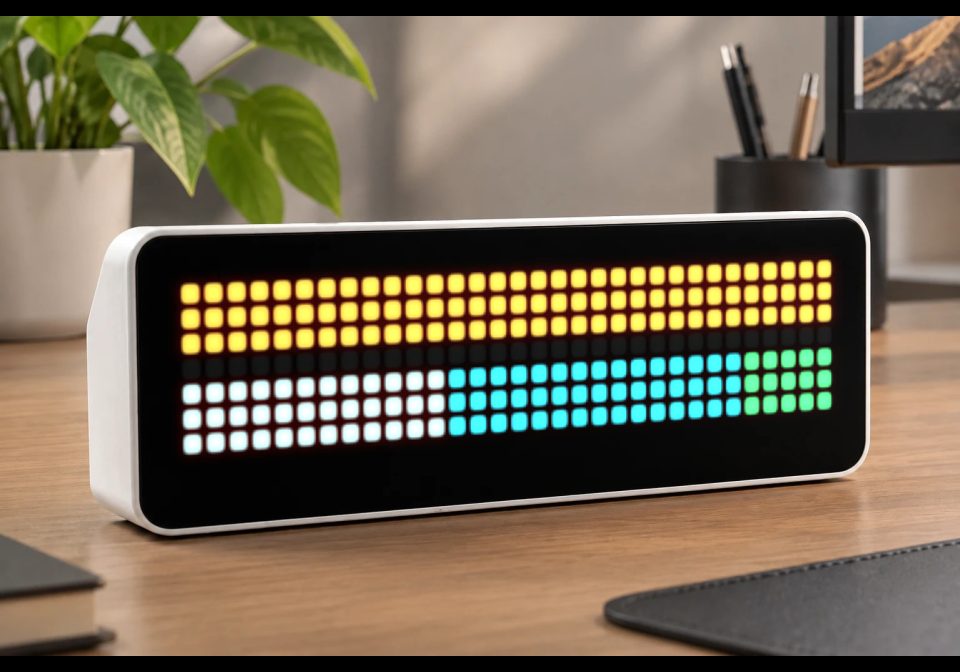
EVCC Energy Dashboard
Live energy balance from EVCC
About this flow
| System | AWTRIX NG Scripts |
|---|---|
| AWTRIX version | AWTRIX NG |
| Topic | Smarthome |
| Built by | Galadril |
| File | lfz0XRjkH7qv.ax · 6.4 KB |
| Icons | — |
| Published | 10 Sep 2026 |
| Downloads | 11 |
Is this your flow?
If you created this flow, open your saved edit link to add it to your account. You can then manage it whenever you sign in. Adding it to your account replaces the edit link.
Flow description
NOTE: This screen requires an EVCC.io setup configured to use the same MQTT server as your AWTRIX NG device.
Energy balance
This screen gives you a live overview of where your energy is coming from and where it is going.
The top bar represents your current energy sources:
- 🟠 Amber — Solar production
- 🔵 Cyan — Battery discharging
- 🔴 Red — Grid import
The bottom bar represents where the energy is being used:
- ⚪ White — Home consumption
- 🟣 Violet — EV charging
- 🔵 Cyan — Battery charging
- 🟢 Green — Grid export
Both bars always fill the full width of the display. Each segment is therefore proportional to the current power flow: a larger segment means that source or consumer represents a larger share of the total power at that moment.
EV battery indicator
The bottom line represents the car's battery level.
It stays empty when no car is connected to the charger and lights up violet while the car is charging.
Only real power flows are shown
The visualization only displays energy that is actually flowing right now.
For example, if the car isn't charging, there is no violet EV segment. If there is no grid import or export, no red or green grid segment is shown. The display deliberately avoids arrows or other indicators that could suggest an energy flow that isn't actually happening.
More EVCC details
Press the button to cycle through the available EVCC datapoints and view more detailed information about your energy system, charger, and vehicle.
More information about EVCC can be found at evcc.io.
lfz0XRjkH7qv.ax
# @name    EVCC Energy Dashboard
# @desc    Live energy balance from EVCC
# @author  Galadril
# @version 1.0
# @config  lp   number "Loadpoint"            default=1 min=1 max=8
# @config  binv bool   "Invert battery sign"  default=false
import math
class SunCatcher
var MODES,LABEL,MCOL
var CPV,CBAT,CIMP,CEXP,CHOME,CCAR
var CARW,CARB,CART,SUNC,SUNR,BLTC,BLTE
var PYLT,PYLA,PYLP,HSER,HSEW,HSEL,PLGP,PLGB,PLGC,BATS
var pv,home,grid,bat,bp,cp,soc,chg,mode
var seen,view,lp,binv
def init()
self.MODES=["pv","minpv","now","off"]
self.LABEL=["PV","MINPV","NOW","OFF"]
self.MCOL=[0x4FC96F,0xE8A33F,0xD9455F,0x6B6B6B]
self.CPV=0xE8A33F
self.CBAT=0x35B5C9
self.CIMP=0xD9455F
self.CEXP=0x4FC96F
self.CHOME=0xB4B4B4
self.CCAR=0x9B7FE0
self.CARW=[3,0,4,0,5,0]
self.CARB=[2,1,3,1,4,1,5,1,6,1,1,2,2,2,3,2,4,2,5,2,6,2,7,2,0,3,1,3,2,3,3,3,4,3,5,3,6,3,7,3]
self.CART=[1,4,6,4]
self.SUNC=[2,1,3,1,4,1,2,2,3,2,4,2,2,3,3,3,4,3]
self.SUNR=[3,0,0,2,6,2,3,4,1,0,5,0,1,4,5,4]
self.BLTC=[3,0,2,1,2,2,3,2,2,3,1,4]
self.BLTE=[4,0,3,1,1,2,4,2,3,3,2,4]
self.PYLT=[3,0,3,1,3,2,3,3,2,4,3,4,4,4]
self.PYLA=[1,1,2,1,4,1,5,1,1,3,2,3,4,3,5,3]
self.PYLP=[0,1,6,1,0,3,6,3]
self.HSER=[3,0,2,1,3,1,4,1,1,2,2,2,3,2,4,2,5,2]
self.HSEW=[1,3,2,3,4,3,5,3,1,4,2,4,4,4,5,4]
self.HSEL=[3,3,3,4]
self.PLGP=[2,0,4,0,2,1,4,1]
self.PLGB=[1,2,2,2,3,2,4,2,5,2,1,3,2,3,3,3,4,3,5,3]
self.PLGC=[3,4]
self.BATS=[0,0,1,0,2,0,3,0,4,0,5,0,6,0,0,1,6,1,0,2,6,2,7,2,0,3,6,3,0,4,1,4,2,4,3,4,4,4,5,4,6,4]
self.lp=store.get("lp",1)
self.binv=store.get("binv",false)
self.pv=0
self.home=0
self.grid=0
self.bat=0
self.bp=0
self.cp=0
self.soc=0
self.chg=false
self.mode="off"
self.seen=0
self.view=0
end
def setup()
var me = self
var st = "evcc/site/#"
var lt = "evcc/loadpoints/" + str(self.lp) + "/#"
mqtt.subscribe(st, def (t, v) me._site(t, v) end)
mqtt.subscribe(lt, def (t, v) me._lp(t, v) end)
end
def _site(t, v)
if t=="evcc/site/pvPower"
self.pv=round(num(v,0))
end
if t=="evcc/site/homePower"
self.home=round(num(v,0))
end
if t=="evcc/site/gridPower"
self.grid=round(num(v,0))
end
if t=="evcc/site/grid/power"
self.grid=round(num(v,0))
end
if t=="evcc/site/batteryPower"
self.bp=round(num(v,0))
end
if t=="evcc/site/battery/power"
self.bp=round(num(v,0))
end
if t=="evcc/site/batterySoc"
self.bat=round(num(v,0))
end
if t=="evcc/site/battery/soc"
self.bat=round(num(v,0))
end
self.seen=now_ms()
end
def _lp(t, v)
var b="evcc/loadpoints/"+str(self.lp)+"/"
if t==b+"chargePower"
self.cp=round(num(v,0))
end
if t==b+"vehicleSoc"
self.soc=round(num(v,0))
end
if t==b+"charging"
self.chg=false
if v=="true"
self.chg=true
end
if v=="1"
self.chg=true
end
end
if t==b+"mode"
self.mode=v
end
self.seen=now_ms()
end
def _mi()
var i=0
while i<size(self.MODES)
if self.MODES[i]==self.mode
return i
end
i+=1
end
return 3
end
def _bpow()
if self.binv
return 0-self.bp
end
return self.bp
end
def _src()
if self.cp<=0
return 0x555555
end
if self.grid<=0
return self.CEXP
end
if self.grid>=self.cp
return self.CIMP
end
return self.CPV
end
def _glyph(g,ox,oy,c)
var i=0
while i<size(g)
pixel(ox+g[i],oy+g[i+1],c)
i+=2
end
end
def _w(v)
var a=v
if a<0
a=0-a
end
if a>=10000
return str(v/1000)+"K"
end
return str(v)+"W"
end
def _stack(y,h,vals,cols)
var tot=0
var i=0
while i<size(vals)
if vals[i]>0
tot+=vals[i]
end
i+=1
end
if tot<=0
rect_fill(0,y,32,h,0x121212)
return
end
var x=0
var lastc=0
i=0
while i<size(vals)
var v=vals[i]
if v>0
var w=v*32/tot
if w<1
w=1
end
if x+w>32
w=32-x
end
if w>0
rect_fill(x,y,w,h,cols[i])
lastc=cols[i]
x+=w
end
end
i+=1
end
if x<32
rect_fill(x,y,32-x,h,lastc)
end
end
def _balance()
var imp=self.grid
var exp=0
if imp<0
exp=0-imp
imp=0
end
var b=self._bpow()
var bdis=b
var bchg=0
if b<0
bchg=0-b
bdis=0
end
var pvp=self.pv
if pvp<0
pvp=0
end
self._stack(0,3,[pvp,bdis,imp],[self.CPV,self.CBAT,self.CIMP])
rect_fill(0,3,32,1,0x0C0C0C)
self._stack(4,3,[self.home,self.cp,bchg,exp],[self.CHOME,self.CCAR,self.CBAT,self.CEXP])
if self.soc>0
var bw=self.soc*32/100
if bw>32
bw=32
end
var c=0x3A2F52
if self.chg
c=self.CCAR
end
rect_fill(0,7,32,1,0x121212)
if bw>0
rect_fill(0,7,bw,1,c)
end
end
end
def _batt(ox)
self._glyph(self.BATS,ox,0,0x8A8A8A)
var lv=self.bat
if lv<0
lv=0
end
if lv>100
lv=100
end
var c=self.CEXP
if lv<50
c=self.CPV
end
if lv<20
c=self.CIMP
end
var n=lv*5/100
var i=0
while i<n
rect_fill(ox+1+i,1,1,3,c)
i+=1
end
end
def _icon(v,ox)
if v==1
self._glyph(self.CARB,ox,0,self.CCAR)
self._glyph(self.CARW,ox,0,0xD9CCF5)
self._glyph(self.CART,ox,0,0x4A4458)
return
end
if v==2
self._glyph(self.BLTE,ox,0,self._src())
self._glyph(self.BLTC,ox,0,0xFFF0A0)
return
end
if v==3
self._glyph(self.SUNR,ox,0,self.CPV)
self._glyph(self.SUNC,ox,0,0xFFE08A)
return
end
if v==4
var tc=self.CIMP
if self.grid<=0
tc=self.CEXP
end
self._glyph(self.PYLA,ox,0,0x6B6B6B)
self._glyph(self.PYLT,ox,0,0x8A8A8A)
self._glyph(self.PYLP,ox,0,tc)
return
end
if v==5
self._glyph(self.PLGB,ox,0,0x8A8A8A)
self._glyph(self.PLGP,ox,0,self.MCOL[self._mi()])
self._glyph(self.PLGC,ox,0,0x5A5A5A)
return
end
if v==6
self._batt(ox)
return
end
self._glyph(self.HSEW,ox,0,self.CHOME)
self._glyph(self.HSER,ox,0,0x8A7F6B)
self._glyph(self.HSEL,ox,0,0xE8C33F)
end
def _iw(v)
if v==1
return 8
end
if v==2
return 5
end
if v==5
return 6
end
if v==6
return 8
end
if v==7
return 6
end
return 7
end
def _detail()
var v=self.view
var s=str(self.soc)+"%"
var tc=self.CCAR
if v==2
s=self._w(self.cp)
tc=self._src()
end
if v==3
s=self._w(self.pv)
tc=self.CPV
end
if v==4
s=self._w(self.grid)
tc=self.CIMP
if self.grid<=0
tc=self.CEXP
end
end
if v==5
s=self.LABEL[self._mi()]
tc=self.MCOL[self._mi()]
end
if v==6
s=str(self.bat)+"%"
tc=self.CBAT
end
if v==7
s=self._w(self.home)
tc=self.CHOME
end
var gw=self._iw(v)
var tw=text_ink_width(s)
var gp=2
if gw+gp+tw>32
gp=1
end
var tot=gw+gp+tw
var ox=(32-tot)/2
if ox<0
ox=0
end
self._icon(v,ox)
text(ox+gw+gp,5,s,tc)
end
def on_button(b)
if b!="select"
return
end
self.view=(self.view+1)%8
end
def on_hide()
self.view=0
end
def duration()
return 18000
end
def draw()
clear()
var now=now_ms()
if self.seen==0
var w="NO EVCC"
text((width()-text_ink_width(w))/2,6,w,0x6B6B6B)
return
end
if self.view==0
self._balance()
end
if self.view>0
self._detail()
end
if now-self.seen>120000
pixel(31,3,self.CIMP)
end
end
end
return SunCatcher()
Install it on your AWTRIX NG
Add this flow to your AWTRIX NG. It will start appearing on your display after installation.
Unable to connect? Download the flow and add it in the Scripts section of your AWTRIX. Advanced users can also use this command:
Discussion 0
Ask a question, suggest a change or share how you use it.
No comments yet. Start the conversation.
More flows for AWTRIX NG Scripts or Smarthome
Something wrong with this flow? Report it.
Have an idea?
Sign in to ask questions and join the conversation.