JP Clock
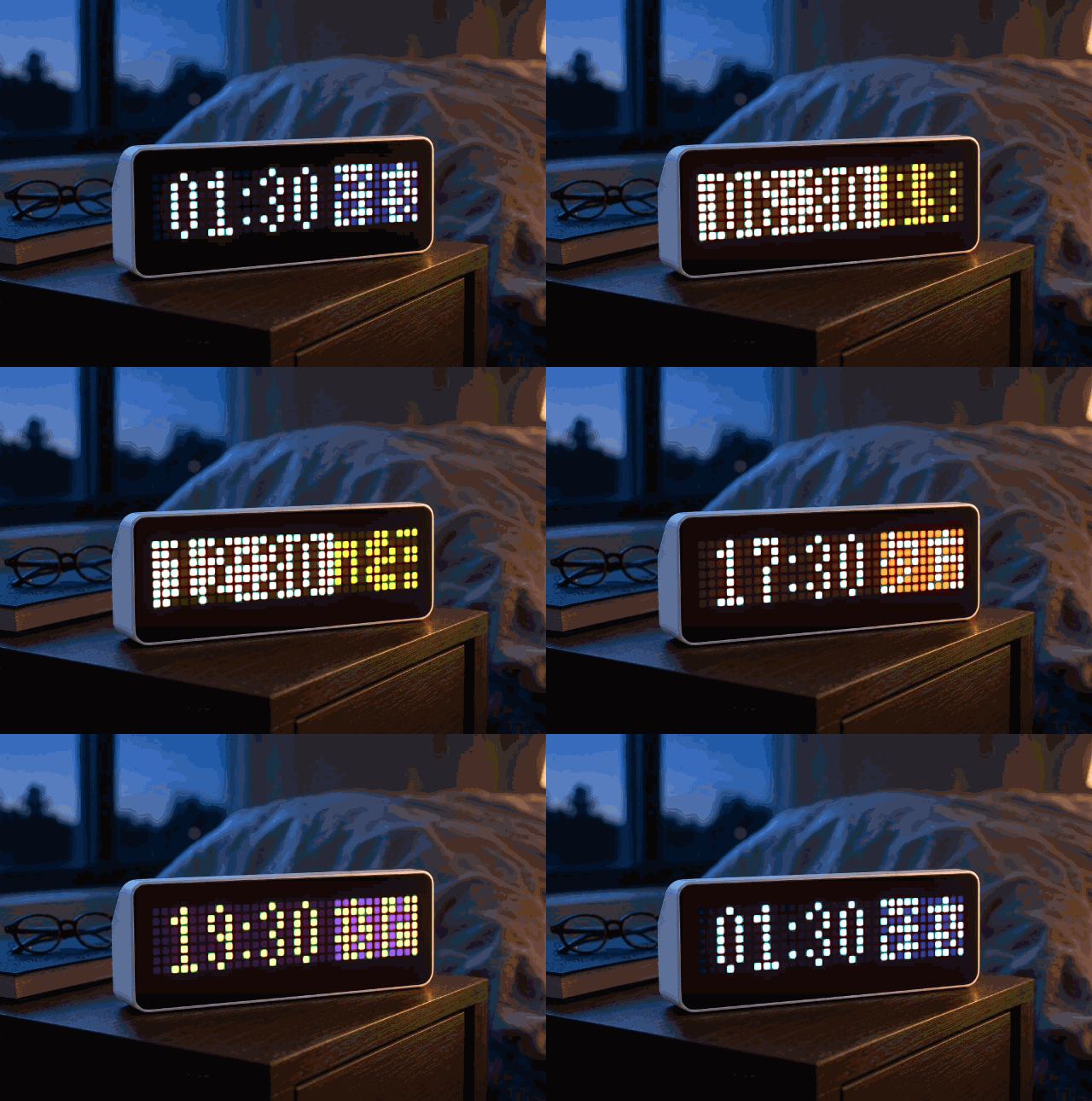
On your display
24-hour clock with Japanese period colours — 深夜 to 夜中.
- Works with
- AWTRIX NG
- Topic
- Miscellaneous
- Includes
- Script
Choose your display in the next step.
Flow description
JP Clock
Shows the time with a Japanese period label on the 32×8 matrix.
Time format: HH:MM (24-hour) plus a two-kanji period on the right.
Periods follow everyday Japanese sense (uneven lengths), not meteorological definitions.
Example: 14:30 午後 = 2:30 p.m.
Periods
| Hours | Kanji | Romaji | Meaning |
|---|---|---|---|
| 00–03 | 深夜 | shinya | Late night |
| 03–05 | 未明 | mimei | Before dawn |
| 05–08 | 早朝 | sōchō | Early morning |
| 08–11 | 午前 | gozen | Morning / a.m. |
| 11–14 | 正午 | shōgo | Midday |
| 14–16 | 午後 | gogo | Afternoon / p.m. |
| 16–18 | 夕方 | yūgata | Evening |
| 18–21 | 夜間 | yakan | Night |
| 21–24 | 夜中 | yonaka | Midnight hours |
Each period has its own split colours: time-side background, label-side background, and ink.
Digits and period kanji are pixel-drawn on the device — no CJK font, no icons, and no Home Assistant push.
Requirements
- AWTRIX NG with Run scripts enabled (System → save → reboot). Do not hold left+right at boot (that disables scripting).
- Correct local time / NTP.
Install
- Paste the script under Scripts → Save.
- Enable Run scripts, reboot without touching the buttons.
Demo (Apps → ⚙)
| Setting | Default | |
|---|---|---|
| Demo mode | off | Cycles all nine periods (sample mid-slot time). Pauses app rotation while on. |
| Demo seconds | 2 | Seconds per step |
Glyph shapes adapted from the k6x8 bitmap font family (narrow 5 px cells).
jW7e3p9FjO3q.ax
# @name JP Clock
# @desc Time + Japanese period label (深夜…夜中)
# @author FORCEK
# @version 2.0
# @config demo bool "Demo mode" default=false
# @config demosec number "Demo seconds" default=2 min=1 max=10 unit=s

class JpClock
  var digits
  var glyphs
  var p_h0
  var p_h1
  var p_g0
  var p_g1
  var p_lb
  var p_ink
  var p_tb
  var demo_i
  var demo_tick
  var demo_every
  var demo_hold

  def init()
    self.demo_i = 0
    self.demo_tick = 0
    self.demo_hold = false
    self.demo_every = int(store.get("demosec"))
    if self.demo_every < 1
      self.demo_every = 2
    end
    # Flat row bitmasks: digit d → index d*8 .. d*8+7
    self.digits = [
      2,5,5,5,5,5,2,0,
      2,6,2,2,2,2,7,0,
      2,5,1,2,2,4,7,0,
      2,5,1,2,1,5,2,0,
      1,3,5,5,7,1,1,0,
      7,4,6,5,1,5,2,0,
      2,5,4,6,5,5,2,0,
      7,5,1,2,2,2,2,0,
      2,5,5,2,5,5,2,0,
      2,5,5,3,1,5,2,0
    ]
    # Glyph g → index g*8 .. g*8+7
    self.glyphs = [
      31,13,18,15,18,23,26,0,
      4,31,10,11,29,10,13,0,
      4,14,4,31,4,14,21,0,
      31,21,31,21,31,5,11,0,
      14,10,14,10,14,31,4,0,
      31,13,31,29,15,29,11,0,
      8,15,20,4,31,4,4,0,
      10,31,0,29,21,29,21,0,
      31,2,2,11,10,10,31,0,
      10,20,10,27,13,10,13,0,
      8,15,9,21,2,4,24,0,
      4,31,8,15,9,9,19,0,
      27,27,17,23,23,23,17,0,
      4,31,21,21,31,4,4,0
    ]
    # Parallel period tables (was 9 nested 7-tuples)
    self.p_h0 = [0,3,5,8,11,14,16,18,21]
    self.p_h1 = [3,5,8,11,14,16,18,21,24]
    self.p_g0 = [0,2,4,6,8,6,10,1,1]
    self.p_g1 = [1,3,5,7,6,9,11,12,13]
    self.p_lb = [0x142464,0x1C3078,0xFFBA48,0xFFD228,0xFFE63C,0xFFBE32,0xFF7830,0x783CA0,0x282830]
    self.p_ink = [0xDCE6FF,0xFFE68C,0x281C0C,0x282008,0x1E1C00,0x241C06,0xFFEBE0,0xFFE678,0xFFDC50]
    self.p_tb = [0x060812,0x0C1024,0xFFECC8,0xFFF8C8,0xFFFCDC,0xFFF5D2,0x24120C,0x1C0E24,0x08080C]
  end

  def blit(src, base, x0, w, color)
    var y = 0
    while y < 8
      var bits = src[base + y]
      var x = 0
      while x < w
        if bits & (1 << (w - 1 - x))
          pixel(x0 + x, y, color)
        end
        x += 1
      end
      y += 1
    end
  end

  def period_i(h)
    var i = 0
    while i < 9
      if h >= self.p_h0[i] && h < self.p_h1[i]
        return i
      end
      i += 1
    end
    return 8
  end

  def hold_demo(on)
    if on
      if !self.demo_hold
        rotation.pause()
        self.demo_hold = true
      end
    elif self.demo_hold
      rotation.resume()
      self.demo_hold = false
    end
  end

  def on_show()
    if store.get("demo")
      self.hold_demo(true)
    end
  end

  def on_hide()
    self.hold_demo(false)
  end

  def loop()
    if !store.get("demo")
      self.hold_demo(false)
      return
    end
    self.demo_tick += 1
    if self.demo_tick < self.demo_every
      return
    end
    self.demo_tick = 0
    self.demo_i += 1
    if self.demo_i >= 9
      self.demo_i = 0
    end
  end

  def draw()
    var h = hour()
    var m = minute()
    var pi = self.period_i(h)

    if store.get("demo")
      self.hold_demo(true)
      pi = self.demo_i
      h = int((self.p_h0[pi] + self.p_h1[pi]) / 2)
      if h >= 24
        h = 23
      end
      m = 30
    end

    var ink = self.p_ink[pi]
    clear()
    rect_fill(0, 0, 21, 7, self.p_tb[pi])
    rect_fill(21, 0, 11, 7, self.p_lb[pi])

    self.blit(self.digits, int(h / 10) * 8, 2, 3, ink)
    self.blit(self.digits, (h % 10) * 8, 6, 3, ink)
    pixel(10, 2, ink)
    pixel(10, 5, ink)
    self.blit(self.digits, int(m / 10) * 8, 12, 3, ink)
    self.blit(self.digits, (m % 10) * 8, 16, 3, ink)

    self.blit(self.glyphs, self.p_g0[pi] * 8, 21, 5, ink)
    self.blit(self.glyphs, self.p_g1[pi] * 8, 27, 5, ink)
  end

  def duration()
    if store.get("demo")
      return 86400000
    end
    return 8000
  end
end

return JpClock()Discussion 0
Ask a question, suggest a change or share how you use it.
No comments yet. Start the conversation.
More flows for AWTRIX NG Scripts or Miscellaneous
Something wrong with this flow? Report it.
Have an idea?
Sign in to ask questions and join the conversation.