Sonos Artist Names
For your scripts
Global, optional artist abbreviations for Sonos Remote after the first full-name scroll.
A module, not an app: it shows nothing by itself and adds functions that your scripts import.
- Topic
- Smarthome
- Includes
- Module
Runs on
- Does not run on 32×8 (TC001 & DIY) Made for 52×16 (TC002).
- Runs on 52×16 (TC002)
- Does not run on 32×8 with AWTRIX 3 (TC001 & DIY) Made for AWTRIX NG.
Choose your display in the next step.
Flow description
Sonos Artist Names — settings module
A settings dependency of Sonos Remote for TC002. It does not draw a screen or control a player by itself. Defaults are empty: full artist names keep scrolling. Tested with Sonos Remote 3.3.1 on official AWTRIX NG TC002 beta 1.1.6.
Installation
Install under the exact name sonos_artist_names. Use Install all when installing the main Sonos Remote app, or install this module first for a manual installation.
Optional global rules
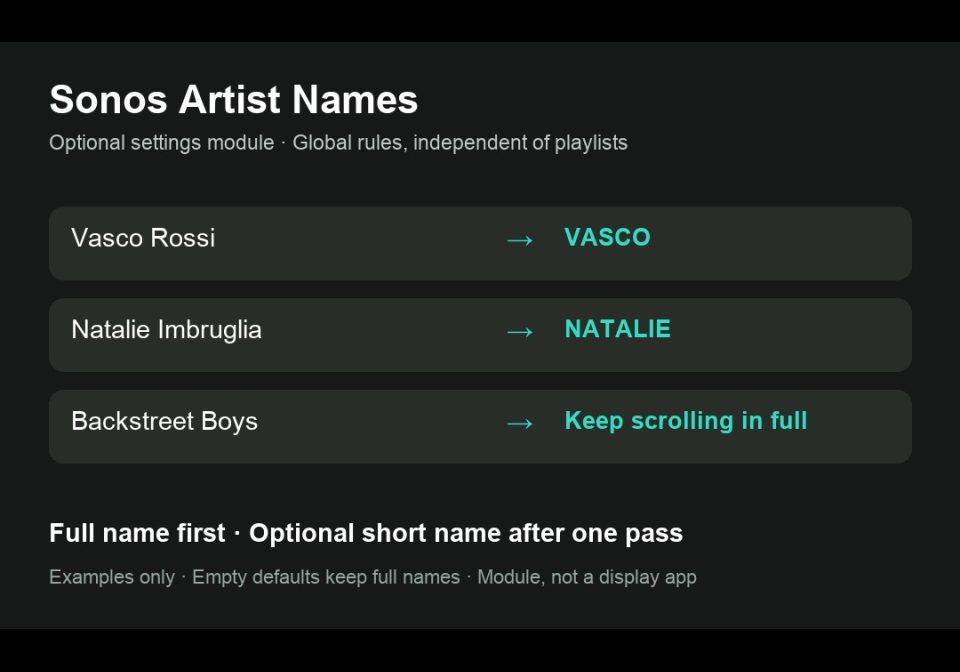
Open the module settings in Apps → Modules → Sonos Artist Names. Enter rules as Full name|Short name, separated with ;. Example: Vasco Rossi|Vasco. Use Full name|* to keep the full name scrolling. Rules apply globally, independently of playlists. The optional overrides field takes priority.
On the artist line, a name that already fits remains centered. A longer full name scrolls once before a configured short name is centered, provided the abbreviation fits the available pixels. Without a valid fitting abbreviation, the complete name continues to scroll. The second line keeps the track title. Names such as Backstreet Boys are kept complete by default.
The cover is illustrative: example rules are not installed as defaults.
Main app, Home Assistant blueprint and documentation: https://github.com/lucaamo/tc002-sonos-remote
License: PolyForm Noncommercial 1.0.0, supplied in the source repository. Required Notice: Copyright © Stephan Mühl (Blueforcer) https://github.com/Blueforcer/awtrix-ng. Community contribution by lucaamo; no official endorsement is implied.
Sign in to view and copy the code of this flow.
Discussion 0
Ask a question, suggest a change or share how you use it.
No comments yet. Start the conversation.
More flows for AWTRIX NG Scripts or Smarthome
Something wrong with this flow? Report it.
Have an idea?
Sign in to ask questions and join the conversation.