Claude Usage
Use with Home Assistant Blueprint
Shows Claude usage.
- Topic
- Miscellaneous
- Includes
- Flow
Runs on
- Does not run on 32×8 (TC001 & DIY) Made for 52×16 (TC002).
- Runs on 52×16 (TC002)
- Does not run on 32×8 with AWTRIX 3 (TC001 & DIY) Made for AWTRIX NG.
Flow description
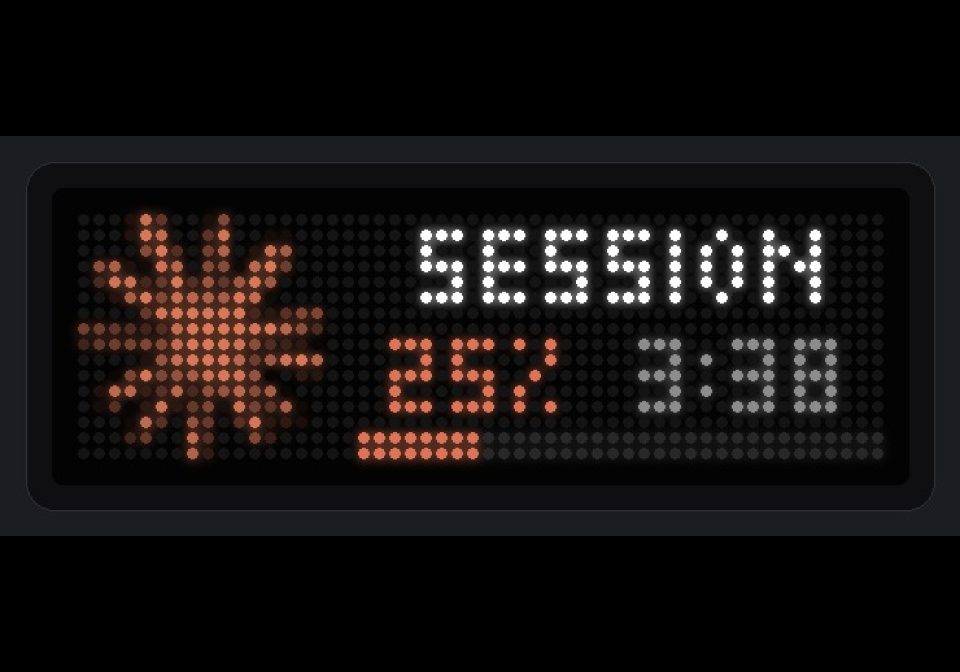
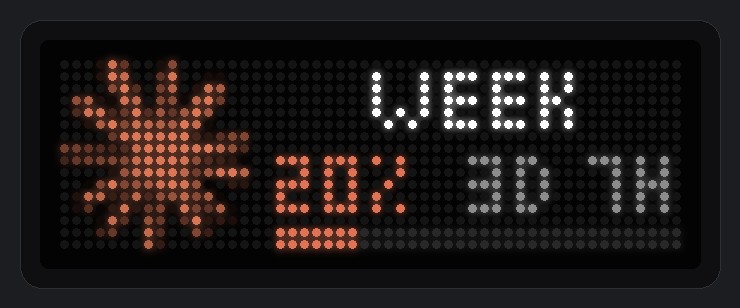
Shows your Claude plan usage on an AWTRIX NG TC002 (52x16). Use one automation per limit, for example the 5-hour session and the weekly limit.
Each app shows an icon, a label, the usage percentage and the time left until the reset, with a progress bar along the bottom. The percentage and bar turn yellow and then red as usage crosses two thresholds you choose. When a reset time sensor is set, the time left refreshes every minute.
-
Install the Claude Usage integration (github.com/trickv/hass-claude-usage). It provides the usage sensors (session and week, in %) and the reset time sensors.
-
Upload a 16x16 icon to the clock and enter its ID in the blueprint (default: claude). AWTRIX NG refuses the update when the icon is missing. Leave the field empty for a text-only layout.
-
Import the blueprint and create two automations:
Session
- Usage sensor: Session usage
- Reset sensor: Session reset time
- Label: Session
- App name: claude_session_usage
Week
- Usage sensor: Week usage
- Reset sensor: Weekly reset time
- Label: Week
- App name: claude_week_usage
-
Adjust the thresholds, colors and time-left language as needed.
Community blueprint, not affiliated with Anthropic.
Sign in to view and copy the code of this flow.
Discussion 1
Ask a question, suggest a change or share how you use it.
Newest first
More flows for Home Assistant Blueprint or Miscellaneous
Something wrong with this flow? Report it.
Have an idea?
Sign in to ask questions and join the conversation.