Pixel Fireplace
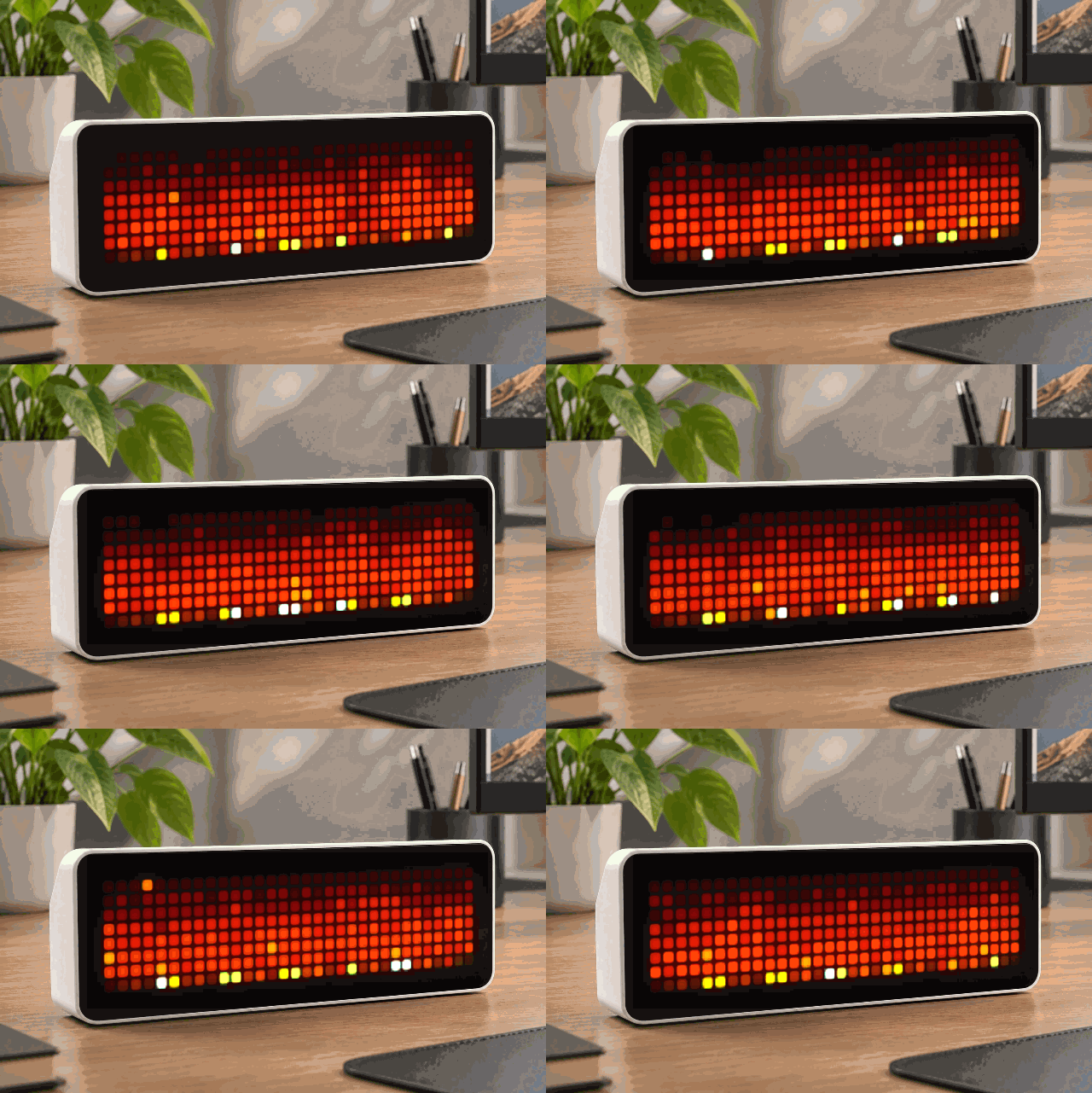
On your display
Turn your AWTRIX NG into a tiny, cozy 32×8 pixel fireplace. 🔥
- Works with
- AWTRIX NG
- Topic
- Miscellaneous
- Includes
- Script
Choose your display in the next step.
Flow description
Bring some warmth to your pixel clock with Pixel Fireplace.
This isn't a looping animation. The fireplace uses a continuously evolving heat simulation, creating flames that rise, spread, cool and flicker naturally across the display.
Hot white and yellow cores emerge from the glowing ember bed, transition through orange and deep red, and disappear into the darkness. Small sparks occasionally escape from the flames, making the entire display feel alive.
XdOC4aQM8Fgq.ax
# @name Pixel Fireplace
# @desc Full-screen procedural pixel fire
# @version 2.0

class PixelFireplace

 var a,b,seed,last

 def init()
  self.seed=now_ms()+4517
  self.last=0
  self.a=[]
  self.b=[]

  for i:0..255
   self.a.push(0)
   self.b.push(0)
  end
 end

 def rnd(n)
  self.seed=(self.seed*1103515245+12345)%2147483647
  if self.seed<0 self.seed=-self.seed end
  return self.seed%n
 end


 # =====================================
 # FIRE PHYSICS
 # =====================================

 def update()

  var n=now_ms()
  if n-self.last<75 return end
  self.last=n


  # -----------------------------------
  # FIRE BED
  #
  # Constant heat along bottom with
  # random darker holes and hot spots.
  # -----------------------------------

  for x:0..31

   var h=190+self.rnd(66)

   if self.rnd(8)==0
    h=80+self.rnd(80)
   end

   self.a[224+x]=h

  end


  # extra white-hot pockets

  for i:0..5
   var x=2+self.rnd(28)
   self.a[224+x]=255
  end


  # -----------------------------------
  # PROPAGATE HEAT UPWARD
  # -----------------------------------

  for y:0..6

   for x:0..31

    var below=(y+1)*32+x
    var h=self.a[below]

    # mix nearby heat

    if x>0
     h+=self.a[below-1]
    else
     h+=self.a[below]
    end

    if x<31
     h+=self.a[below+1]
    else
     h+=self.a[below]
    end

    # heat two rows below makes
    # taller connected flames

    if y<6
     var yy=y+2
     if yy>7 yy=7 end
     h+=self.a[yy*32+x]
    end

    h=h/4


    # cooling increases toward top

    var cool=10+self.rnd(22)

    if y<3
     cool+=10
    end

    h-=cool

    if h<0 h=0 end


    # sideways turbulence

    var dx=0
    var r=self.rnd(5)

    if r==0 dx=-1 end
    if r==4 dx=1 end

    var xx=x+dx
    if xx<0 xx=0 end
    if xx>31 xx=31 end

    self.b[y*32+xx]=h

   end

  end


  # bottom remains combustion layer

  for x:0..31
   self.b[224+x]=self.a[224+x]
  end


  # swap buffers

  var q=self.a
  self.a=self.b
  self.b=q

 end


 # =====================================
 # HEAT -> FIRE COLOR
 # =====================================

 def dot(x,y,h)

  if h<18
   return
  end

  var c=0

  # deep ember
  if h<55
   c=0x260000

  # dark red
  elif h<90
   c=0x600000

  # red
  elif h<125
   c=0xB01000

  # orange/red
  elif h<165
   c=0xFF2800

  # orange
  elif h<200
   c=0xFF7000

  # yellow
  elif h<230
   c=0xFFC000

  # yellow-white
  elif h<248
   c=0xFFFF40

  # hottest core
  else
   c=0xFFFFD0
  end

  pixel(x,y,c)

 end


 # =====================================
 # EMBERS
 # =====================================

 def embers()

  # occasional isolated hot pixels
  # above the main flames

  if self.rnd(3)==0

   var x=3+self.rnd(26)
   var y=self.rnd(4)

   if self.rnd(3)==0
    pixel(x,y,0xFFFF80)
   else
    pixel(x,y,0xFF5000)
   end

  end

 end


 # =====================================
 # LOG / COAL BED
 # =====================================

 def bed()

  # dark irregular foreground

  pixel(0,7,0x240800)
  pixel(1,7,0x451000)
  pixel(2,7,0x701500)
  pixel(3,7,0x301000)

  pixel(6,7,0x701500)
  pixel(7,7,0xA02000)
  pixel(8,7,0x451000)

  pixel(11,7,0x8A1800)
  pixel(12,7,0xD03000)
  pixel(13,7,0x601000)

  pixel(16,7,0xA02000)
  pixel(17,7,0xF04000)
  pixel(18,7,0x701500)

  pixel(21,7,0x701500)
  pixel(22,7,0xC02800)
  pixel(23,7,0x501000)

  pixel(26,7,0x901800)
  pixel(27,7,0xD03000)
  pixel(28,7,0x601000)

  pixel(30,7,0x401000)
  pixel(31,7,0x200800)

 end


 # =====================================
 # DRAW
 # =====================================

 def draw()

  self.update()

  clear(0x010000)

  for y:0..7
   for x:0..31
    self.dot(x,y,self.a[y*32+x])
   end
  end

  self.embers()
  self.bed()

 end

end

return PixelFireplace()Discussion 0
Ask a question, suggest a change or share how you use it.
No comments yet. Start the conversation.
More flows for AWTRIX NG Scripts or Miscellaneous
Something wrong with this flow? Report it.
Have an idea?
Sign in to ask questions and join the conversation.