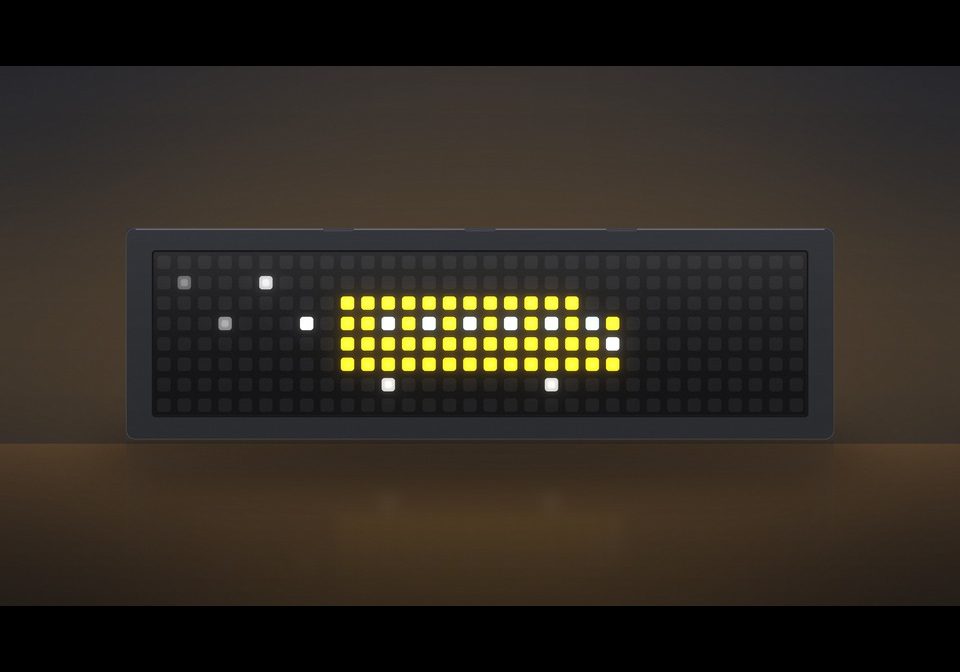
Bus Time Alert for Kids
Flashes a Bus animation at a given time
About this flow
| System | AWTRIX NG Scripts |
|---|---|
| AWTRIX version | AWTRIX 3 |
| Topic | Smarthome |
| Built by | LAGold27 |
| File | WrSDE5wrdVfV.ax · 3.5 KB |
| Icons | — |
| Published | 28 Aug 2026 |
| Downloads | 28 |
Is this your flow?
If you created this flow, open your saved edit link to add it to your account. You can then manage it whenever you sign in. Adding it to your account replaces the edit link.
Flow description
My kids are always late for the School Bus. This script allows the user to set a time and displays an animation of a School Bus and plays a tune during a 10 minute window so the kids get moving and out the door to get to the bus!
WrSDE5wrdVfV.ax
# @name    Bus Clock
# @desc    HH:MM clock; flashes BUS TIME at 8:15 for 10 min with a melody and animation
# @config  weekdaysOnly bool "Weekdays only" default=false

class BusClock
  var alerted   # true once the melody has played for the current window

  def init()
    self.alerted = false
  end

  def in_window()
    # 08:15:00 through 08:24:59
    if hour() != 8 || minute() < 10 || minute() >= 22
      return false
    end
    if store.get("weekdaysOnly") && (weekday() == 0 || weekday() == 6)
      return false
    end
    return true
  end

  def loop()
    if self.in_window()
      if !self.alerted
        self.alerted = true
        sound.rtttl("cucaracha:d=8,o=5,b=170:c,c,c,4f,4a,c,c,c,4f,4a,4f,4f,e,e,d,d,2c")
        rotation.show()   # bring this app on screen when the alert starts
      end
    else
      self.alerted = false
    end
  end

  def draw()
    clear()

    if self.in_window()
      # 9800ms cycle: 3s text, 2.8s bus animation, 4s clock
      var t = now_ms() % 9800
      if t < 3000
        scroll_text("BUS TIME", 0xFF0000)
      elif t < 5800
        # bus drives left-to-right over 2.8s, starting and
        # ending fully off-screen (smoke trail included)
        var span = width() + 30   # travel distance: 22px off left + 8px off right
        self.draw_bus(-22 + ((t - 3000) * span) / 2800)
      else
        # show the clock for 4 seconds
        self.draw_clock(false)
      end
      return
    end

    if hour() < 0   # clock not synced yet
      text(1, 6, "--:--", 0x666666)
      return
    end

    self.draw_clock(true)
  end

  def draw_clock(with_battery)
    var h = hour()
    var m = minute()
    var h12 = h % 12
    if h12 == 0
      h12 = 12
    end
    var suffix = h < 12 ? " AM" : " PM"
    var mm = m < 10 ? "0" + str(m) : str(m)
    var full = str(h12) + ":" + mm + suffix
    var x = (width() - text_width(full)) / 2
    text(x, 6, full, hsv(210, 50, 10))   # blue at 10% brightness
    if with_battery
      self.draw_battery()
    end
  end

  def draw_bus(x)
    # x is the left edge of the bus body; the bus is 14px long with the
    # nose and headlight, and the smoke trail extends 8px behind it
    var yellow = 0xFFB000

    rect_fill(x, 2, 12, 4, yellow)        # body
    rect_fill(x + 12, 3, 2, 3, yellow)    # snub nose at the front

    var win = 0x99CCFF                    # windows along the top
    pixel(x + 2, 3, win)
    pixel(x + 4, 3, win)
    pixel(x + 6, 3, win)
    pixel(x + 8, 3, win)
    pixel(x + 10, 3, win)
    pixel(x + 12, 3, win)                 # windshield

    pixel(x + 13, 4, 0xFFFFFF)            # headlight
    pixel(x + 2, 6, 0x999999)             # wheels
    pixel(x + 10, 6, 0x999999)

    # smoke puffs behind the bus, fading out and bobbing as it drives
    var bob = int(now_ms() / 150) % 2
    pixel(x - 2, 2 + bob, 0xBBBBBB)
    pixel(x - 4, 1 + (1 - bob), 0x888888)
    pixel(x - 6, 2 + bob, 0x555555)
    pixel(x - 8, 1 + (1 - bob), 0x333333)
  end

  def draw_battery()
    var b = sensor.battery()
    if b == nil   # no battery sensor on this device
      return
    end
    var w = (width() * clamp(b, 0, 100) + 50) / 100
    #var w = (width() * clamp(b, 0, 100)) / 100
    if w > 0
      # light green / red at 10% brightness to match the clock
      var c = b < 15 ? hsv(0, 100, 10) : hsv(115, 30, 5)
      rect_fill(0, height() - 1, w, 1, c)
    end
  end
end

return BusClock()
Install it on your AWTRIX NG
Add this flow to your AWTRIX NG. It will start appearing on your display after installation.
Unable to connect? Download the flow and add it in the Scripts section of your AWTRIX. Advanced users can also use this command:
Discussion 0
Ask a question, suggest a change or share how you use it.
No comments yet. Start the conversation.
More flows for AWTRIX NG Scripts or Smarthome
Something wrong with this flow? Report it.
Have an idea?
Sign in to ask questions and join the conversation.