JP Date — weekday (youbi) icon + month/day
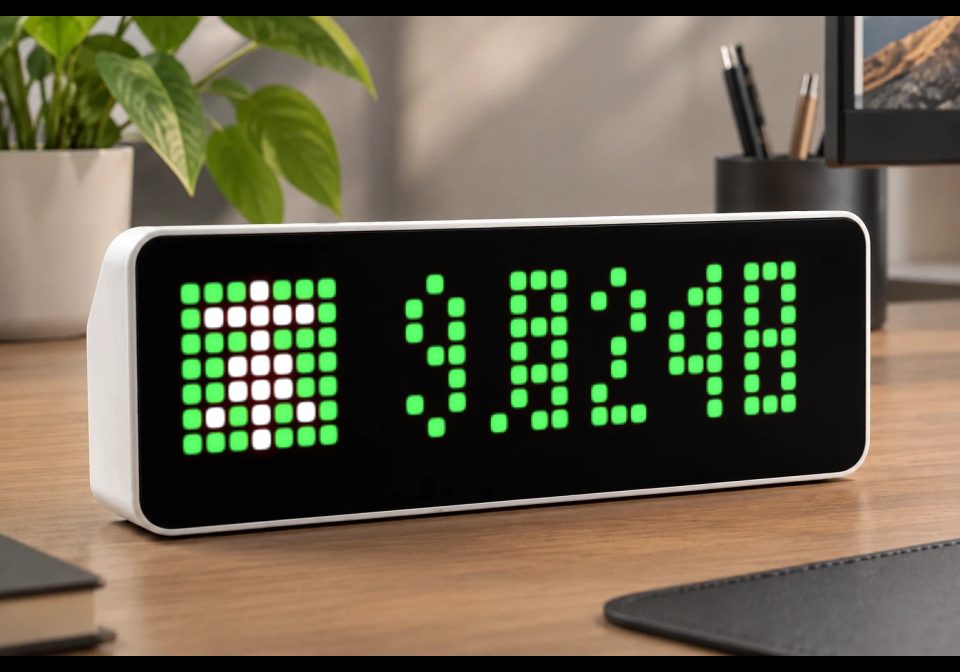
On your display
Coloured Japanese weekday icon and today’s date as month「月」day「日」
- Works with
- AWTRIX NG
- Topic
- Miscellaneous
- Includes
- Script
Choose your display in the next step.
Flow description
JP Date
Shows a coloured Japanese weekday icon and today’s date on the 32×8 matrix.
Date format: M月D日
- 月 (gatsu / tsuki) = month
- 日 (nichi / hi) = day
Example: 9月24日 = September 24.
Weekday icons (曜 youbi):
| Icon file | Kanji | Romaji | Meaning |
|---|---|---|---|
youbi_sun_nichi |
日 | nichi | Sunday |
youbi_mon_getsu |
月 | getsu | Monday |
youbi_tue_ka |
火 | ka | Tuesday |
youbi_wed_sui |
水 | sui | Wednesday |
youbi_thu_moku |
木 | moku | Thursday |
youbi_fri_kin |
金 | kin | Friday |
youbi_sat_do |
土 | do | Saturday |
Digits and 月/日 are pixel-drawn on the device — no CJK font and no Home Assistant push.
Requirements
- AWTRIX NG with Run scripts enabled (System → save → reboot). Do not hold left+right at boot (that disables scripting).
- Correct local time / NTP.
- The seven 7×7 GIF icons named exactly as in the table above.
Install
- Upload the seven GIFs to
/ICONS(or install via Hub if attached). - Paste the script under Scripts → Save.
- Enable Run scripts, reboot without touching the buttons.
Layout
Left: weekday kanji icon. Right: centred M月D日 (digit pitch 4 px). If space is tight, padding to the right of 日 is reduced first. Duration 8 s.
Glyph shapes adapted from the k6x8 bitmap font family.
W5eBzh7msvJX.ax
# @name    JP Date
# @desc    Weekday icon + x月x日
# @author  FORCEK
# @version 1.1
# @icons   youbi-sun-nichi, youbi-mon-getsu, youbi-tue-ka, youbi-wed-sui, youbi-thu-moku, youbi-fri-kin, youbi-sat-do

class JpDate
  var colors
  var icons
  var digits
  var tsuki
  var nichi

  def init()
    self.colors = [
      0xEE3333,
      0xC44EC4,
      0xFF8800,
      0x44CCEE,
      0x44CC44,
      0xFFDD00,
      0x3355CC
    ]
    self.icons = [
      "youbi-sun-nichi",
      "youbi-mon-getsu",
      "youbi-tue-ka",
      "youbi-wed-sui",
      "youbi-thu-moku",
      "youbi-fri-kin",
      "youbi-sat-do"
    ]
    self.digits = [
      [[0,1,0],[1,0,1],[1,0,1],[1,1,1],[1,0,1],[1,0,1],[0,1,0],[0,0,0]],
      [[0,1,0],[1,1,0],[0,1,0],[0,1,0],[0,1,0],[0,1,0],[1,1,1],[0,0,0]],
      [[0,1,0],[1,0,1],[0,0,1],[0,1,0],[0,1,0],[1,0,0],[1,1,1],[0,0,0]],
      [[0,1,0],[1,0,1],[0,0,1],[0,1,0],[0,0,1],[1,0,1],[0,1,0],[0,0,0]],
      [[0,0,1],[0,1,1],[1,0,1],[1,0,1],[1,1,1],[0,0,1],[0,0,1],[0,0,0]],
      [[1,1,1],[1,0,0],[1,1,0],[1,0,1],[0,0,1],[1,0,1],[0,1,0],[0,0,0]],
      [[0,1,0],[1,0,1],[1,0,0],[1,1,0],[1,0,1],[1,0,1],[0,1,0],[0,0,0]],
      [[1,1,1],[1,0,1],[0,0,1],[0,1,0],[0,1,0],[0,1,0],[0,1,0],[0,0,0]],
      [[0,1,0],[1,0,1],[1,0,1],[0,1,0],[1,0,1],[1,0,1],[0,1,0],[0,0,0]],
      [[0,1,0],[1,0,1],[1,0,1],[0,1,1],[0,0,1],[1,0,1],[0,1,0],[0,0,0]]
    ]
    self.tsuki = [
      [0,1,1,1],
      [0,1,0,1],
      [0,1,1,1],
      [0,1,0,1],
      [0,1,1,1],
      [0,1,0,1],
      [1,0,1,1],
      [0,0,0,0]
    ]
    self.nichi = [
      [1,1,1],
      [1,0,1],
      [1,0,1],
      [1,1,1],
      [1,0,1],
      [1,0,1],
      [1,1,1],
      [0,0,0]
    ]
  end

  def blit(rows, x0, color)
    var y = 0
    while y < size(rows)
      var row = rows[y]
      var x = 0
      while x < size(row)
        if row[x]
          pixel(x0 + x, y, color)
        end
        x += 1
      end
      y += 1
    end
  end

  def draw()
    clear()
    var wd = weekday()
    var col = self.colors[wd]
    if !icon(self.icons[wd], 0, 0)
      rect_fill(0, 0, 7, 7, col)
    end

    var m = month()
    var d = day()
    var md = 1
    if m >= 10
      md = 2
    end
    var dd = 1
    if d >= 10
      dd = 2
    end
    var cw = md * 4 + 4 + 1 + dd * 4 + 3
    var avail = width() - 7
    var extra = avail - cw
    if extra < 0
      extra = 0
    end
    var left = (extra + 1) / 2
    var x = 7 + left

    if m >= 10
      var t = int(m / 10)
      self.blit(self.digits[t], x, col)
      x += 4
      var o = m - t * 10
      self.blit(self.digits[o], x, col)
      x += 4
    else
      self.blit(self.digits[m], x, col)
      x += 4
    end

    self.blit(self.tsuki, x, col)
    x += 5

    if d >= 10
      var t = int(d / 10)
      self.blit(self.digits[t], x, col)
      x += 4
      var o = d - t * 10
      self.blit(self.digits[o], x, col)
      x += 4
    else
      self.blit(self.digits[d], x, col)
      x += 4
    end

    self.blit(self.nichi, x, col)
  end

  def duration()
    return 8000
  end
end

return JpDate()Discussion 0
Ask a question, suggest a change or share how you use it.
No comments yet. Start the conversation.
More flows for AWTRIX NG Scripts or Miscellaneous
Something wrong with this flow? Report it.
Have an idea?
Sign in to ask questions and join the conversation.