Countdown für TC002
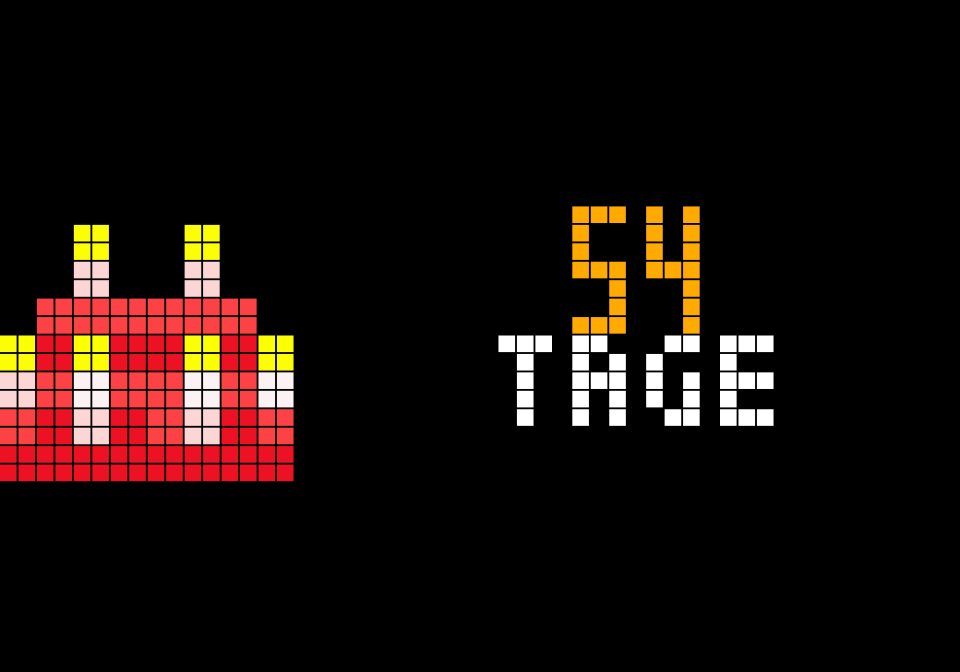
On your display
Day countdown with 16×16 icon
- Topic
- Miscellaneous
- Includes
- Script
Runs on
- Does not run on Ulanzi TC001 Needs a panel of at least 52×16; its panel is 32×8.
- Runs on Ulanzi TC002
- Runs on ESP32 (DIY) Needs a panel of at least 52×16.
- Runs on ESP32-S3 (DIY) Needs a panel of at least 52×16.
- Does not run on Ulanzi TC001 with AWTRIX 3 Made for AWTRIX NG.
- Does not run on ESP32 (DIY) with AWTRIX 3 Made for AWTRIX NG.
Choose your display in the next step.
Flow description
The Countdown app displays the number of days remaining until a specific date—such as Christmas, a vacation, a birthday, or an anniversary—on your Awtrix NG. A 16×16 icon of your choice appears on the left, with the remaining days displayed in a large font to its right. An optional small label, such as "DAYS," can be displayed underneath. The script is designed for panels with a height of 16 pixels (e.g., 52×16). It automatically detects the panel size and centers the number and text within the available space next to the icon.
Everything can be easily configured via the web UI without touching the code: target date, icon ID, label, and colors for the number and text. As the date approaches, the number changes to a warning color; you define the threshold (number of days) for this change. When exactly one day remains, the display shows "DAY" instead of "DAYS," and on the target date itself, it shows "TODAY." You can also choose to have the app automatically remove itself from the rotation once the date has passed.
The script runs entirely locally on the clock, requiring neither an internet API nor Home Assistant. Calculations are performed only once per minute to minimize memory and processing usage. Until the time synchronizes after startup, the app displays "..." as a placeholder. If the icon is missing, a subtle gray frame appears instead.
Settings: Target date (YYYY-MM-DD), icon ID, label, warning threshold (in days), number color, warning color, label color, hide after expiration.
Prerequisites: AWTRIX NG with script support and an installed 16×16 icon.
Sign in to view and copy the code of this flow.
Discussion 0
Ask a question, suggest a change or share how you use it.
No comments yet. Start the conversation.
More flows for AWTRIX NG Scripts or Miscellaneous
Something wrong with this flow? Report it.
Have an idea?
Sign in to ask questions and join the conversation.