Bambu Print Status

Use with N8N
Bambu Lab print progress on your 52x16 clock: percent, time left, finish time, and a DONE / FAIL alert with sound. Uses a small n8n workflow as MQTT bridge.
- Topic
- Smarthome
- Includes
- Flow · 4 icons
Runs on
- Does not run on Ulanzi TC001 Not listed for this device.
- Runs on Ulanzi TC002
- Does not run on ESP32 (DIY) Not listed for this device.
- Does not run on ESP32-S3 (DIY) Not listed for this device.
- Does not run on Ulanzi TC001 with AWTRIX 3 Made for AWTRIX NG.
- Does not run on ESP32 (DIY) with AWTRIX 3 Made for AWTRIX NG.
Flow description
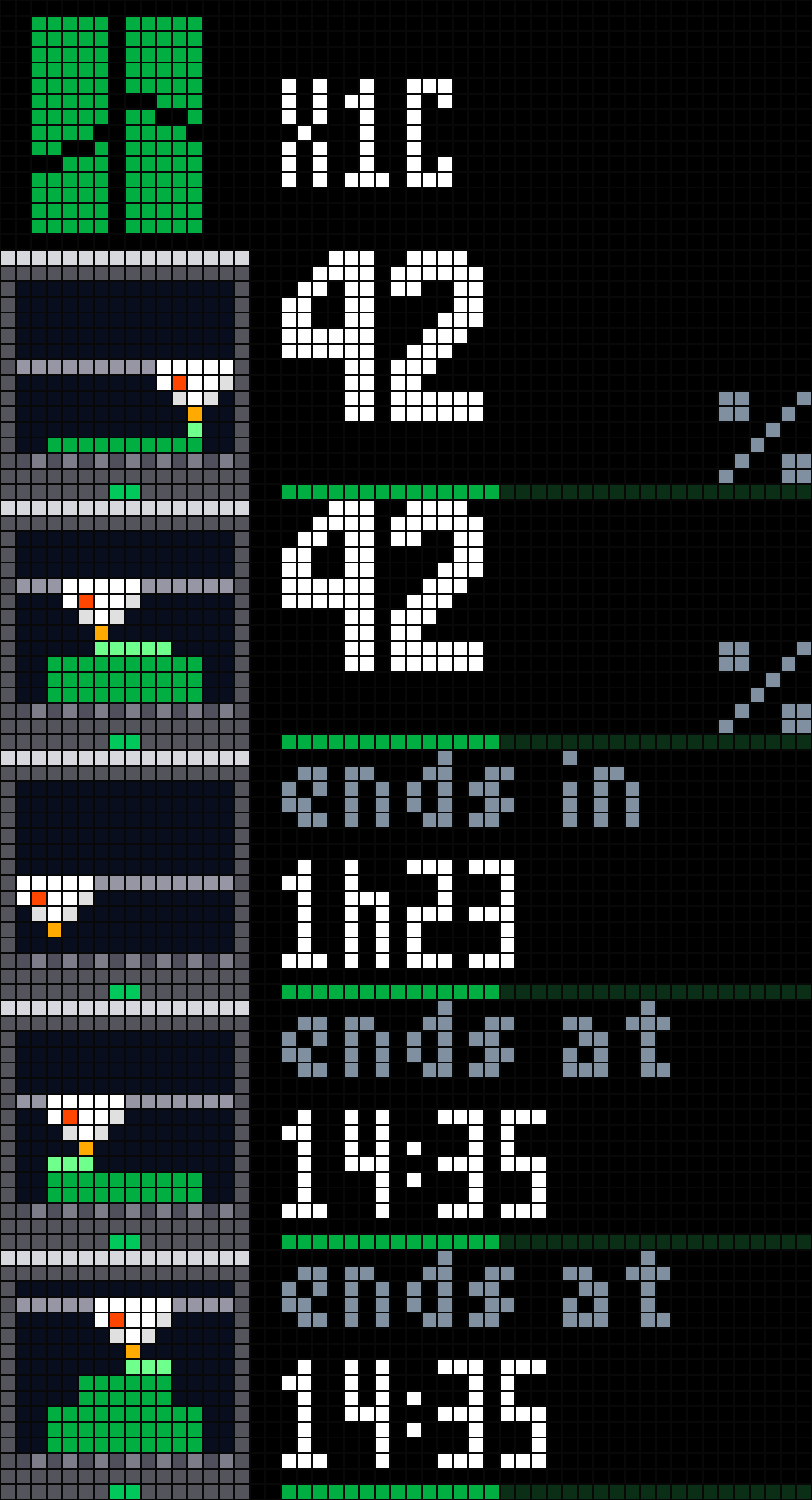
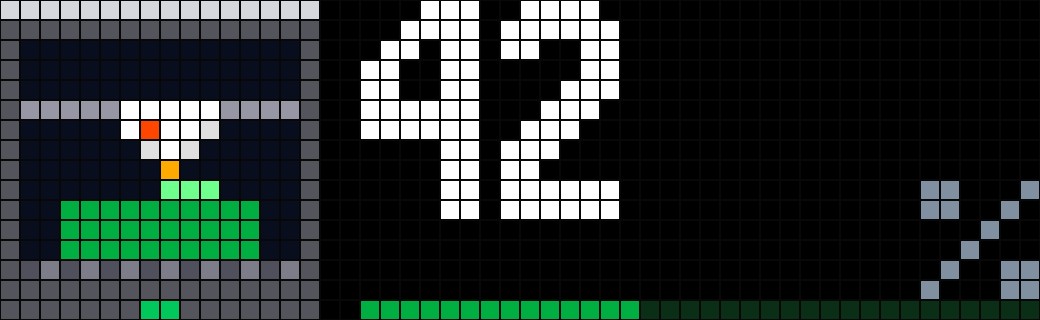
Your Bambu Lab print on your AWTRIX clock: a big percentage with a green progress bar, then the time left, then the finish time. When the print ends, the app jumps onto the screen with a big DONE (or FAIL) and plays a short melody, then leaves the rotation again after a while.
The app only shows up in the rotation while a print is running (and for an hour after it ends, configurable). The rest of the time the clock behaves as usual.
Built for the Ulanzi TC002 (52x16 panel). The screens are laid out for 52x16 with fixed positions, see the notes at the end.
How it works
The printer streams its status over MQTT, but only over TLS (port 8883), and the AWTRIX MQTT client has no TLS. So the flow has two parts:
- An n8n workflow (the flow code of this page) subscribes to the printer, keeps the few values the clock needs, and answers a plain HTTP GET with a small JSON: state, percent, minutes left, finish time.
- A Berry script on the clock polls that URL (every 20 s while printing, every minute otherwise) and draws the screens.
Requirements
- A clock running an AWTRIX build with the Berry scripting engine (for the Ulanzi TC002: the AWTRIX NG port, e.g. sanderdw/awtrix-ng-tc002). It will not run on stock AWTRIX 3 without Berry.
- Self-hosted n8n on the same LAN as the printer (the workflow needs to reach the printer IP; the clock must reach n8n).
- A Bambu Lab printer, its IP address and its LAN access code (on the printer screen: Settings > Network / WLAN).
Tested on an X1C with LAN-only mode off (cloud mode). Some recent Bambu firmwares restrict third-party access on the local network; if the workflow cannot connect, enable LAN-only mode + Developer mode on the printer.
Setup: n8n
- Import the flow code of this page (Workflows > Import from file, or paste it into the editor).
- Create an MQTT credential (e.g. "Bambu printer MQTT"):
- Protocol: mqtts (not
mqtt: that givesECONNRESET) - Host: the printer IP, Port: 8883
- Username: bblp, Password: the printer LAN access code
- SSL: on, Reject Unauthorized Certificate: off (the printer uses a self-signed certificate)
- Protocol: mqtts (not
- Select this credential in both MQTT nodes: Printer Report and Ask Full Report.
- Optional but recommended: create a Header Auth credential for the webhook (name "AWTRIX clock key", header name
X-Awtrix-Key, any secret as value) and select it in Clock Webhook. Or set the Authentication of that node to None. - Publish the workflow. Test
http://YOUR-N8N:5678/webhook/bambuin a browser (with a header auth, use a tool that can send the header, or temporarily set the authentication to None). You should get JSON like{"st":"IDLE","pct":0,...}. Right after publishing it answersno_data(503) until the printer has sent its first report (the printer reports on every change, so it may take until it is used or woken up; the workflow then asks for a full report every 5 minutes).
The finish time is computed in the timezone of your workflow / n8n instance. Successful executions are not saved (the printer sends a message every second or so).
Setup: clock
- In the clock web interface, go to Scripts, create a script named
BambuPrintStatusand paste the script below. It is the compact version (comments and indentation stripped), because the commented source is over the 8 KiB script limit. - Open the app settings and set n8n webhook URL to your webhook, e.g.
http://YOUR-N8N:5678/webhook/bambuwith your n8n address. If you protected the webhook, set Header name (X-Awtrix-Key) and Header value to the secret. Both are optional: the header is only sent when both are filled in. - Icons: the script uses four icons (
bambu_logo,bambu_run,bambu_done,bambu_fail, 16x16 GIFs). They are also uploaded on this flow page: send them to your clock, or upload them in the clock web interface under Icons. The script header has an@iconsline so the clock can offer to install them by name.
Settings
| Setting | Default | Range | Meaning |
|---|---|---|---|
| n8n webhook URL | http://YOUR-N8N:5678/webhook/bambu |
The webhook of the workflow | |
| Header name (optional) | X-Awtrix-Key |
Name of the header holding the secret | |
| Header value (optional secret) | empty | The secret; empty = no header sent | |
| Seconds per page | 5 s | 3-20 | How long each page (percent / time left / finish time) stays |
| Show result for | 60 min | 5-600 | How long DONE / FAIL stays in the rotation after the print ends |
| Sound when done | on | on / off | Melody when the print ends (a happy one for DONE, a sad one for FAIL) |
Screens
The Bambu icon is always on the left; the right side (34 px) changes. The pages do not loop: after the last one the app stays on it until the next app.
| Screen | When | What |
|---|---|---|
| Intro | 1.5 s, when the app appears | Bambu logo and "X1C" |
| % | printing | Big percentage, small % at the bottom right, green progress bar along the bottom |
| ends in | printing | Time left ("1h23" or "45 min") with the progress bar |
| ends at | printing | Finish time ("14:35") with the progress bar |
| PREP | printer preparing (heating, levelling) | Single page |
| PAUSE | print paused | Orange, single page |
| DONE | print finished | Green, with "5min ago" below; check icon |
| FAIL | print failed or cancelled | Red, with the time since; cross icon |
The progress bar is a 34 px line at the very bottom, dark green with a brighter green fill. A red pixel in the bottom right corner means the last poll failed (wrong URL, n8n down...); with no data at all the clock shows NETWORK or ERROR plus the HTTP status.
The done alert
When the state changes from RUNNING or PAUSE to FINISH or FAILED, the app forces itself onto the screen (even if another app is showing) and plays a short melody (rising for DONE, falling for FAIL) if "Sound when done" is on. This only triggers on a real transition seen by the clock, not when the clock boots while a finished print is still in the flow state.
Clock script (paste into the Scripts editor)
# @name Bambu Print Status
# @desc Bambu Lab print progress (via an n8n bridge) on a 52x16 panel: percent, time left, finish time, done/fail alert
# @version 1.2
# @author bNj
# @icons bambu_logo bambu_run bambu_done bambu_fail
# @config url text "n8n webhook URL" default=http://YOUR-N8N:5678/webhook/bambu
# @config hname text "Header name (optional)" default=X-Awtrix-Key
# @config key text "Header value (optional secret)" default=
# @config page number "Seconds per page" default=5 min=3 max=20 unit=s
# @config keep number "Show result for" default=60 min=5 max=600 unit=min
# @config sound bool "Sound when done" default=true
import json
class BambuPrintStatus
static INTRO=2500
var j,err,next_at,busy,since,per,ps,got_at
var dig
def init()
self.dig={"0":[30,63,51,51,51,51,51,51,51,63,30],"1":[12,28,60,12,12,12,12,12,12,63,63],
"2":[30,63,51,3,7,14,28,56,48,63,63],"3":[30,63,51,3,14,14,3,3,51,63,30],
"4":[7,15,27,51,51,63,63,3,3,3,3],"5":[63,63,48,48,62,63,3,3,51,63,30],
"6":[30,63,51,48,62,63,51,51,51,63,30],"7":[63,63,3,3,6,6,12,12,24,24,24],
"8":[30,63,51,51,30,30,51,51,51,63,30],"9":[30,63,51,51,51,63,31,3,51,63,30]}
self.per=int(store.get("page",5))*1000
self.since=0
self.next_at=0
self.got_at=0
self.busy=false
end
def loop()
var t=now_ms()
if self.busy||t<self.next_at return end
self.busy=true
self.next_at=t+60000
var h={}
var hn=store.get("hname","")
var kv=store.get("key","")
if hn!= "" &&kv!= ""h[hn]=kv end
http.get(store.get("url"),/b,st->self.got(b,st),{"headers":h})
end
def got(b,st)
self.busy=false
var j=st==200&&b!=nil?json.load(b):nil
if type(j)== "instance" &&type(j.find("st"))== "string"
var s=j["st"]
var p=self.ps
self.j=j
self.err=nil
self.got_at=now_ms()
self.ps=s
self.next_at=self.got_at+(self.act()?20000:60000)
if(p== "RUNNING" ||p== "PAUSE")&&(s== "FINISH" ||s== "FAILED")
if self.should_show()rotation.show()end
if store.get("sound",true)sound.rtttl(s== "FINISH" ? "ok:d=8,o=6,b=160:c,e,g,c7,p,g,c7":"ko:d=4,o=4,b=90:g,e,c")end
end
return
end
self.err=st==0? "NETWORK":"ERROR " +str(st)
end
def act()
var s=self.j["st"]
return s== "RUNNING" ||s== "PREPARE" ||s== "PAUSE"
end
def ago()
var a=self.j.find("ago")
return type(a)== "int" ?a+(now_ms()-self.got_at)/60000:0
end
def should_show()
if self.j==nil||self.j.find("off")==true||now_ms()-self.got_at>600000 return false end
var s=self.j["st"]
if self.act()return true end
return(s== "FINISH" ||s== "FAILED")&&self.ago()<store.get("keep",60)
end
def pages()
if self.j["st"]!= "RUNNING"return[3]end
var l=[0]
if type(self.j.find("rem"))== "int"l.push(1)end
if type(self.j.find("fin"))== "string"l.push(2)end
return l
end
def duration()return self.j==nil?5000:self.INTRO+size(self.pages())*self.per end
def on_show()self.since=now_ms()end
def number(s,x,y,c)
for i:0..size(s)-1
var ch=s[i]
if ch== ":"
rect_fill(x,y+2,2,2,c)
rect_fill(x,y+7,2,2,c)
x+=3
else
var g=self.dig.find(ch)
if g!=nil
for r:0..10
for b:0..5
if g[r]&(32>>b)pixel(x+b,y+r,c)end
end
end
end
x+=7
end
end
end
def value(s,unit,oy,c)
self.number(s,18,oy,c)
if unit== "%"
for r:0..5
for b:0..5
if[49,50,4,8,19,35][r]&(32>>b)pixel(46+b,9+r+oy,0x8090A0)end
end
end
elif unit!= ""
text(52-text_width(unit),15+oy,unit,0x8090A0)
end
end
def label(oy)
var s=self.j["st"]
var f=s== "FINISH"
var sub=nil
if f||s== "FAILED"
var a=self.ago()
sub=a<60?str(a)+ "min":str(a/60)+ "h" +str(a%60)
var t=sub
sub=t+ " ago"
if text_width(sub)>34 sub=t end
end
font("large")
text(18,(sub!=nil?8:11)+oy,s== "PREPARE" ? "PREP":(s== "PAUSE" ? "PAUSE":(f? "DONE":"FAIL")),
s== "PAUSE" ?0xFFA020:(f?0x30E060:(s== "FAILED" ?0xFF4030:0xFFFFFF)))
font("small")
if sub!=nil text(18,15+oy,sub,0x8090A0)end
end
def page(p,oy)
if p<0
font("large")
text(18,11+oy,"X1C",0xFFFFFF)
font("small")
return
end
var id=self.pages()
id=id[p<size(id)?p:size(id)-1]
if id<3
var pc=self.j.find("pct")
if type(pc)!= "int"pc=0 end
if pc>100 pc=100 end
if id==0
self.value(str(pc),"%",oy,0xFFFFFF)
else
var r=self.j.find("rem")
var t=id==1?(r<60?str(r)+ " min":str(r/60)+ "h" +(r%60<10? "0":"")+str(r%60)):self.j["fin"]
text(18,5+oy,id==1? "ends in":"ends at",0x8090A0)
font("large")
text(18,13+oy,t,0xFFFFFF)
font("small")
end
rect_fill(18,15+oy,34,1,0x0A2E16)
rect_fill(18,15+oy,pc*34/100,1,0x00AE42)
else
self.label(oy)
end
end
def draw()
var e=now_ms()-self.since
clear(0)
if self.j==nil
text(2,10,self.err!=nil?self.err:"BAMBU",0xFF6040)
return
end
var s=self.j["st"]
if e<self.INTRO
self.page(-1,0)
icon("bambu_logo",0,0)
else
var q=e-self.INTRO
var p=q/self.per
var n=size(self.pages())
if p>n-1 p=n-1 end
var k=(q-p*self.per)*16/300
if k<16
self.page(p-1,-k)
self.page(p,16-k)
else
self.page(p,0)
end
rect_fill(0,0,16,16,0)
icon(s== "FINISH" ? "bambu_done":(s== "FAILED" ? "bambu_fail":"bambu_run"),0,0)
end
if self.err!=nil pixel(51,15,0xFF2020)end
end
end
return BambuPrintStatus()
Notes
- Fan-made icons. The four icons (logo, running, done, fail) were drawn by me for this flow. This is an unofficial fan project, not affiliated with Bambu Lab. "Bambu Lab" and the Bambu logo are trademarks of their owner.
- Panel size. The layout is designed for the 52x16 panel of the TC002: positions and sizes are fixed (icon 16x16, text from column 18, 34 px wide, the digits are 6x11). The script does not read
width()/height(). On a 32x8 matrix it is untested and will need layout changes (smaller icons and digits, different columns). - Only one printer is supported (the first one to report). The n8n workflow keeps its state in workflow static data.
Sign in to view and copy the code of this flow.
These icons are attached to the flow. Send them to your AWTRIX separately; they are not included in the script installation.

16×16 px

16×16 px

16×16 px

16×16 px
Sign in to download these icons or send them to your AWTRIX.
Discussion 1
Ask a question, suggest a change or share how you use it.
Newest first
Have an idea?
Sign in to ask questions and join the conversation.