Not Watching
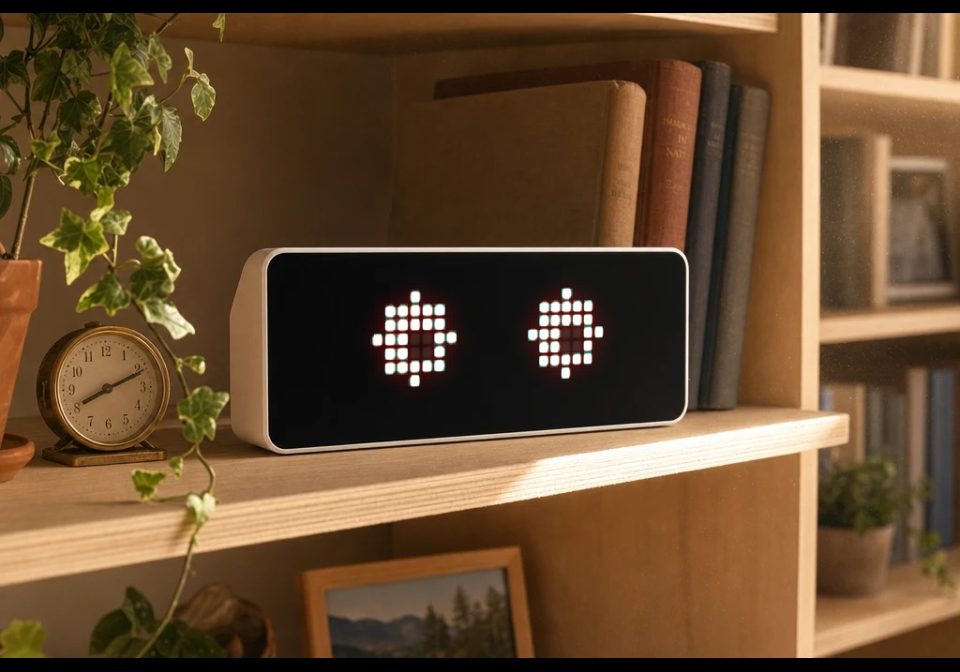
Two eyes that dart to random targets, blink on their own schedule, and randomly **squint**.
About this flow
| System | AWTRIX NG Scripts |
|---|---|
| AWTRIX version | AWTRIX NG |
| Topic | Miscellaneous |
| Built by | Galadril |
| File | MA29GsxNTR8a.ax · 2.5 KB |
| Icons | — |
| Published | 8 Sep 2026 · updated 8 Sep 2026 |
| Downloads | 24 |
Is this your flow?
If you created this flow, open your saved edit link to add it to your account. You can then manage it whenever you sign in. Adding it to your account replaces the edit link.
Flow description
Two eyes that dart to random targets, blink on their own schedule, and randomly squint.
Reads sensor.light() in loop() - turn the room lights on and the pupils shrink to a
point with a blinking ! between them, like you startled it. It also comments out loud:
guaranteed on a button press, and 30% likely each time it rotates into view.
Controls: select = make it say something.
If the startle never fires, lower the l-self.lit>15 threshold in loop() - I could not
verify what scale sensor.light() reports on a TC001. If the eyes look boxy, swap
circle_fill(cx,3,3,...) for rect_fill(cx-3,1,7,5,...); on only 8 rows that can read
rounder than an actual circle.
MA29GsxNTR8a.ax
# @name    Not Watching
# @desc    Definitely not watching you
# @author  Galadril
# @version 1.0
# @config  sound bool "Sound"          default=false
# @config  chat  bool "Let it comment" default=true
import math
class NotWatching
var LINES
var st,ex,ey,tx,ty,nt,bl,nb,sq,ns,alert,txt,base
var lit,snd,chat
def init()
self.snd=store.get("sound",false)
self.chat=store.get("chat",true)
self.LINES=["I SAW THAT.","STILL WATCHING.","GO ON. CONTINUE.","NOTED.","THAT WAS A CHOICE.","BLINK. I DARE YOU.","I AM IN THE WALLS.","DO THAT AGAIN. SLOWLY."]
self.st=0
self.ex=0
self.ey=0
self.tx=0
self.ty=0
self.nt=0
self.bl=0
self.nb=0
self.sq=0
self.ns=0
self.alert=0
self.base=-1
self.lit=-1
end
def _beep(m)
if self.snd
if settings.get("soundEnabled")!=false
sound.rtttl(m)
end
end
end
def _say()
self.txt=self.LINES[math.rand()%size(self.LINES)]
self.base=-1
self.st=1
end
def loop()
var l=sensor.light()
if l!=nil
if self.lit>=0
if l-self.lit>15
self.alert=now_ms()+2200
self._beep("q:d=16,o=6,b=200:c,g")
end
end
self.lit=l
end
end
def on_show()
self.st=0
if self.chat
if math.rand()%100<30
self._say()
end
end
end
def on_button(b)
if b=="select"
if self.chat
self._say()
end
end
end
def on_hide()
self.st=0
end
def duration()
return 12000
end
def _eye(cx,dx,dy,shut,slit,wide)
if shut
line(cx-3,3,cx+3,3,0x8A7F6B)
return
end
circle_fill(cx,3,3,0xF2E3C8)
if slit
rect_fill(cx-3,0,7,2,0x000000)
rect_fill(cx-3,5,7,2,0x000000)
end
if wide
pixel(cx+dx,3+dy,0x14100C)
return
end
rect_fill(cx+dx-1,3+dy-1,2,2,0x14100C)
end
def draw()
clear()
var now=now_ms()
if self.st==1
var laps=scroll_text(self.txt,0xE05540)
if self.base<0
self.base=laps
else
if laps>self.base
self.st=0
end
end
return
end
if now>=self.nt
self.tx=math.rand()%5-2
self.ty=math.rand()%3-1
self.nt=now+600+math.rand()%2200
end
self.ex=self.tx
self.ey=self.ty
if now>=self.nb
self.bl=now+130
self.nb=now+2600+math.rand()%5000
end
if now>=self.ns
self.sq=0
if math.rand()%100<22
self.sq=now+900
end
self.ns=now+4000+math.rand()%6000
end
var shut=false
if now<self.bl
shut=true
end
var slit=false
if now<self.sq
slit=true
end
var wide=false
if now<self.alert
wide=true
shut=false
slit=false
self.ex=0
self.ey=0
end
self._eye(9,self.ex,self.ey,shut,slit,wide)
self._eye(22,self.ex,self.ey,shut,slit,wide)
if wide
if (now/200)%2==0
rect_fill(15,1,1,3,0xFFD34D)
pixel(15,5,0xFFD34D)
end
end
end
end
return NotWatching()
Install it on your AWTRIX NG
Add this flow to your AWTRIX NG. It will start appearing on your display after installation.
Unable to connect? Download the flow and add it in the Scripts section of your AWTRIX. Advanced users can also use this command:
Discussion 0
Ask a question, suggest a change or share how you use it.
No comments yet. Start the conversation.
More flows for AWTRIX NG Scripts or Miscellaneous
Something wrong with this flow? Report it.
Have an idea?
Sign in to ask questions and join the conversation.