Rain forecast
Use with Home Assistant Blueprint
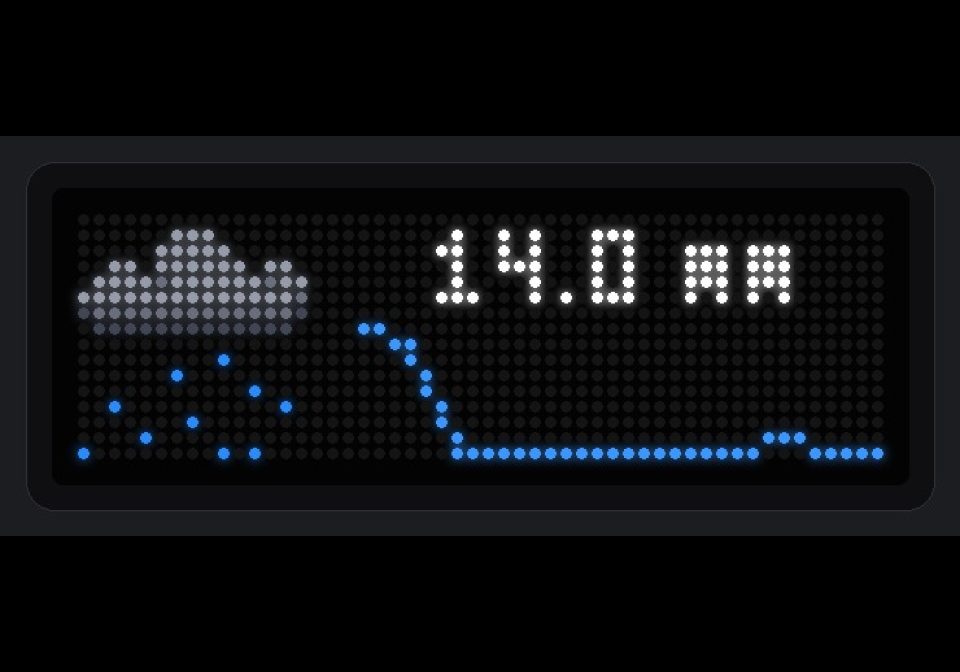
Shows a graph with the rain forecast
- Topic
- Miscellaneous
- Includes
- Flow
Runs on
- Does not run on 32×8 (TC001 & DIY) Made for 52×16 (TC002).
- Runs on 52×16 (TC002)
- Does not run on 32×8 with AWTRIX 3 (TC001 & DIY) Made for AWTRIX NG.
Flow description
Shows an hourly rain forecast on an AWTRIX NG TC002 (52x16) and updates it automatically whenever the forecast changes.
The app shows a rain icon on the left, the expected total rain (mm) on the top line and a bar or line chart of the coming hours below it. When no rain is expected it shows a text instead, in one of 10 languages or your own wording.
-
Make sure you have a weather entity that provides an hourly forecast (for example Met.no, Buienradar or OpenWeatherMap).
-
Upload a 16x16 rain icon to the clock and enter its ID in the blueprint (default: rainy). AWTRIX NG refuses the update when the icon is missing. Leave the field empty for a layout without icon.
-
Import the blueprint and create an automation:
- AWTRIX Displays: select your TC002 (needs Home Assistant discovery enabled on the clock)
- Sensor: your forecast entity
- Hours: number of hours in the chart (default 12, up to 34)
-
Optional settings:
- Graph type: bar or line chart
- Show total: shows the total rain above the chart; turn off to use the full height for the chart
- Autoscale: off gives a fixed scale up to "Chart maximum", so light and heavy rain look different
- Colors, language of the "no rain" text, scroll speed, effect and weather overlay
Sign in to view and copy the code of this flow.
Discussion 0
Ask a question, suggest a change or share how you use it.
No comments yet. Start the conversation.
More flows for Home Assistant Blueprint or Miscellaneous
Something wrong with this flow? Report it.
Have an idea?
Sign in to ask questions and join the conversation.