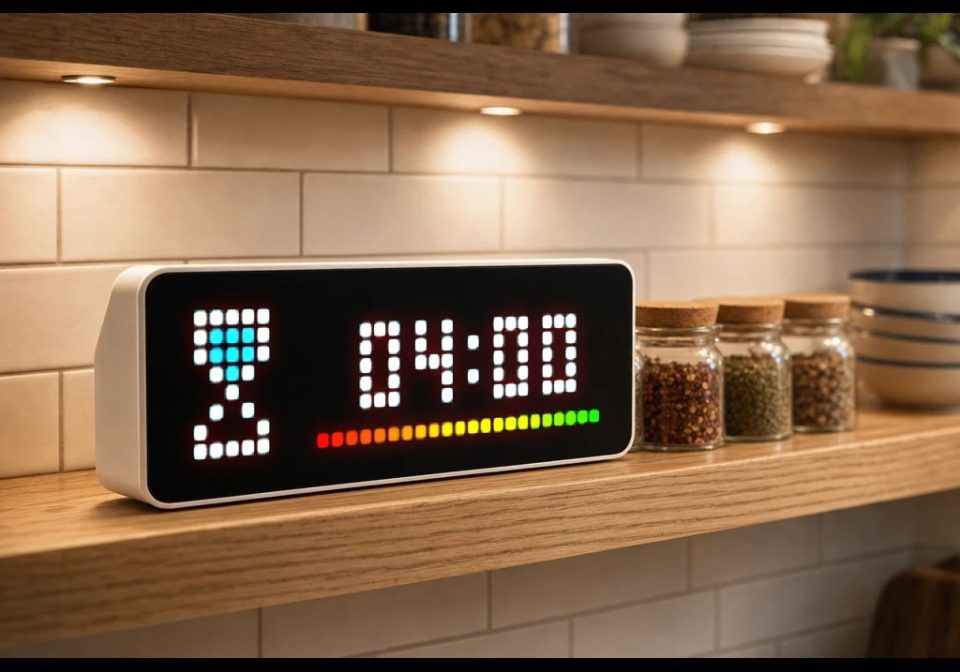
EggTimer
EggTimer, also useful for tea...
About this flow
| System | AWTRIX NG Scripts |
|---|---|
| AWTRIX version | AWTRIX NG |
| Topic | Miscellaneous |
| Built by | Töm |
| File | L6WmrORqkzHU.ax · 4.4 KB |
| Icons | — |
| Published | 11 Aug 2026 · updated 14 Aug 2026 |
| Downloads | 56 |
Flow description
EggTimer
Overview
This AWTRIX NG script provides an egg timer that counts down the configured minutes and seconds to 00:00.
The timer can be started and paused using the center button. You can also start the timer via the AWTRIX NG Web UI in the app settings.
Double-pressing the center button within one second resets the timer to the previously configured values. Make sure not to press the button too quickly in succession, otherwise the display may be switched off or on.
Use the left button to adjust the preset minutes and the right button to adjust the preset seconds.
Installation
Before installing the script, make sure that:
- AWTRIX scripting is enabled.
- AWTRIX NG firmware
1.0.10-devor later is installed (required for the settings). - The script has been tested with AWTRIX NG firmware
1.0.15-dev. - The required LaMetric icons (see below) have been uploaded to AWTRIX NG.
Installation steps:
- Upload the required LaMetric icons.
- Install the script on your AWTRIX NG.
- Adjust the settings as required.
Icons
Before installing the script, use the AWTRIX NG web interface to install the following LaMetric icons:
19105– Timer idle42893– Timer running44960– Timer finished
Configuration
The following settings are available under Apps in AWTRIX NG:
-
Timer Min.: Set the timer duration in minutes (
0–99). -
Timer Sec.: Set the timer duration in seconds (
0–59). -
Alarm Duration Sec.: The message indicating that the timer has ended will be displayed for this duration
-
Alarm Message: This text will be displayed when the timer ends
-
Alarm Sound: Play a sound when the message indicating that the timer has ended is displayed
-
Text color: Change the color of the time display.
-
Progress bar: Displays the remaining time as a colored progress bar at the bottom of the display.
-
Always show running timer: Keeps the timer visible on the display for the entire duration of the timer (+20 seconds).
-
Start/Stop: Use this switch to start or stop the timer.
Privacy
No network connections are used.
Known bugs
Currently, the app also switches when the left and right buttons are used.
Changelog
v0.1 – Initial version
v0.2 – new notification when the timer ends, with an alarm sound, customizable text, and adjustable alarm duration, memory optimizations
v0.3 - Optimized Progress Bar
L6WmrORqkzHU.ax
# @name EggTimer
# @desc Eieruhr Kurzzeitimer
# @author Töm (taschenserver im Discord)
# @version 0.3
# @config TMin number "Timer Min." default=5 min=0 max=99 unit=Min.
# @config TSek number "Timer Sek." default=0 min=0 max=59 unit=Sek.
# @config Alarm_Duration number "Alarmdauer Sek." default=5 min=0 max=30 unit=Sek.
# @config Alarm_Text text "Alarmanzeige" default="00:00" maxlen=50
# @config Alarm_Audio bool "Alarmton" default=true
# @config TextColor color "Textfarbe" default=0xFFFFFF
# @config ProgressBar bool "Fortschrittsbalken" default=true
# @config HoldDisplay bool "Laufender Timer wird ständig angezeigt" default=true
# @config StartStop bool "STart/Stop" default=false

class EggTimer
  var TStat, TMin, TSek, StSt, tDuration, tEnd, timer, dclick
  var i0, pb

  def init()
    self.TStat = 0 # 0-Stop, 1-Läuft, 2-Beendet
    self.timer = 0
    self.dclick = 0
    self.tDuration = 0
    self.tEnd = 0
    self.TMin = store.get("TMin", 5)
    self.TSek = store.get("TSek", 0)
    self.StSt = store.get("StartStop",false)
    self.i0 = "19105"
    self.pb = 21
  end

  def loop()
    var v
    if self.StSt == true && self.TStat == 0
      self.tDuration = (self.TMin*60+self.TSek)*1000
      self.tEnd = now_ms()+self.tDuration
      self.TStat = 1
    end
    if self.StSt == true
      i0 = "42893"
      self.timer = self.tEnd-now_ms()
      if self.timer < 0 self.timer = 0 end
      v = self.timer / 1000
      self.TMin = int(v / 60)
      self.TSek = int((v - (self.TMin*60)))
      log("Timer"+str(self.timer))
      if self.timer == 0
        i0 = "44960"
        self.StSt = false
        store.set("StartStop",self.StSt)
        self.TMin = store.get("TMin", 5)
        self.TSek = store.get("TSek", 0)
        self.TStat = 0
        if store.get("Alarm_Audio", true) == true
          notify({"name":"EggTimerAlarm", "text": store.get("Alarm_Text", "00:00"), "scroll":"loop", "textCase":"asTyped", "icon": "44960", "durationMs":(store.get("Alarm_Duration", 5)*1000), "soundLoop": true, "soundRtttl": "d:d=4,o=5,b=120:c,e,g"})
        else
          notify({"name":"EggTimerAlarm", "text": store.get("Alarm_Text", "00:00"), "scroll":"loop", "textCase":"asTyped", "icon": "44960", "durationMs":(store.get("Alarm_Duration", 5)*1000)})
        end
      end
    else
      i0 = "19105"
    end

    if (self.tDuration == 0 || self.timer == 0) && self.StSt == true
      self.pb = 0
    elif (self.tDuration == 0 || self.timer == 0) && self.StSt == false
      self.pb = 21
    else
      self.pb = 21-(22-int(22/real(self.tDuration)*self.timer))
    end
  end

  def draw()
    clear()
    icon(self.i0,0,0)
    text(12, 6, (self.TMin < 10 ? "0":"")+str(self.TMin)+":"+(self.TSek < 10 ? "0":"")+str(self.TSek), store.get("TextColor", 0xFFFFFF))
    if store.get("ProgressBar",true) == true
      var pal = [0xFF0000, 0xFF1200, 0xFF2400, 0xFF3600, 0xFF4800, 0xFF5A00, 0xFF6C00, 0xFF7E00, 0xFF9000, 0xFFA200, 0xFFB400, 0xFFC600, 0xFFD800, 0xFFEA00, 0xFCFF00, 0xDAFF00, 0xB8FF00, 0x96FF00, 0x74FF00, 0x52FF00, 0x30FF00, 0x00FF00]
      for i : 0 .. self.pb
        pixel( 9+i, 7, pal[i] )
      end
      #line(31,7, self.pb, 7,0x000000)
    end
  end

  def duration()
    if self.StSt == true
      if self.timer == nil self.timer = 0 end
      return self.timer+20000
    else
      return 10000
    end
  end

  def on_button(btn)
    if btn == "select"
      if now_ms()-self.dclick < 1000
        if self.StSt == true
          self.StSt = false
          self.TStat = 0
          self.TMin = store.get("TMin", 5)
          self.TSek = store.get("TSek", 0)
          self.tDuration = (self.TMin*60+self.TSek)*1000
          self.tEnd = now_ms()+self.tDuration
        end
      else
        if self.StSt == false
          self.tEnd = now_ms()+((self.TMin*60+self.TSek)*1000)
        end
        self.StSt = self.StSt == false ? true : false
      end
      self.dclick = now_ms()
      store.set("StartStop",self.StSt)
    end
    if btn == "left" && self.StSt == false
      self.TMin = self.TMin == 99 ? 0 : self.TMin + 1
      store.set("TMin",self.TMin)
      store.set("TSek",self.TSek)
    end
    if btn == "right" && self.StSt == false
      self.TSek = self.TSek == 59 ? 0 : self.TSek + 1
      store.set("TMin",self.TMin)
      store.set("TSek",self.TSek)
    end
  end
end

return EggTimer()
Install it on your AWTRIX NG
Add this flow to your AWTRIX NG. It will start appearing on your display after installation.
Unable to connect? Download the flow and add it in the Scripts section of your AWTRIX. Advanced users can also use this command:
Discussion 0
Ask a question, suggest a change or share how you use it.
No comments yet. Start the conversation.
More flows for AWTRIX NG Scripts or Miscellaneous
Something wrong with this flow? Report it.
Have an idea?
Sign in to ask questions and join the conversation.