FlowAWTRIX NG
OpenCode Go Usage
On an AWTRIX display
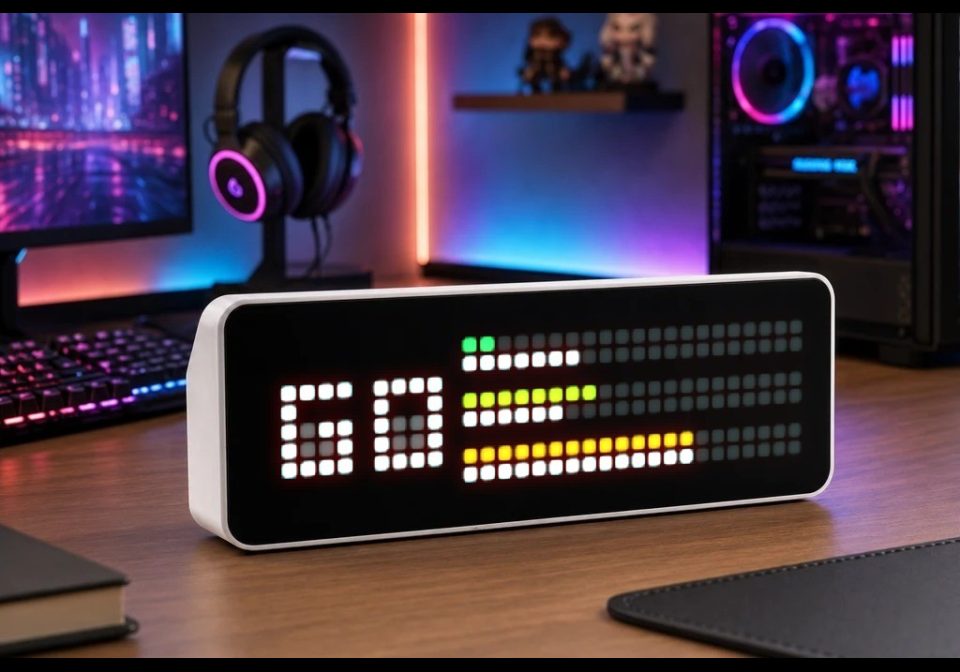
On your display
Shows your OpenCode Go plan usage: 5-hour, weekly and monthly
- Works with
- AWTRIX NG
- Topic
- Miscellaneous
- Includes
- Script
Choose your display in the next step.
Flow description
Shows how much of your OpenCode Go plan you have used: the 5-hour window, the current week and the month. The script fetches the usage endpoint over HTTPS with your configured API key.
Layouts:
- Timeline (default): split progress bar showing the actual vs. expected usage by displaying the passed time in the windows
- Bars: thicker simple bars per window, showing only the usage
- Numbers: two-digit percentage per window with a mini bar underneath
Colour modes:
- usage (default): green → yellow → red as usage rises
- fix: fixed colour per window
- pace: green = on or under expected pace, yellow = up to 10 points over, red = more than 10 points over
Installation
- Install the script from this page (Send to AWTRIX) or paste it into the Scripts tab of your AWTRIX web interface and save.
- Open Apps → OpenCode Go → ⋯ → Settings and paste your API key.
- Optional: choose layout and colour mode, adjust the refresh interval.
DF93pOVcy3pN.ax
# @name OpenCode Go
# @desc 5h / week / month usage of the OpenCode Go plan
# @author Max
# @version 0.5
# @config key    text   "API key"     maxlen=128 help="API key from the OpenCode Go dashboard (opencode.ai)"
# @config layout select "Layout"      options=timeline,numbers,bars default=timeline
# @config colour select "Colour mode" options=usage,fix,pace      default=usage
# @config every  number "Refresh (s)" min=60 max=3600 step=60 unit=s default=600
#
# Fetches https://opencode.ai/zen/go/v1/usage on the clock itself (bearer key from the
# settings) and draws 5h / week / month. No host, no Home Assistant.
#
# Memory is tight on this board and the pool is shared by all scripts ("going easy on
# memory"): hence only 7 methods, values are computed ONCE per fetch (expected, colour,
# label) and draw() allocates nothing. Parsing uses re instead of json.load (no parse
# tree). Failures keep the last values and set a red corner pixel - never a crash.
#
# The key belongs in the settings (gear icon in the Apps tab): the script source is
# stored in plain text on the device and the web UI has no login unless authEnabled is on.

var URL = "https://opencode.ai/zen/go/v1/usage"
var UA = "Mozilla/5.0 (X11; Linux x86_64) AppleWebKit/537.36 (KHTML, like Gecko) Chrome/140.0.0.0 Safari/537.36"
var L = 0xF1ECEC
var D = 0x4B4646
var T = 0x202020

class OCGO
  var key, layout, mode, every, ticks, warn, ok
  var pct, exp, col, lab

  def setup()
    # defaults first (store may miss keys), then the stored values
    self.key = ""
    self.layout = "timeline"
    self.mode = "usage"
    self.every = 600
    self.ticks = 0
    self.warn = false
    self.ok = false
    self.pct = [0, 0, 0]
    self.exp = [0.0, 0.0, 0.0]
    self.col = [0x808080, 0x808080, 0x808080]
    self.lab = ["--", "--", "--"]
    self.key = str(store.get("key", ""))
    self.layout = str(store.get("layout", "timeline"))
    self.mode = str(store.get("colour", "usage"))
    self.every = num(store.get("every", 600), 600)
    self.every = max(60, self.every)
    if self.key == "" log("ocgo: no API key set - gear icon in the Apps tab") end
  end

  def fail(why)
    self.warn = true
    log("ocgo: " + why)
    # retry sooner than in self.every seconds
    self.ticks = min(60, self.ticks)
  end

  # num() chokes on leading zeros ("09" -> nil) and ISO timestamps are full of them
  def toi(s)
    if size(s) > 1 && s[0] == "0" s = s[1] end
    return num(s, 0)
  end

  # days since 1970-01-01 (Howard Hinnant); Berry divides integers as integers
  def civil(y, m, d)
    if m <= 2 y -= 1 end
    var era = y / 400
    var yoe = y - era * 400
    var mp = (m + 9) % 12
    return era * 146097 + yoe * 365 + yoe / 4 - yoe / 100 + (153 * mp + 2) / 5 + d - 1 - 719468
  end

  def loop()
    if self.key == "" return end
    self.ticks -= 1
    if self.ticks > 0 return end
    self.ticks = self.every
    log("ocgo: fetching")
    http.get(URL, / b, st -> self.on_body(b, st),
             {'headers': {'Authorization': "***" + self.key,
                          'Accept': "application/json",
                          'User-Agent': UA}})
  end

  def on_body(body, status)
    if body == nil
      self.fail("no response (st " + str(status) + ")")
      return
    end
    if status != 200
      self.fail("HTTP " + str(status))
      return
    end
    # no json.load: just fish out the fields we need
    var wp = re.matchall("\"percent\":[0-9]+", body)
    var wr = re.matchall("\"resetsAt\":\"[^\"]+\"", body)
    if size(wp) < 3 || size(wr) < 3
      self.fail("response incomplete")
      return
    end
    var nms = epoch_ms()
    if nms < 0
      self.ticks = 30   # clock not set yet
      return
    end
    var now = nms / 1000

    for i : 0 .. 2
      var dg = re.matchall("[0-9]+", wr[i])
      var pd = re.matchall("[0-9]+", wp[i])
      if size(dg) < 6 || size(pd) < 1
        self.fail("field missing")
        return
      end
      var y = self.toi(dg[0])
      var mo = self.toi(dg[1])
      var da = self.toi(dg[2])
      var hh = self.toi(dg[3])
      var mi = self.toi(dg[4])
      var ss = self.toi(dg[5])
      var pv = min(self.toi(pd[0]), 100)

      var reset = self.civil(y, mo, da) * 86400 + hh * 3600 + mi * 60 + ss
      var start = reset - 18000                 # 5 hours
      if i == 1 start = reset - 604800 end      # 7 days
      if i == 2                                 # one calendar month
        var py = y
        var pm = mo - 1
        if pm == 0
          py = y - 1
          pm = 12
        end
        var last = 31
        if pm == 2
          last = 28
          if (py % 4 == 0 && py % 100 != 0) || py % 400 == 0 last = 29 end
        elif pm == 4 || pm == 6 || pm == 9 || pm == 11
          last = 30
        end
        start = reset - max(da, last) * 86400
      end
      var e = 0.0
      var total = reset - start
      if total > 0 e = (now - start) * 100.0 / total end
      e = min(100.0, max(0.0, e))
      self.pct[i] = pv
      self.exp[i] = e

      # build the label here, not in draw()
      self.lab[i] = pv >= 100 ? "XX" : pv < 10 ? "0" + str(pv) : str(pv)

      # colour here too: usage = 0 green -> 50 yellow -> 100 red
      var c = 0x00CC66
      if self.mode == "fix"
        c = i == 0 ? 0x00CC66 : i == 1 ? 0xFF9900 : 0xFF3333
      elif self.mode == "pace"
        var dv = pv - e
        c = dv > 10 ? 0xFF3333 : dv < -10 ? 0x00CC66 : 0xFFD400
      else
        var t = pv / 50.0
        if pv > 50
          t = (pv - 50) / 50.0
          c = rgb(255, round(212 + (51 - 212) * t), round(51 * t))
        else
          c = rgb(round(255 * t), round(204 + 8 * t), round(102 - 102 * t))
        end
      end
      self.col[i] = c
    end

    self.warn = false
    self.ok = true
    log("ocgo: " + str(self.pct[0]) + "/" + str(self.pct[1]) + "/" + str(self.pct[2]))
  end

  def draw()
    clear()
    if self.key == ""
      text((width() - text_ink_width("key?")) / 2, 6, "key?", 0x808080)
      return
    end
    # never had data and the fetch already failed -> say so instead of an empty grid
    if !self.ok && self.warn
      text((width() - text_ink_width("no data")) / 2, 6, "no data", 0xFF3333)
      pixel(31, 0, 0xFF3333)
      return
    end

    if self.layout == "numbers"
      # the "o" of OpenCode, with an underline
      rect(1, 1, 4, 5, L)
      rect_fill(2, 3, 2, 2, D)
      rect_fill(1, 7, 4, 1, L)
    else
      # GO wordmark, 9x5
      rect_fill(1, 2, 1, 5, L)
      rect_fill(6, 2, 1, 5, L)
      rect_fill(9, 2, 1, 5, L)
      rect_fill(2, 2, 3, 1, L)
      rect_fill(7, 2, 2, 1, L)
      rect_fill(3, 4, 2, 1, L)
      rect_fill(4, 5, 1, 1, L)
      rect_fill(2, 6, 3, 1, L)
      rect_fill(7, 6, 2, 1, L)
      rect_fill(2, 4, 1, 2, D)
      rect_fill(3, 5, 1, 1, D)
      rect_fill(7, 4, 2, 2, D)
    end

    for i : 0 .. 2
      var x = 11
      var y = i * 3
      var w = 21
      var bh = 1
      if self.layout == "numbers"
        x = 6 + i * 9
        y = 7
        w = 8
        text(x, 6, self.lab[i], self.col[i])
      elif self.layout == "bars"
        bh = 2
      end
      var f = round(self.pct[i] * w / 100.0)
      if self.pct[i] > 0 && f < 1 f = 1 end
      if f > 0 rect_fill(x, y, f, bh, self.col[i]) end
      if f < w rect_fill(x + f, y, w - f, bh, T) end
      if self.layout == "timeline"
        var fe = round(self.exp[i] * 21 / 100.0)
        if fe > 0 rect_fill(11, y + 1, fe, 1, L) end
        if fe < 21 rect_fill(11 + fe, y + 1, 21 - fe, 1, T) end
      end
    end

    if self.warn pixel(31, 0, 0xFF3333) end
  end
end

return OCGO()
Community
Discussion 0
Ask a question, suggest a change or share how you use it.
No comments yet. Start the conversation.
More flows for AWTRIX NG Scripts or Miscellaneous
Something wrong with this flow? Report it.
Have an idea?
Sign in to ask questions and join the conversation.